
Skip to content
  • Academy KB Home Redesign
  • Broadband Home
  • CCaaS
  • Channel Partner Support
  • Circle Loop Home
  • Collaborate
  • Connectivity
  • Courses
  • Documentation
  • Ethernet
  • FibreXchange
  • FUSION IoT
  • Gamma AI Concierge
  • Gamma Plus
  • Gamma SIP for Cloud Connect
  • Gamma SIP Global Communications Enablement
  • Gamma SIP Trunks for Genesys Cloud
  • Hannah – Homepage WIP
  • Home
  • Horizon
  • Horizon Contact
  • Horizon Forms
  • Horizon Service Description Home
  • Horizon with Webex
  • Inbound
  • iPECS
  • Knowledge Base Intro
  • Knowledgebase Directory
  • LoginPress
  • Microsoft
  • Microsoft Teams Direct Routing Home
  • Microsoft Teams Operator Connect
  • Mobile
  • Multiple KB
  • My Courses
  • No Access
  • No active page
  • Numbering and Porting
  • Phoneline+
  • Product Homepage
  • Quick Download Button
  • Release Notes
  • Release Notes
  • SIP Home
  • Test
  • UCaaS
  • User Account
  • Voice
  • Voice Enablement
  • Webex for Gamma
  • Webex for Gamma Release Notes
  • Gamma Academy Knowledge Base
Gamma Academy Knowledge Base
  • Cloud Calling and Collaboration
    • Webex for Gamma
    • Horizon with Webex
    • Horizon
    • Phoneline+
    • Operator Connect
    • Direct Routing
    • Inbound
    • Akixi CX Analytics
    • Red Cactus
  • Connectivity and Networking
    • Numbering and Porting
    • Broadband
    • FibreXchange
    • Ethernet
    • SIP Trunking
    • Gamma FUSION IoT
  • CX
    • Horizon Contact
    • AI Concierge
  • Mobile Services
    • Gamma Mobile
  • CyberSecurity
    • SafeWeb
  • Partner & Portal Support
Gamma Academy Knowledge Base
  • Home
  • Home
  • Gamma AI Concierge
  • The AI Concierge Portal
  • The Gamma AI Concierge Portal Overview
View Categories

The Gamma AI Concierge Portal Overview

Please Note: #

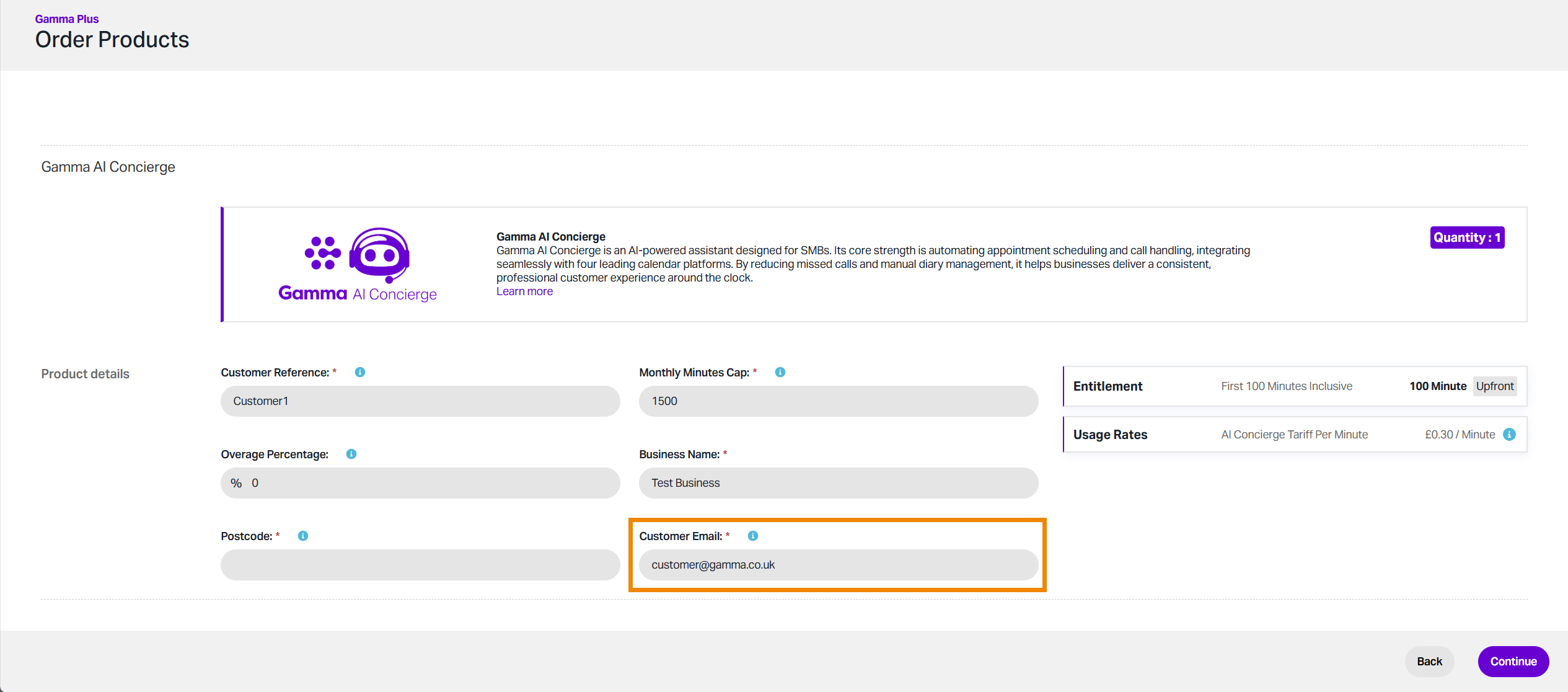
  • Your Gamma AI Concierge portal account details will be sent to the email address set in the Customer Email field during the order journey. You will need to change your password during the initial login.
The Dashboard #

The dashboard is the first page you see when logging in to the Gamma AI Concierge portal. This page collates your AI assistant data, including number of calls handled, the sentiment observed during the call, and appointments booked. 

Assistants #

This section is where you create and configure your AI assistants. You can also test call your assistant/s and connect them to a particular calendar integration.

Calendar Integration #

Here you can connect your calendar service to the AI assistant, allowing it to access and create bookings on your behalf. Multiple calendar services are supported, including Outlook and Google Calendar.

Appointments #

This page collates all appointments that have been created by your AI assistants, and can be filtered by date, calendar service and the AI assistant that created it.

Call Records #

All calls handled by your AI assistants will appear here. Calls can be filtered by date and by specific assistant. Each call can be explored using the eye icon, letting you see the call summary, read a full transcript and listen to the call recording.

Notifications #

All AI Concierge notifications will be collected here.

Billing & Usage #

The final section will outline your current usage in minutes, including a breakdown of usage by assistant, and a summary of your minutes allowance.

Updated on 13/05/2026
SupportThe Dashboard
Contents
  • Please Note:
  • The Dashboard
  • Assistants
  • Calendar Integration
  • Appointments
  • Call Records
  • Notifications
  • Billing & Usage

Copyright © 2026 -  Gamma Telecom Ltd

Gamma API
We use cookies to measure performance and make improvements to this service. This includes page views, device/browser, location, and page interactions. We do not collect any information you upload to this site. By agreeing, you consent for your data to be used for this purpose.