
Skip to content
  • Academy KB Home Redesign
  • Broadband Home
  • CCaaS
  • Channel Partner Support
  • Circle Loop Home
  • Collaborate
  • Connectivity
  • Courses
  • Documentation
  • Ethernet
  • FibreXchange
  • FUSION IoT
  • Gamma AI Concierge
  • Gamma Plus
  • Gamma SIP for Cloud Connect
  • Gamma SIP Global Communications Enablement
  • Gamma SIP Trunks for Genesys Cloud
  • Hannah – Homepage WIP
  • Home
  • Horizon
  • Horizon Contact
  • Horizon Forms
  • Horizon Service Description Home
  • Horizon with Webex
  • Inbound
  • iPECS
  • Knowledge Base Intro
  • Knowledgebase Directory
  • LoginPress
  • Microsoft
  • Microsoft Teams Direct Routing Home
  • Microsoft Teams Operator Connect
  • Mobile
  • Multiple KB
  • My Courses
  • No Access
  • No active page
  • Numbering and Porting
  • Phoneline+
  • Product Homepage
  • Quick Download Button
  • Release Notes
  • Release Notes
  • SIP Home
  • Test
  • UCaaS
  • User Account
  • Voice
  • Voice Enablement
  • Webex for Gamma
  • Webex for Gamma Release Notes
  • Gamma Academy Knowledge Base
Gamma Academy Knowledge Base
  • Cloud Calling and Collaboration
    • Webex for Gamma
    • Horizon with Webex
    • Horizon
    • Phoneline+
    • Operator Connect
    • Direct Routing
    • Inbound
    • Akixi CX Analytics
    • Red Cactus
  • Connectivity and Networking
    • Numbering and Porting
    • Broadband
    • FibreXchange
    • Ethernet
    • SIP Trunking
    • Gamma FUSION IoT
  • CX
    • Horizon Contact
    • AI Concierge
  • Mobile Services
    • Gamma Mobile
  • CyberSecurity
    • SafeWeb
  • Partner & Portal Support
Gamma Academy Knowledge Base
  • Home
  • Home
  • Gamma AI Concierge
  • The AI Concierge Portal
  • The Dashboard
View Categories

The Dashboard

Once logged in to the AI Concierge portal, you will see the dashboard. The dashboard is made up of widgets that will display statistics specific to your business and the assistants that are active.

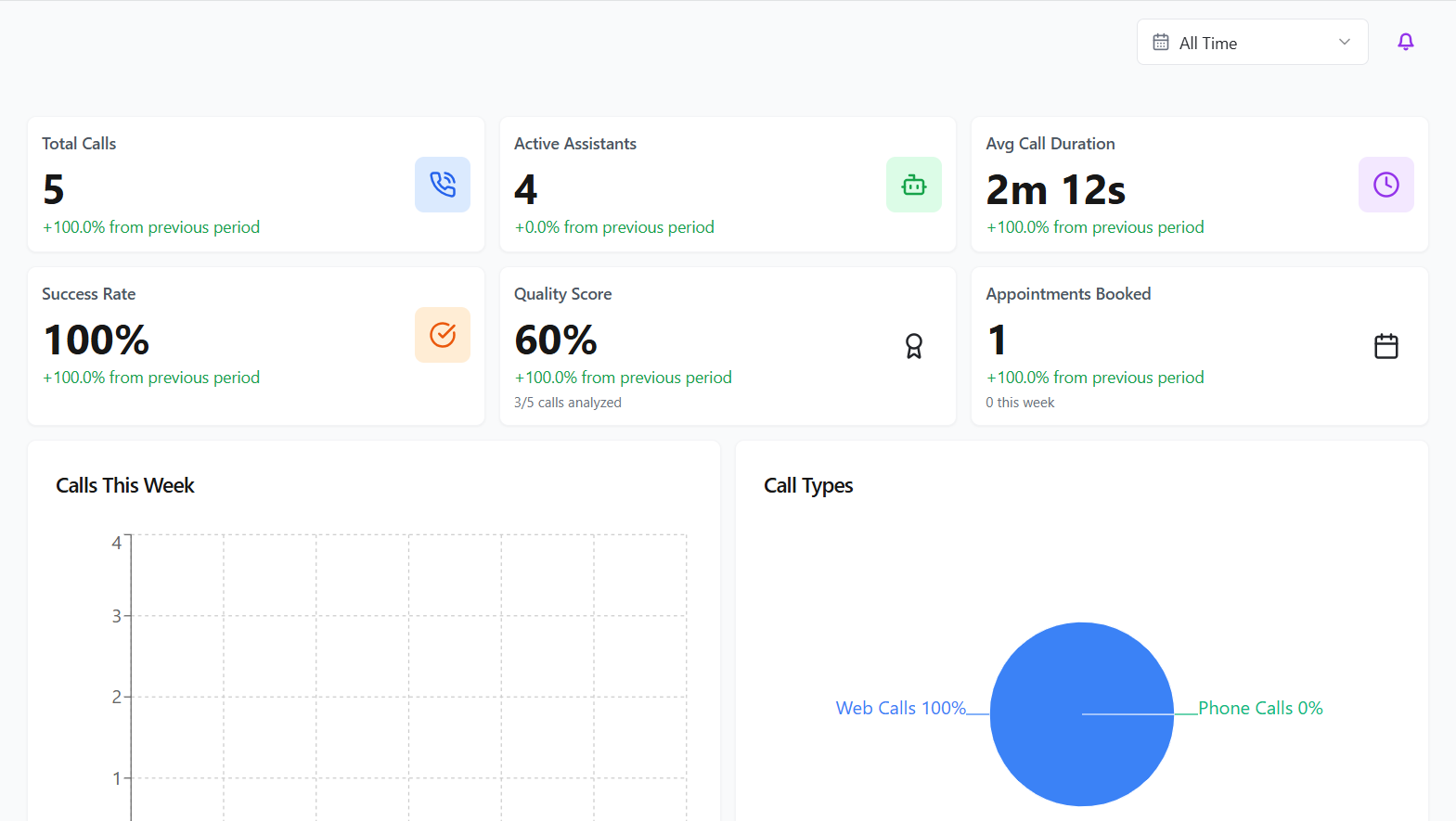
The AI Concierge dashboard can be broken into three rows:

Top and Middle Rows #

The top two rows collate information regarding handled call, including the total number of calls answered by all of your active AI assistants. The average call direction and overall success rate for these calls. This section will also show you the number of appointments currently booked across the system.
Below the top two rows are two additional widgets. The first shows how many calls were handled by your AI assistant/s in the past week, whilst the second outlines the type of call that was handled. Depending on your setup this may be split between web calls, calls that originate from your website through a browser, or calls via a traditional phone number.
Bottom Row #

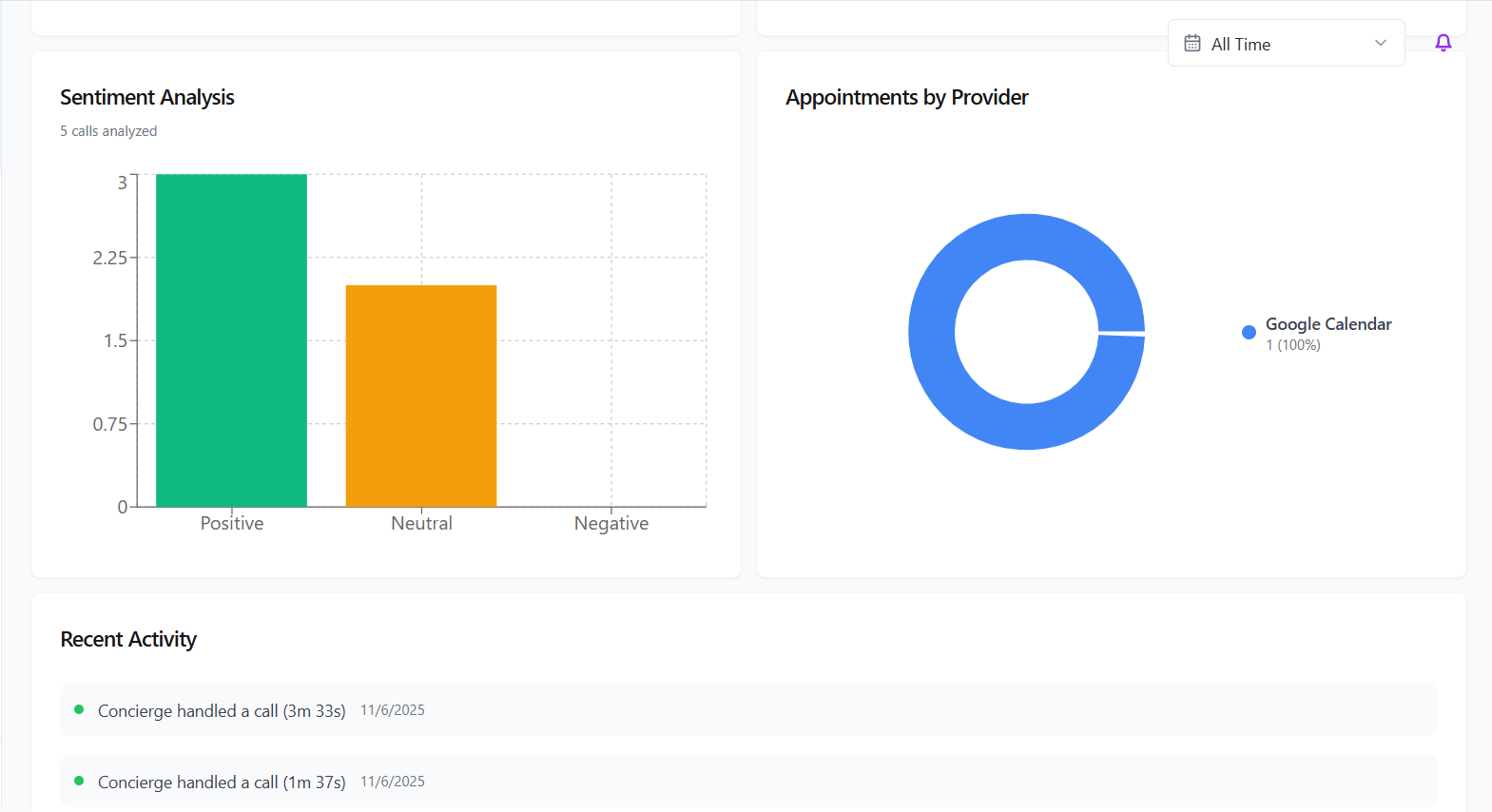
The sentiment analysis widget will plot calls handled by the assistant/s and split them into positive, neutral and negative calls. Calls can be listened to via the Call Records section of the portal. How your appointments are split between your integrated calendars can also be seen here.
Finally, any recent activity made by your assistants, such as handling calls, will be recorded at the bottom of the dashboard.
Updated on 13/05/2026
The Gamma AI Concierge Portal OverviewAssistants
Contents
  • Top and Middle Rows
  • Bottom Row

Copyright © 2026 -  Gamma Telecom Ltd

Gamma API
We use cookies to measure performance and make improvements to this service. This includes page views, device/browser, location, and page interactions. We do not collect any information you upload to this site. By agreeing, you consent for your data to be used for this purpose.