
Skip to content
  • Academy KB Home Redesign
  • Broadband Home
  • CCaaS
  • Channel Partner Support
  • Circle Loop Home
  • Collaborate
  • Connectivity
  • Courses
  • Documentation
  • Ethernet
  • FibreXchange
  • FUSION IoT
  • Gamma AI Concierge
  • Gamma Plus
  • Gamma SIP for Cloud Connect
  • Gamma SIP for Cloud Connect
  • Gamma SIP for Genesys Cloud
  • Gamma SIP Global Communications Enablement
  • Gamma SIP Trunks for Genesys Cloud
  • Hannah – Homepage WIP
  • Home
  • Horizon
  • Horizon Contact
  • Horizon Forms
  • Horizon Service Description Home
  • Horizon with Webex
  • Inbound
  • iPECS
  • Knowledge Base Intro
  • Knowledgebase Directory
  • LoginPress
  • Microsoft
  • Microsoft Teams Direct Routing Home
  • Microsoft Teams Operator Connect
  • Mobile
  • Multiple KB
  • My Courses
  • No Access
  • No active page
  • Numbering and Porting
  • Phoneline+
  • Product Homepage
  • Quick Download Button
  • Release Notes
  • Release Notes
  • SIP Home
  • Test
  • UCaaS
  • User Account
  • Voice
  • Voice Enablement
  • Webex for Gamma
  • Webex for Gamma Release Notes
  • Gamma Academy Knowledge Base
Gamma Academy Knowledge Base
  • Cloud Calling and Collaboration
    • Webex for Gamma
    • Horizon with Webex
    • Horizon
    • Phoneline+
    • Operator Connect
    • Direct Routing
    • Inbound
    • Akixi CX Analytics
    • Red Cactus
  • Connectivity and Networking
    • Numbering and Porting
    • Broadband
    • FibreXchange
    • Ethernet
    • SIP Trunking
    • Gamma FUSION IoT
  • CX
    • Horizon Contact
    • AI Concierge
  • Mobile Services
    • Gamma Mobile
  • CyberSecurity
    • SafeWeb
  • Partner & Portal Support
Gamma Academy Knowledge Base

Service Suite for MS Teams Phone

  • Service Suite for MS Teams Phone
  • Service Suite for Microsoft Teams Guide
  • Service Suite for MS Teams Documents

Provisioning and In-Life Changes

  • Ordering Microsoft Teams Direct Routing Service
  • Microsoft Teams Direct Routing – Service Management and In-life Changes

Service Description

  • Microsoft Teams Direct Routing Service Description

T&Cs and SLAs

  • Microsoft Teams Direct Routing – Terms and Conditions

Technical Support

  • Microsoft Teams Direct Routing – Health Check
  • Microsoft Teams Direct Routing – Advanced Diagnostics
  • Home
  • Home
  • Microsoft Teams Direct Routing
  • Technical Support
  • Microsoft Teams Direct Routing – Health Check
View Categories

Microsoft Teams Direct Routing – Health Check

Our Microsoft Teams – Direct Routing Health Checks gives you an overview of issues you may be having with your service in an easy to view format.

To access the Health Check go to the Gamma Portal, Provisioning and Service Management, Voice Connectivity, Microsoft Teams – Direct Routing and Service Management.

Locate the endpoint and click View. The Health Check is loaded up in the middle of the Service Details page.
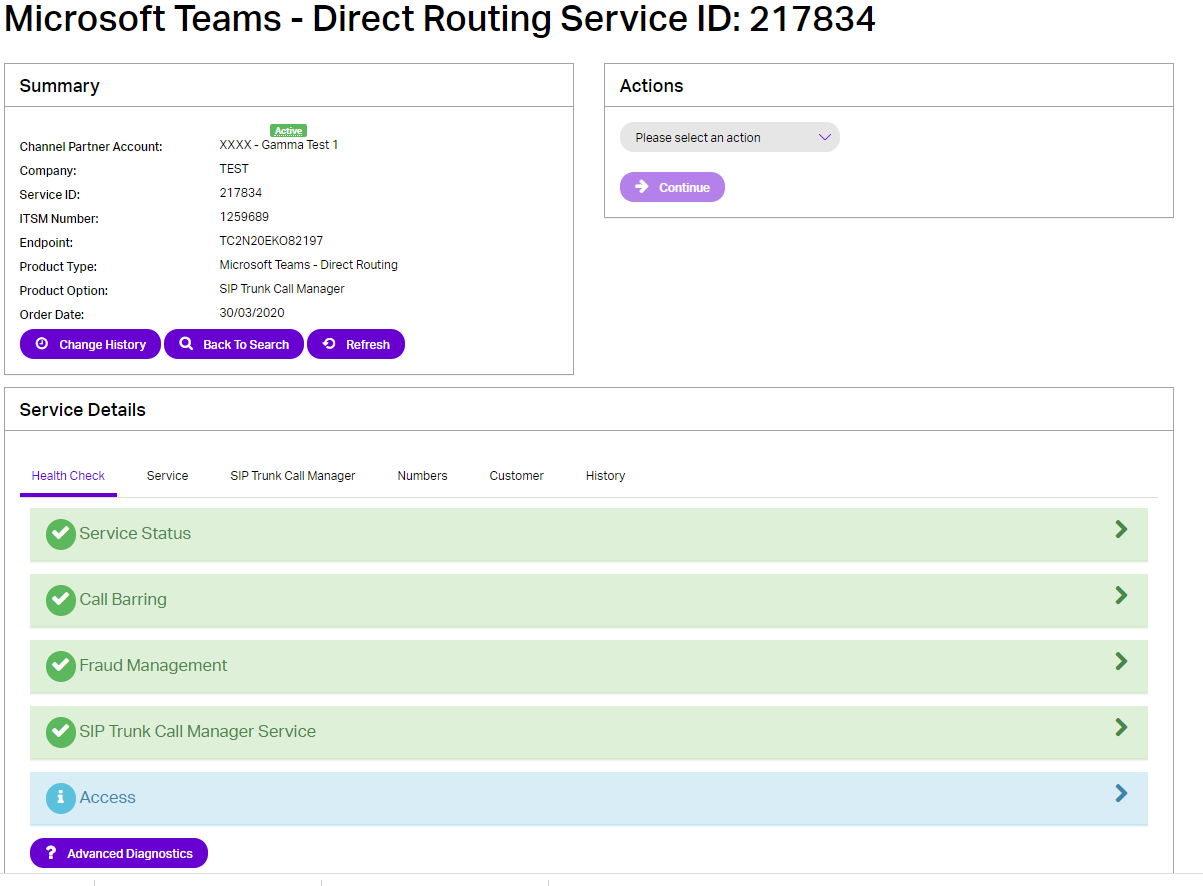
Service Status #

The Service Status tab will show as green if there are no pending changes or if there are pending changes that are less than 24 hours old. This panel will become red if a change has not completed within 24 hours.

Call Barring #

Call Barring will show green if the endpoint defaults are selected (Premium and International calls barred) and amber with any additional call barring options selected, so that if your customer is experiencing issues with calls you can see quickly to see if there are any additional bars.

You can also edit bars from this panel.

Fraud Management #

You can see if Fraud Management is set up, and if it is whether the agreed limits have been breached or not. For more information on Fraud Management, please see the Microsoft Teams – Direct Routing Provisioning and In Life Changes guide.

SIP Trunk Call Manager Service #

You can log into siptrunkcallmanager.co.uk as an admin from this panel.

Access #

If users are experiencing any dropped calls or media-related issues, we advise to check their access first (this is usually the root cause of these issues).

DTMF #

Gamma supports the transmission of digits as RFC2833 events and in-band DTMF transmission.

DTMF events must be sent either in-band or in accordance with RFC2833 (payload 101). Gamma does not support the conveying of digits in SIP INFO, and will return a ‘415 unsupported’ error upon receipt of an INFO message.

If DTMF is not working with one number then you should ensure that the ‘event duration threshold’ in your RFC2833 events contains a positive value and one which increments with each individual packet of a DTMF tone.

An ‘event duration’ set to zero can cause DTMF events (particularly the initial digit) not to be recognised as a valid input by particularly sensitive far-end IVRs. Similarly, the codec sampling rate should be set to 8000 KHz. It is always a good idea to try to emulate the problem by dialling the affected IVR from other providers’ networks.

image_pdf
Updated on 14/08/2024
Microsoft Teams Direct Routing – Advanced DiagnosticsMicrosoft Teams Direct Routing – Advanced Diagnostics
Contents
  • Service Status
  • Call Barring
  • Fraud Management
  • SIP Trunk Call Manager Service
  • Access
  • DTMF

Copyright © 2026 -  Gamma Telecom Ltd

Gamma API
We use cookies to measure performance and make improvements to this service. This includes page views, device/browser, location, and page interactions. We do not collect any information you upload to this site. By agreeing, you consent for your data to be used for this purpose.