Skip to content
  • Academy KB Home Redesign
  • Broadband Home
  • CCaaS
  • Channel Partner Support
  • Circle Loop Home
  • Collaborate
  • Connectivity
  • Courses
  • Documentation
  • Ethernet
  • FibreXchange
  • FUSION IoT
  • Gamma AI Concierge
  • Gamma Plus
  • Gamma SIP for Cloud Connect
  • Gamma SIP Global Communications Enablement
  • Gamma SIP Trunks for Genesys Cloud
  • Hannah – Homepage WIP
  • Home
  • Horizon
  • Horizon Contact
  • Horizon Forms
  • Horizon Service Description Home
  • Horizon with Webex
  • Inbound
  • iPECS
  • Knowledge Base Intro
  • Knowledgebase Directory
  • LoginPress
  • Microsoft
  • Microsoft Teams Direct Routing Home
  • Microsoft Teams Operator Connect
  • Mobile
  • Multiple KB
  • My Courses
  • No Access
  • No active page
  • Numbering and Porting
  • Phoneline+
  • Product Homepage
  • Quick Download Button
  • Release Notes
  • Release Notes
  • SIP Home
  • Test
  • UCaaS
  • User Account
  • Voice
  • Voice Enablement
  • Webex for Gamma
  • Webex for Gamma Release Notes
  • Gamma Academy Knowledge Base
Gamma Academy Knowledge Base
  • Cloud Calling and Collaboration
    • Webex for Gamma
    • Horizon with Webex
    • Horizon
    • Phoneline+
    • Operator Connect
    • Direct Routing
    • Inbound
    • Akixi CX Analytics
    • Red Cactus
  • Connectivity and Networking
    • Numbering and Porting
    • Broadband
    • FibreXchange
    • Ethernet
    • SIP Trunking
    • Gamma FUSION IoT
  • CX
    • Horizon Contact
    • AI Concierge
  • Mobile Services
    • Gamma Mobile
  • CyberSecurity
    • SafeWeb
  • Partner & Portal Support
Gamma Academy Knowledge Base

Provisioning and In-Life Changes

  • Bulk Upgrade Tool User Guide
  • Bulk Upgrade Tool FAQ
  • Horizon Collaborate (and Horizon Softphones) – end of sale & end of life FAQs
  • Ordering Horizon with Webex on the Gamma Portal
    • Horizon with Webex – Provisioning Guide

Features

  • Horizon with Webex – Feature Matrix

Technical Support

  • Horizon with Webex – User Quick Start Guide
  • Horizon with Webex – Network Configuration Guide

User Knowledge Base

  • Horizon with Webex User Knowledge Base

Service Description

  • Horizon with Webex Service Description

Horizon with Webex Release Notes

  • Horizon with Webex 2024 Release Notes

Horizon with Webex Forms

  • Horizon with Webex Documents and Forms

T&Cs and SLAs

  • Horizon with Webex – Terms and Conditions
  • Home
  • Home
  • Horizon with Webex
  • Provisioning and In-Life Changes
  • Ordering Horizon with Webex on the Gamma Portal
  • Horizon with Webex – Provisioning Guide
View Categories

Horizon with Webex – Provisioning Guide

Introduction and Purpose #

What is Horizon with Webex? #

Horizon with Webex is the next generation of Unified Communications as a Service solution offered within your Horizon solution; combining the award winning Webex application with Gamma’s trusted Horizon telephony capabilities to deliver a cohesive user experience with a consistent user interface across desktop, mobile and tablet devices. Horizon with Webex provides voice, video, presence, messaging, audio & video conferencing services and collaborative tools.

How do I set up Horizon with Webex for my customers? #

Horizon with Webex is enabled through the Gamma Portal and Horizon GUI. This can be installed as part of a New Company Order, and added in-life to an existing Company.

Prerequisites #

  • Gamma Portal Account: Ensure you have a Gamma Portal account and the necessary permissions to order Horizon. If you lack these permissions, please speak to your account manager.
  • Horizon GUI Access: You must be a Horizon Company Administrator.

Ordering Webex Bolt-Ons through the Gamma Portal: #

  1. Navigate to Provisioning & Service Management:
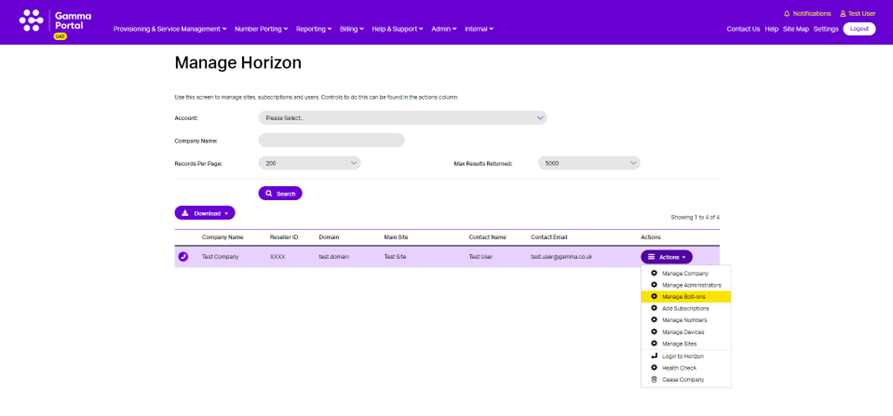
    • Go to ‘Provisioning & Service Management’ > ‘Hosted’ > ‘Horizon’ > ‘Horizon Manage Company’.

  1. Search for Horizon Company:
    • Locate the Horizon Company you wish to add Horizon with Webex to.

  1. Manage Bolt-ons:
    • Select ‘Actions’ > ‘Manage Bolt-ons’
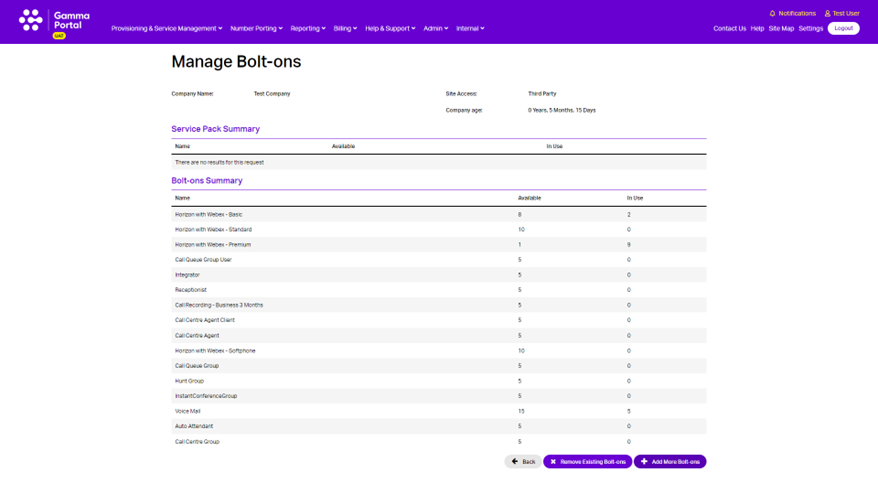
  1. Subscription Summary:
    • On the ‘Subscription Summary’ page, click ‘Add More Bolt-ons’:
  1. Select Bolt-ons:
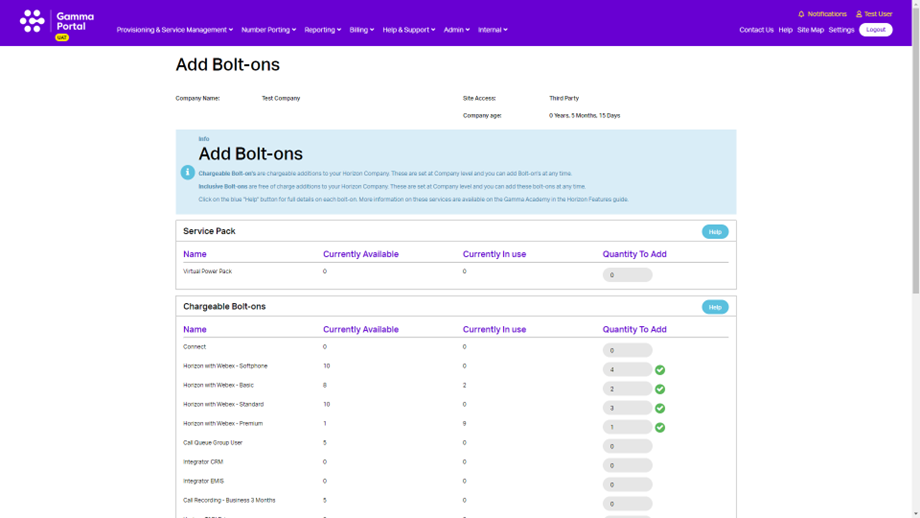
    • Choose the quantity of desired Bolt-ons:
      • Horizon with Webex – Smartphone
      • Horizon with Webex – Basic
      • Horizon with Webex – Standard
      • Horizon with Webex – Premium

Please refer to the Horizon with Webex Feature Matrix for further details on subscription tiers.
  1. Submit Order:
    • Press ‘Submit’

Confirmation #

Once these steps are completed, you will receive a confirmation message with your order reference number. If you do not receive this, please contact the Service Desk.

Configuring Horizon with Webex for a user in the Horizon GUI #

Notes #

  • Ensure you have the correct Bolt-ons before proceeding.
  • You can log in to the Horizon GUI as a Company Administrator by visiting https://www.unlimitedhorizon.co.uk/ or via SSO through the Gamma Portal (‘Login to Horizon’).
  • Horizon with Webex can only be provisioned onto an existing user. For new users, create the user first and then follow the instructions below.
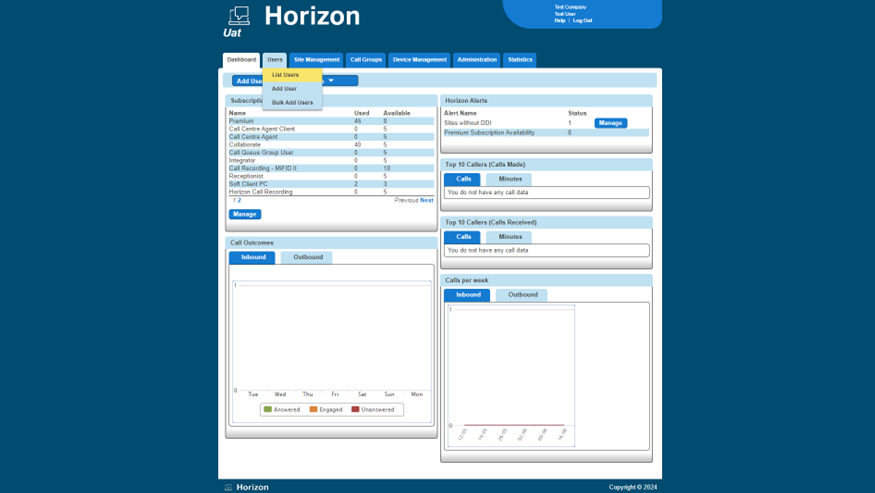
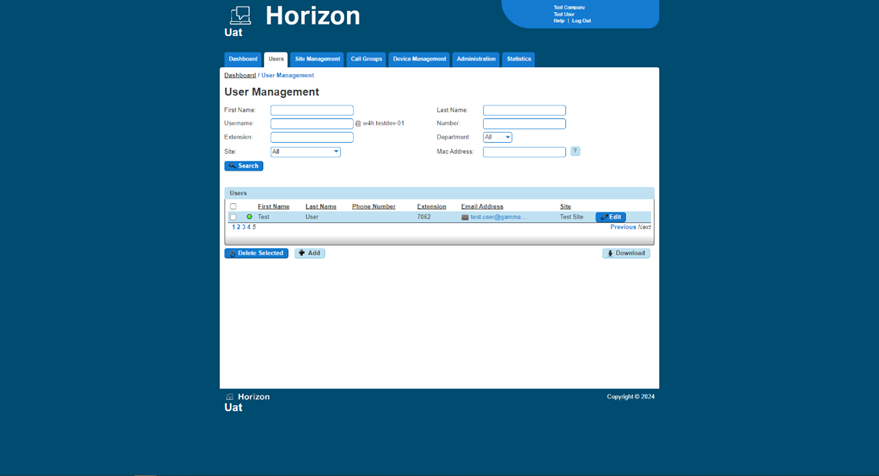
  1. List Users:
    • Highlight ‘Users’ and select ‘List Users’
  1. Edit User:
    • Find the user you wish to add Horizon with Webex to and select ‘Edit’.
  1. Phone Tab:
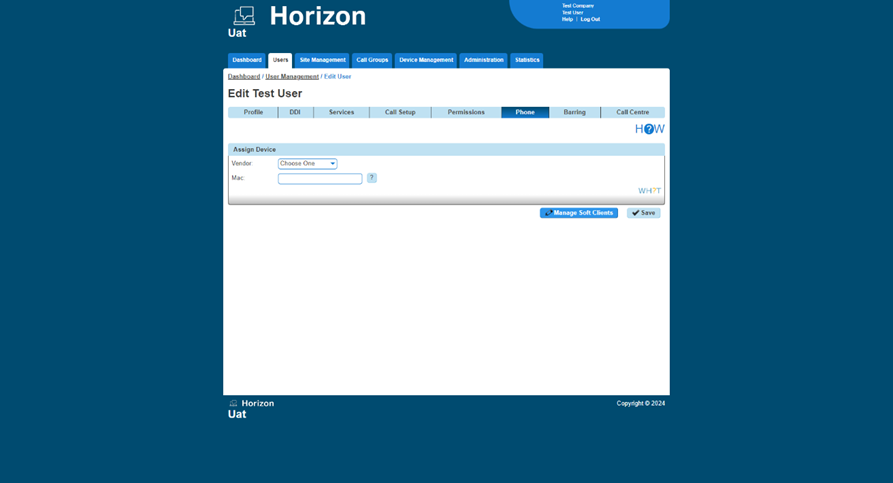
    • Select the ‘Phone’ tab.

  1. Manage Soft Clients:
    • Select ‘Manage Soft Clients’.
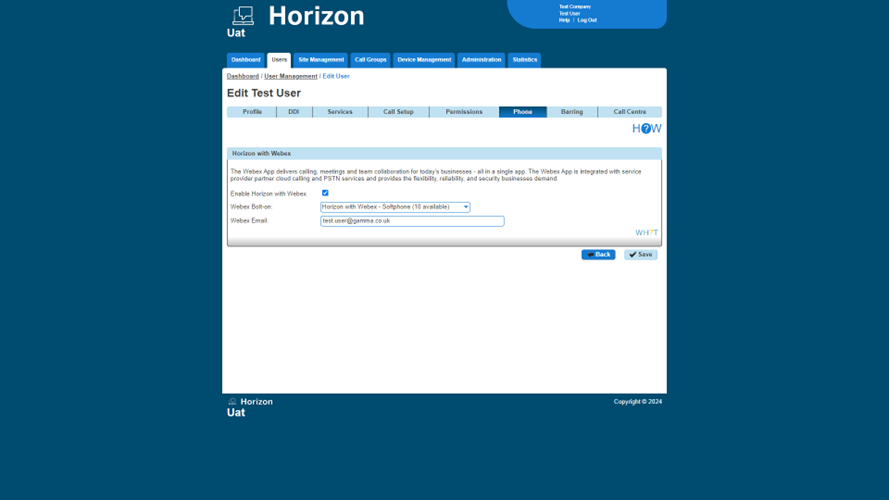
  1. Enable Horizon with Webex:
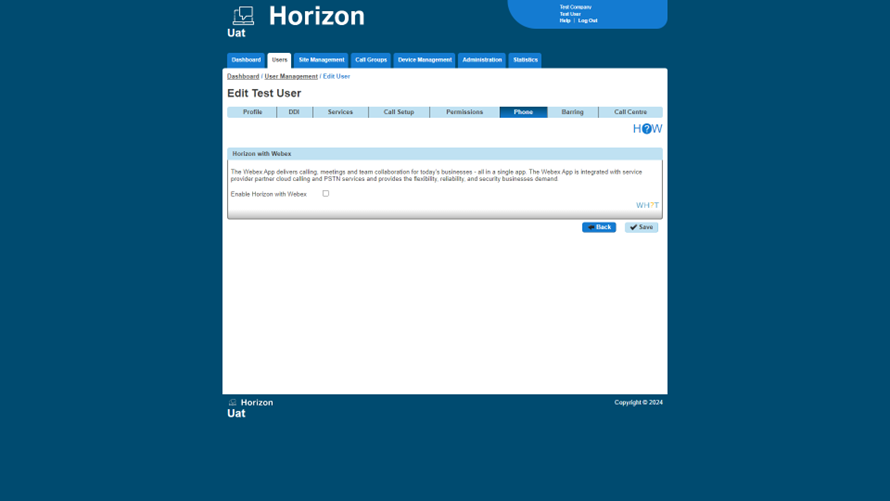
    • Select ‘Enable Horizon with Webex’.
  1. Select Webex Bolt-on:
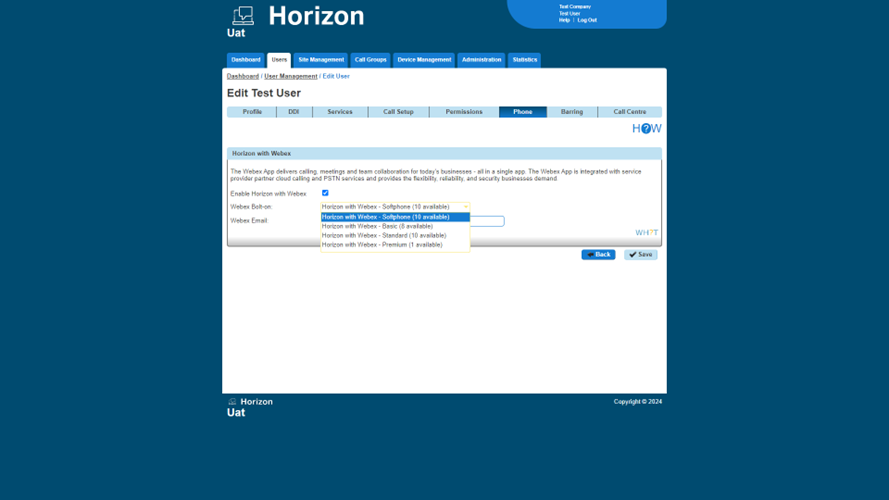
    • Choose the relevant Webex Bolt-on.
  1. Webex Email:
    • Enter the ‘Webex Email’ and submit.

Confirmation #

Once submitted successfully, an email will be sent to the End User with details to download Webex and set their password. This initial password will expire 7 days from creation.

If you encounter any issues or require further assistance, please contact the Service Desk.

Updated on 02/07/2024
Horizon with Webex – Provisioning GuideHorizon with Webex – Provisioning Guide
Contents
  • Introduction and Purpose
    • What is Horizon with Webex?
  • How do I set up Horizon with Webex for my customers?
    • Prerequisites
  • Ordering Webex Bolt-Ons through the Gamma Portal:
    • Confirmation
  • Configuring Horizon with Webex for a user in the Horizon GUI
    • Notes
    • Confirmation

Copyright © 2026 -  Gamma Telecom Ltd

Gamma API
We use cookies to measure performance and make improvements to this service. This includes page views, device/browser, location, and page interactions. We do not collect any information you upload to this site. By agreeing, you consent for your data to be used for this purpose.