
Skip to content
  • Academy KB Home Redesign
  • Broadband Home
  • CCaaS
  • Channel Partner Support
  • Circle Loop Home
  • Collaborate
  • Connectivity
  • Courses
  • Documentation
  • Ethernet
  • FibreXchange
  • FUSION IoT
  • Gamma AI Concierge
  • Gamma Plus
  • Gamma SIP for Cloud Connect
  • Gamma SIP for Cloud Connect
  • Gamma SIP for Genesys Cloud
  • Gamma SIP Global Communications Enablement
  • Gamma SIP Trunks for Genesys Cloud
  • Hannah – Homepage WIP
  • Home
  • Horizon
  • Horizon Contact
  • Horizon Forms
  • Horizon Service Description Home
  • Horizon with Webex
  • Inbound
  • iPECS
  • Knowledge Base Intro
  • Knowledgebase Directory
  • LoginPress
  • Microsoft
  • Microsoft Teams Direct Routing Home
  • Microsoft Teams Operator Connect
  • Mobile
  • Multiple KB
  • My Courses
  • No Access
  • No active page
  • Numbering and Porting
  • Phoneline+
  • Product Homepage
  • Quick Download Button
  • Release Notes
  • Release Notes
  • SIP Home
  • Test
  • UCaaS
  • User Account
  • Voice
  • Voice Enablement
  • Webex for Gamma
  • Webex for Gamma Release Notes
  • Gamma Academy Knowledge Base
Gamma Academy Knowledge Base
  • Cloud Calling and Collaboration
    • Webex for Gamma
    • Horizon with Webex
    • Horizon
    • Phoneline+
    • Operator Connect
    • Direct Routing
    • Inbound
    • Akixi CX Analytics
    • Red Cactus
  • Connectivity and Networking
    • Numbering and Porting
    • Broadband
    • FibreXchange
    • Ethernet
    • SIP Trunking
    • Gamma FUSION IoT
  • CX
    • Horizon Contact
    • AI Concierge
  • Mobile Services
    • Gamma Mobile
  • CyberSecurity
    • SafeWeb
  • Partner & Portal Support
Gamma Academy Knowledge Base

Service Suite for MS Teams Phone

  • Service Suite for MS Teams Phone
  • Service Suite for Microsoft Teams Guide
  • Service Suite for MS Teams Documents

Provisioning and In-Life Changes

  • Ordering Microsoft Teams Direct Routing Service
  • Microsoft Teams Direct Routing – Service Management and In-life Changes

Service Description

  • Microsoft Teams Direct Routing Service Description

T&Cs and SLAs

  • Microsoft Teams Direct Routing – Terms and Conditions

Technical Support

  • Microsoft Teams Direct Routing – Health Check
  • Microsoft Teams Direct Routing – Advanced Diagnostics
  • Home
  • Home
  • Microsoft Teams Direct Routing
  • Service Suite for MS Teams Phone
  • Service Suite for Microsoft Teams Guide
View Categories

Service Suite for Microsoft Teams Guide

Introduction: #

The Service Suite allows you to easily add additional hardware, such as handsets, conference phones and headsets, as well as additional services to your Microsoft Teams setup.

Guide: #

  • You will need the following information, depending on the products and/or services you wish to order:
    • Hardware – Delivery address and For Attention Of contact details
    • Call Recording – Microsoft Tenant ID
    • Reporting and Analytics – Microsoft Tenant ID
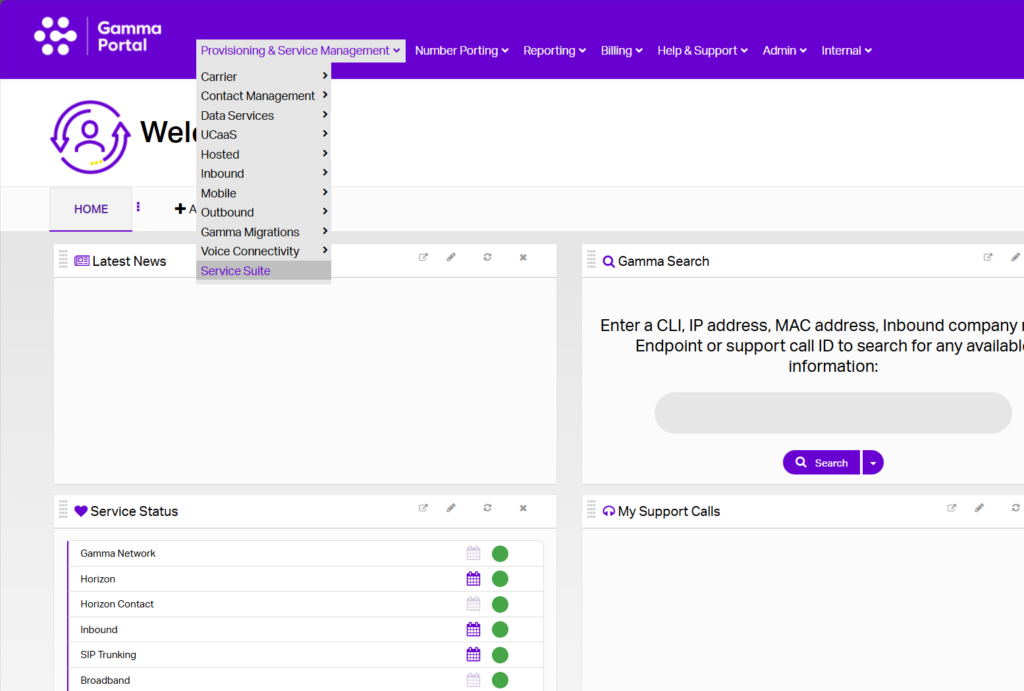
  • To begin using the Service Suite, login to the Gamma Portal and navigate to the Provisioning & In-Life Management tab:
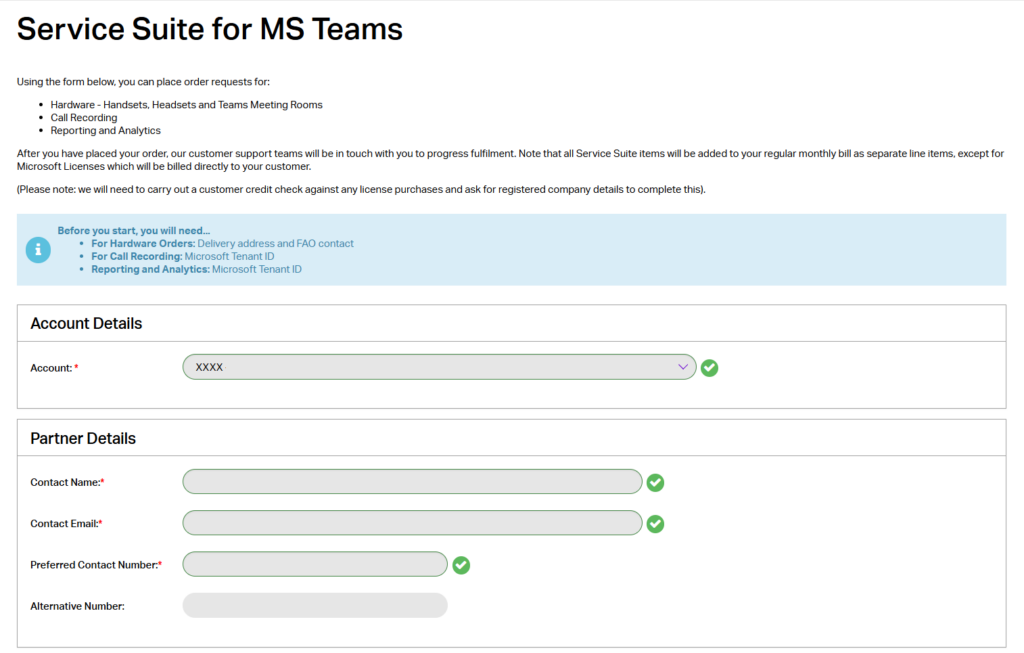
  • Enter your account and contact details:
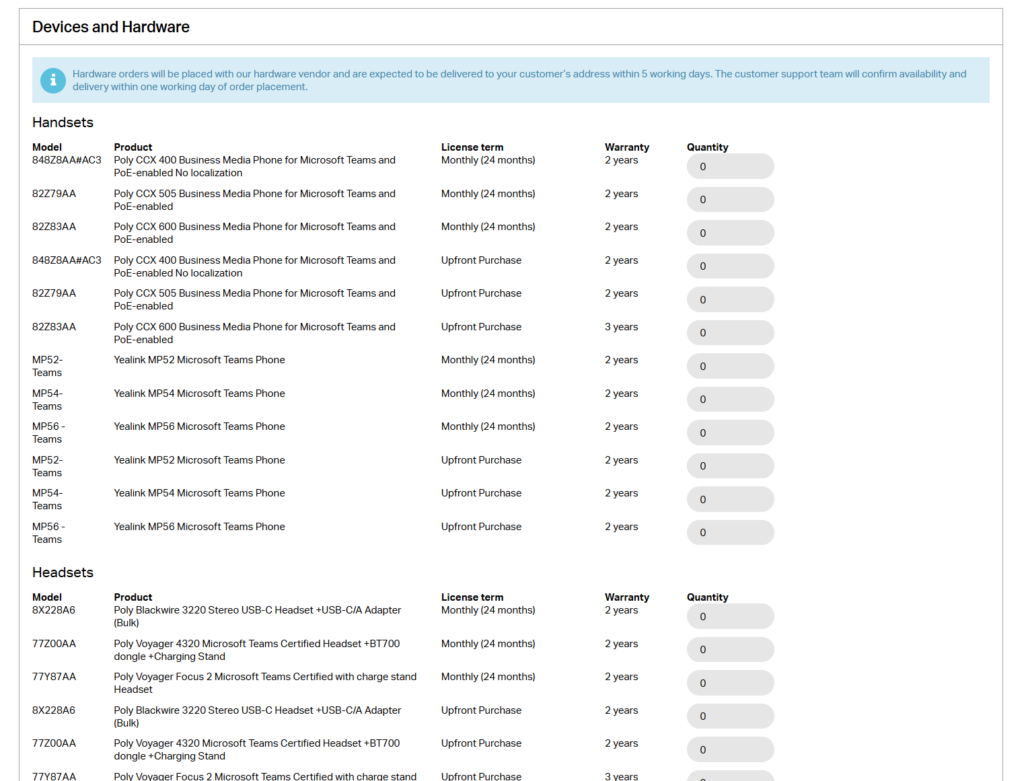
  • The first section details the various handsets and devices that can be ordered. Enter the quantity you need in the box:
  • The next two sections introduce Teams Call Recording using Dubber, as well as powerful reporting and analytics powered by Akixi. Please note that the Service Suite can only be used for new Dubber and/or Akixi accounts.
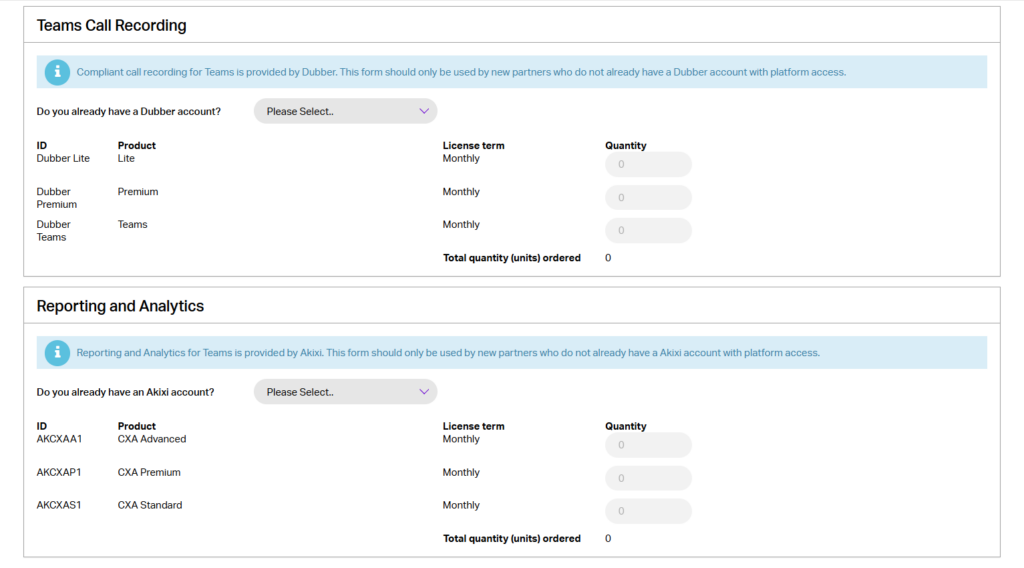
  • Ensure you select No to order Dubber and/or Akixi licenses:
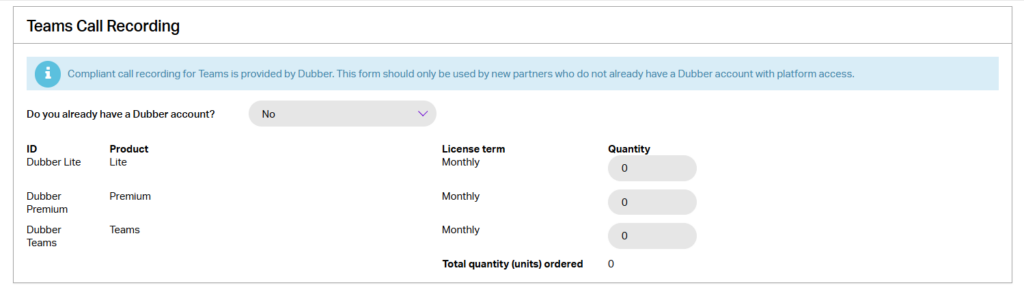
  • The first of the final three Service Suite sections asks for your Microsoft Tenant ID. This will help the ordering process as many of our partners require this information when setting up additional services.
  • The second of the final three Service Suite sections provides an overview of our Professional Services option. Gamma’s Professional Services team can help with installs, training and deployment via bespoke assistance. If you would like further information, tick the box and a member of the team will contact you.
  • The final section is the quoted monthly invoice. This totals any costs that will be added to your invoice for the devices and/or services you have submitted for order. Please note all Service Suite items will be added to your regular monthly bill as separate line items, except for Microsoft Licenses, which will be billed directly to your customer.
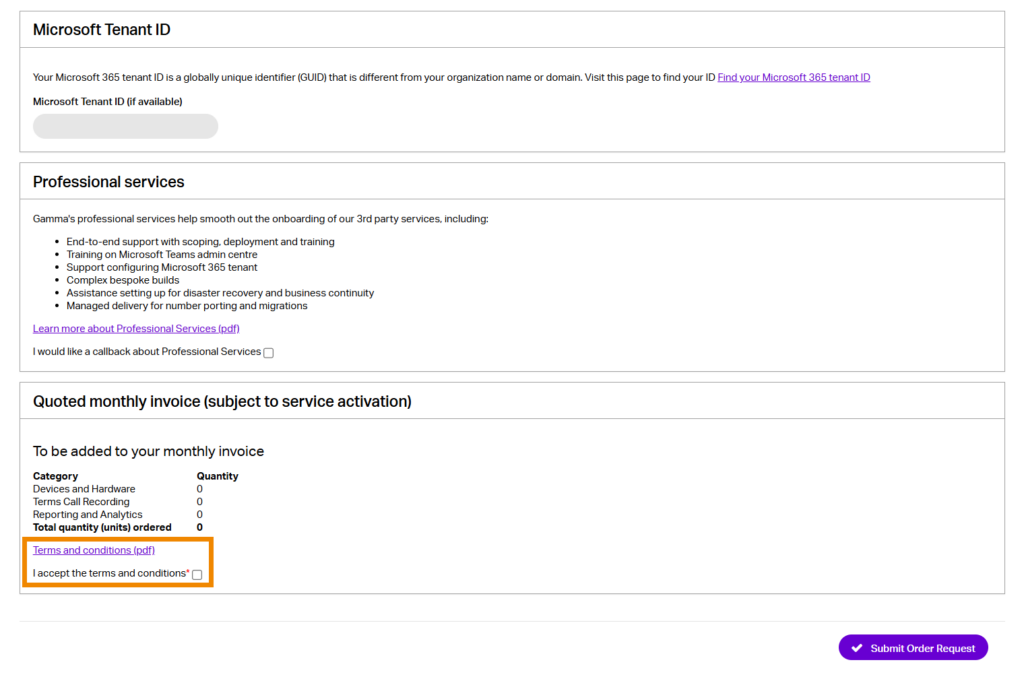
  • Read the terms and conditions via the link and tick the I accept the terms and conditions box. 
  • Press the Submit Order Request.
  • This request will now be sent to our provisioning teams who will fulfil the order.

Please Note: #

  • The service desk can be contacted via email at: servicesuite@gamma.co.uk
  • This should be used for questions and assistance regarding requested orders, delivery dates, returns etc only.

image_pdf
Updated on 08/05/2025
Service Suite for MS Teams PhoneService Suite for MS Teams Documents
Contents
  • Introduction:
  • Guide:
  • Please Note:

Copyright © 2026 -  Gamma Telecom Ltd

Gamma API
We use cookies to measure performance and make improvements to this service. This includes page views, device/browser, location, and page interactions. We do not collect any information you upload to this site. By agreeing, you consent for your data to be used for this purpose.