
Skip to content
  • Academy KB Home Redesign
  • Broadband Home
  • CCaaS
  • Channel Partner Support
  • Circle Loop Home
  • Collaborate
  • Connectivity
  • Courses
  • Documentation
  • Ethernet
  • FibreXchange
  • FUSION IoT
  • Gamma AI Concierge
  • Gamma Plus
  • Gamma SIP for Cloud Connect
  • Gamma SIP for Cloud Connect
  • Gamma SIP for Genesys Cloud
  • Gamma SIP Global Communications Enablement
  • Gamma SIP Trunks for Genesys Cloud
  • Hannah – Homepage WIP
  • Home
  • Horizon
  • Horizon Contact
  • Horizon Forms
  • Horizon Service Description Home
  • Horizon with Webex
  • Inbound
  • iPECS
  • Knowledge Base Intro
  • Knowledgebase Directory
  • LoginPress
  • Microsoft
  • Microsoft Teams Direct Routing Home
  • Microsoft Teams Operator Connect
  • Mobile
  • Multiple KB
  • My Courses
  • No Access
  • No active page
  • Numbering and Porting
  • Phoneline+
  • Product Homepage
  • Quick Download Button
  • Release Notes
  • Release Notes
  • SIP Home
  • Test
  • UCaaS
  • User Account
  • Voice
  • Voice Enablement
  • Webex for Gamma
  • Webex for Gamma Release Notes
  • Gamma Academy Knowledge Base
Gamma Academy Knowledge Base
  • Cloud Calling and Collaboration
    • Webex for Gamma
    • Horizon with Webex
    • Horizon
    • Phoneline+
    • Operator Connect
    • Direct Routing
    • Inbound
    • Akixi CX Analytics
    • Red Cactus
  • Connectivity and Networking
    • Numbering and Porting
    • Broadband
    • FibreXchange
    • Ethernet
    • SIP Trunking
    • Gamma FUSION IoT
  • CX
    • Horizon Contact
    • AI Concierge
  • Mobile Services
    • Gamma Mobile
  • CyberSecurity
    • SafeWeb
  • Partner & Portal Support
Gamma Academy Knowledge Base

Provisioning and In-Life Changes

  • Customer Requirements Capture Guide
  • Enable Horizon Contact with a New Horizon Company
  • Enable Horizon Contact with an Existing Horizon Company
  • Network Configuration Guidelines for Horizon Contact
  • Provisioning Horizon Contact Users on the Horizon Platform
  • Assigning CRM bolt-ons to users
  • Ceasing Horizon & Horizon Contact
  • System Level Functionality
    • System Level Functionality
    • Automatically assigned system level settings
    • System level flows

Technical Support

  • Offline Reporting Destinations
  • Horizon Contact AWS migration – What you need to know
  • Diagnosing Call Quality Issues with WebRTC Diagnostics
  • Understanding WebRTC diagnostic tests
  • Horizon Contact Known Behaviours
  • Horizon Contact as a Web Application Via Edge
  • Generating HAR Files for diagnostics
  • Horizon Contact Glossary

Knowledge Bases

  • Horizon Contact Agent Knowledge Base
  • Horizon Contact Supervisor Knowledge Base
  • Horizon Contact Administrator Knowledge Base

Integration Guides

  • ConConnect Integration
  • Care Connect Integration
  • Contact Salesforce Integration
  • Contact Zendesk Integration
  • Contact Microsoft Dynamics Integration
  • Contact CRM Integration Developer Guide

Service Description

  • Horizon Contact Service Description

Horizon Contact Release Notes

  • Horizon Contact Release Notes
  • Horizon Contact 2024 Release Notes
  • Horizon Contact 2023 Release Notes
  • Horizon Contact 2022 Release Notes
  • Horizon Contact 2021 Release Notes

T&Cs and SLAs

  • Horizon T&Cs and Horizon Contact
  • Horizon Contact SLAs
    • Horizon Contact 2025 SLAs
    • Horizon Contact 2024 SLAs
  • Contact Safe-Pay T&Cs
    • Contact Safe-Pay T&Cs

Horizon Contact Forms

  • Horizon Contact Forms and Downloads
  • Home
  • Home
  • Horizon Contact
  • Technical Support
  • Understanding WebRTC diagnostic tests
View Categories

Understanding WebRTC diagnostic tests

The WebRTC diagnostics tool is designed to help agents quickly identify and resolve common issues that may affect their ability to receive or make WebRTC calls. It checks their WebRTC authentication, browser performance, microphone access, and network connectivity to the Contact Centre’s WebRTC servers.

What the Test Checks #
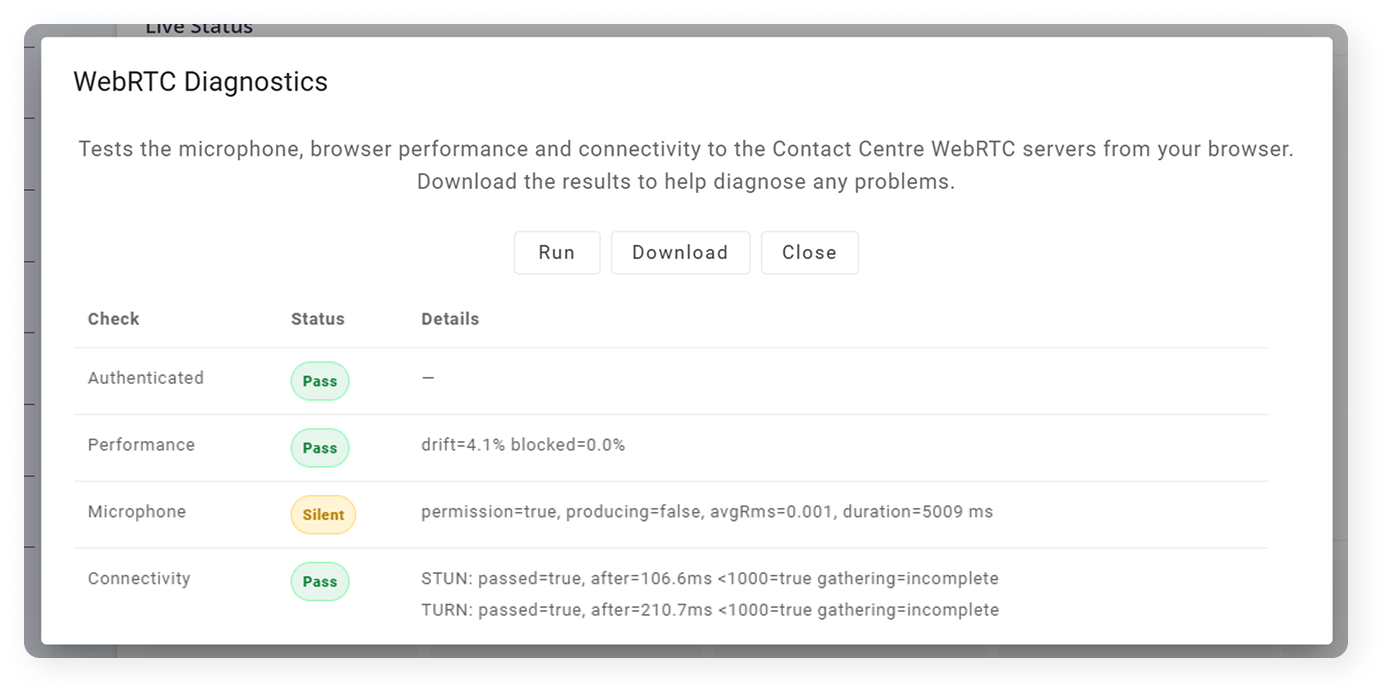
TestWhat It DoesWhat to Look For
AuthenticateConfirms your browser is properly authenticated to the WebRTC registration service and has received valid ICE server details. Pass – Your session is ready for calls.
Fail – Reload the page and sign in again.
PerformanceMeasures your browser’s CPU performance and responsiveness. Pass – Browser performance is good.
Fail – Browser or system is overloaded; close unused apps or tabs.
MicrophoneChecks microphone permission and listens briefly for sound. Pass – Audio detected.
Silent – Permission granted but no sound detected; check mic input or speak during test.
Fail – Permission denied; allow mic access and retry.
ConnectivityTests network reachability of your STUN and TURN WebRTC servers. Pass – All servers responded correctly.
Warn – One path succeeded but another timed out.
Fail – No valid ICE candidates; network or firewall issue.

Understanding the Connectivity Test #

The connectivity check gathers ICE candidates, which represent possible routes for WebRTC media. You’ll see separate results for STUN and TURN servers:

TypeWhat It MeansTypical Issues
STUN (Server-Reflexive)Verifies basic UDP connectivity and NAT traversal.UDP 3478 blocked or STUN server unreachable.
TURN (Relay)Verifies media can be relayed through the TURN server (used when direct paths fail).Expired TURN credentials, blocked UDP/TCP 3478 or 5349, strict corporate firewalls.

Healthy networks usually show both srflx (STUN) and relay (TURN) candidates. Partial results may still allow calls but can indicate restricted connectivity.

Useful Resources

  • Diagnosing Call Quality Issues with WebRTC Diagnostics
image_pdf
Updated on 24/10/2025
Diagnosing Call Quality Issues with WebRTC DiagnosticsHorizon Contact Known Behaviours
Contents
  • What the Test Checks
  • Understanding the Connectivity Test

Copyright © 2026 -  Gamma Telecom Ltd

Gamma API
We use cookies to measure performance and make improvements to this service. This includes page views, device/browser, location, and page interactions. We do not collect any information you upload to this site. By agreeing, you consent for your data to be used for this purpose.