Introduction #
Purpose of this Document #
Horizon Contact is an Omnichannel Customer Communications service suitable for those wishing to run a formal contact centre or those organisations that need a tool to manage their day-to-day customer interactions.
This service has a large feature set allowing administrators to provide a very customised experience for their agents and customers.
This document aims to outline any area of functionality where it has been highlighted to Gamma that the end user was expecting a different behaviour. This could be because there are multiple ways to achieve a result and Gamma have chosen what we believe is the easiest to use or least likely to cause issues. There are also occasions where Gamma use third party code or systems and we are therefore unable to change how something works.
Identification of Known Behaviours #
Due to the number of features on Horizon Contact, and how this is deployed by our Channel Partners into different types of businesses in their customer bases, what might seem to be a fault or implementation design issue, might in fact work exactly how another user would expect.
On this basis the following tables have been identified through feedback from our Channel Partners, and through master tickets raised on faults reported. In all cases our aim is to ensure all supported modes of use are available and achievable.
Raising Additional Known Behaviours #
In order to ensure new behaviours are raised from a consolidated and validated source, investigated and added to the list for record, there are two feeds available.
Fault reference: Where a trend or difference in behaviour is raised and accepted by our support team a fault ticket and further Master support ticket will be raised by our 3rd line support teams for progression. These will then be shared through this document.
Please note a fault should always be raised with the support teams first to ensure a speedy response and resolution implemented where available.
Known Behaviours #
Call Recording
#Behaviour | Notes | |
When viewing the call recording settings in the Horizon Portal under Users and Call Setup, the settings listed under Call Recording only affect those users not using Horizon Contact, i.e., those users we call back-office users. | To manage the settings for Horizon Contact users, you must use the Horizon Contact Portal | |
Voice
#Behaviour | Notes | ||
When viewing queues in the Supervisor’s Live Data screen, it may appear that there are calls in the queue and agents available to take these, however, the agents are not receiving the calls and the customer is left in the queue. This has been reported as “Stuck Calls”. Please see screenshots below. Even when viewing agents, they can appear to be available. However, if you click into the agent, you will see which channels they are taking interactions on. | This is usually a result of the agent turning off the ability for them to receive calls in the Agent Desktop. The default setting is for agents to be able to decide which channels they wish to receive contacts on. We are assessing whether to set the default to off, so agents can no longer prevent calls being delivered. | ||
| If an agent is logged in twice, they may not be able to receive calls since the routing engine will not know which window to deliver the call to. | The agent should log out of all instances and close any windows running Horizon Contact, before they log back in. | ||
| If an agent is taking calls from a queue on physical handset, call controls such as call transfer will not work on this device. | Agents should use the agent desktop call controls, even when using a physical phone | ||
| The Horizon feature, Call Paging is not compatible with Horizon Contact and will not work for these users | Call Paging is a feature that allows a user to call numerous users all at the same time with one-way audio. | ||
| Voice queues have a setting to set the maximum number of calls on that queue. However, the maximum number of calls that can be queued by an organisation is determined by the number of agents provisioned. | 15 calls can be queued per agent provisioned but remember that if that agent is on a call, they will be using one of those 15 channels. Additionally, if they transfer a call, they will consumer another channel, leaving only 13 for queuing calls | ||
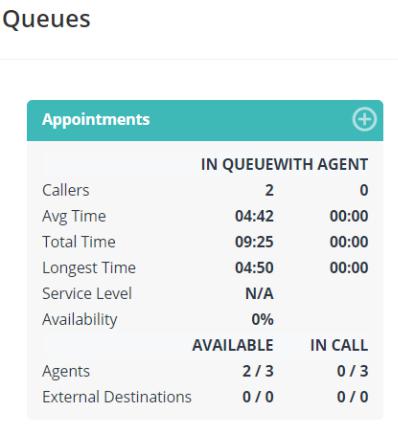
This extract from the Live Data page shows appears to show that there are indeed two agents available for the Appointments queue, but they are not being sent any calls.

This is drilled-down view of Agent One. Here you can see that they are only taking emails and not calls. Be aware that agents can select which channels they wish to work on within the agent portal.

Reporting #
Behaviour | Notes | |||
Once a user has a Horizon Contact Subscription allocated, they will no longer appear in Akixi reports. | This is expected behaviour since Akixi does not see the call routing that happens with Horizon Contact. Customers should use the reporting provided by Horizon Contact. | |||
Admin Interface #
| Behaviour | Notes |
| The Staff Menu has an item called Roles. This appears to be read-only. | Currently we do not support the creation of custom roles, but do expect to release this in the future, whereupon you will be able to use this menu to configure new roles |
| Under the Themes Menu > Images, there appears to be an option to use your own background image and Favicon, however, these don’t currently do anything | This is some legacy code from an early version of the product and these options will be removed. |
Supervisor Experience #
| Behaviour | Notes |
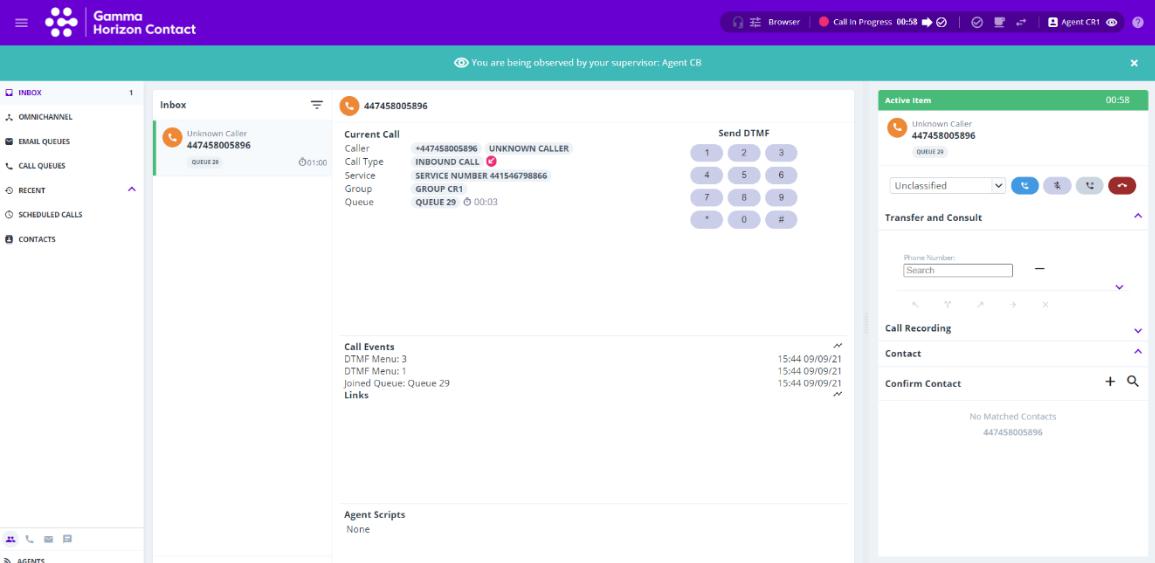
| A recent update made it obvious to agents that they were being listened to on calls by their supervisor. In an upcoming release we will make this announcement optional. | Please see screens below for what the agent currently sees. |