
Starting in September we are migrating our infrastructure from our own data centres into scalable public cloud infrastructure – a move that brings exciting benefits to customers and our product roadmap.
Key highlights #
- New customers will be onboarded to a new cloud-based version of Horizon Contact, starting in September 2025.
- Migration of existing customers will begin in Q4.
- Some integrations require updated configuration.
- Network configuration requirements are now separated into their own section.
- Firewall updates – These are mandatory for any customers who restrict Contact connectivity.
What’s changing #
- New customers: From September, new customers will be onboarded to the cloud-based version of Horizon Contact.
- New URL: New customers will access the platform via https://horizon.contact.gammagroup.co. Existing customers will continue using their existing URL (https://contact.unlimitedhorizon.co.uk/)
- Care Connect and ConConnect apps:
- New customers must use the latest version.
- Existing customers must be on the latest version before migration in Q4 (exact dates TBC).
- Download Care Connect
- Download ConConnect
- Network Configuration Guidelines:
- Requirements for Horizon Contact are now separated into their own section.
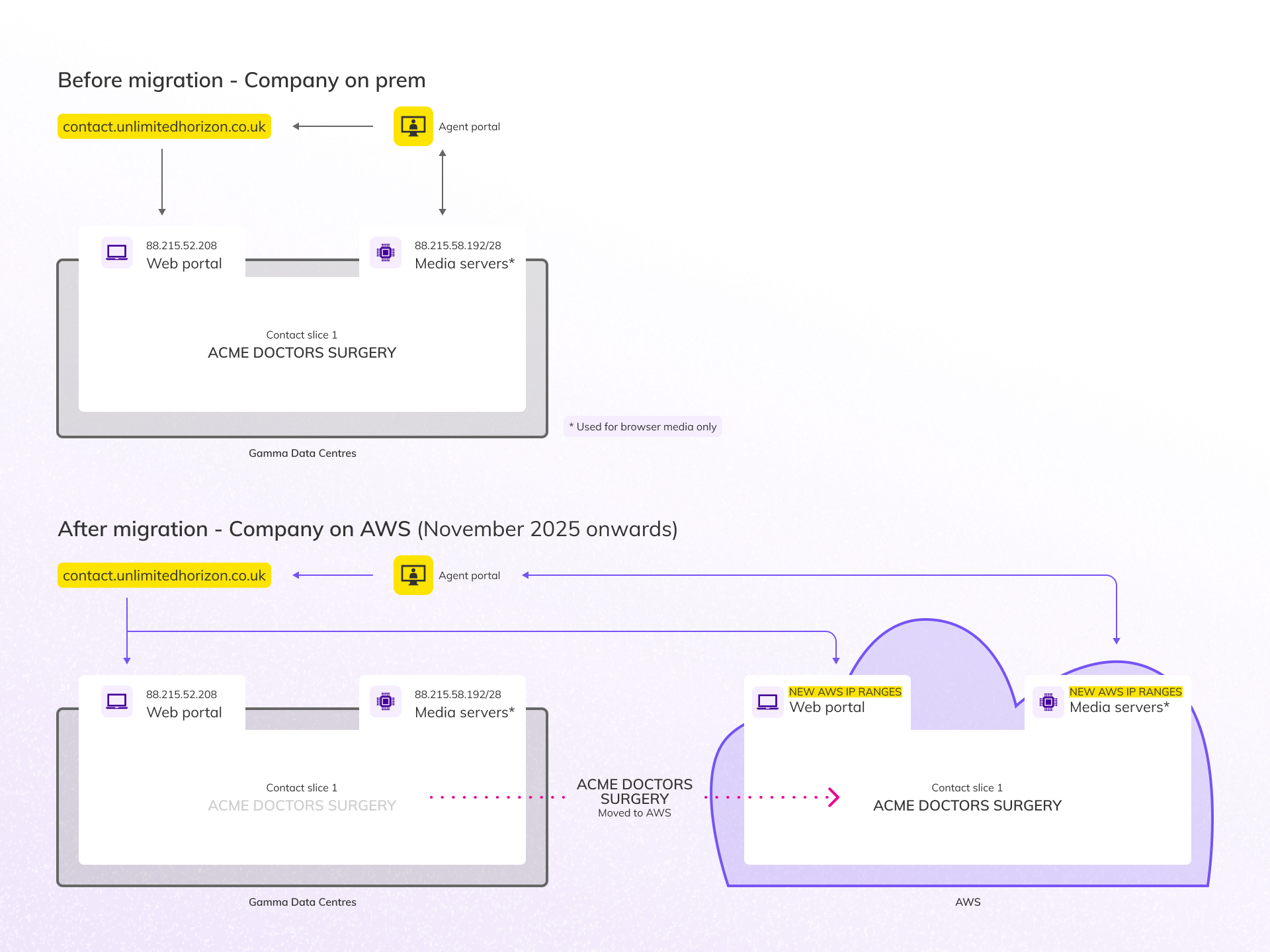
- The cloud platform uses separate IP ranges to the existing platform.
- Firewall updates are mandatory for any customers who restrict Contact connectivity.
- A new version of the Network Configuration Guide is available here.
What’s staying the same #
We’re doing a lot of work behind the scenes to make this transition as seamless as possible. Here’s what won’t change:
- SSO Access: Partners signing into Horizon Contact via the Gamma Portal will still be able to click through as usual. The portal will direct logins to the correct URL automatically.
- User onboarding: New customers will continue to receive user account creation emails. If they’re on the new URL, the links will simply point to the new platform; no extra steps are needed.
- Customer experience: There are no frontend changes to Horizon Contact. Aside from the URL, the platform will look and behave the same for both new and existing customers.
- URL continuity for existing customers: When migrated, customers will still be able to use their current URL to access the platform.
What you need to do #
To ensure a smooth experience for customers on the new platform, please take the following actions:
- Care Connect (Optum/EMIS and SystmOne) and ConConnect setup:
- Make sure you’re using the new version of Care Connect/ConConnect which supports both URLs.
- The new apps will be available from August 18th.
- Make sure you’re using the new version of Care Connect/ConConnect which supports both URLs.
- Navigating between companies:
- When switching between companies in Horizon Contact, you’ll now only see companies that are on the same URL. This is a change from the previous experience where all companies were visible.
- New URL awareness:
- Companies signing up from September – and partners accessing it via SSO – will see a different URL in their browser. Please ensure your teams and customers are aware of this.
- Update your user guides:
- If you’ve created your own documentation or guides for Horizon Contact, please update it to reflect:
- New URLs.
- Integration steps.
- Network configuration requirements.
- If you’ve created your own documentation or guides for Horizon Contact, please update it to reflect:
- Update network configuration:
- Customers on the new URL will need to follow a different set of firewall rules. This applies to any customers who manage their own network configuration.
- Firewall updates are mandatory: calls will not work without them.
- The new version of the Network Configuration Guide is available here.
- Customers on the new URL will need to follow a different set of firewall rules. This applies to any customers who manage their own network configuration.
- Update spam filters:
- System emails, such as reports or password reset emails, will come from noreply@horizon.contact.gammagroup.co. Please ensure your spam filters are updated to ensure you can receive emails correctly.
Where to find more information #
All setup instructions, updated integration files, and guidance for supporting customers on the new platform are available on the Academy Knowledge Base.
Migration of existing customers and the changes to expect #
Migration of existing customers to the new cloud platform will begin in Q4, in coordination with partners.
- We will be in touch with a further communications closer to the time to support planning and preparation.
- In order to be ready for migration you need to follow the steps outlined in the What you need to do section above.
When being migrated into the cloud there are a few things that will change:
- Customers will be able to log in via the new URL https://horizon.contact.gammagroup.co
- This URL will also be used for Partners signing into Contact via the Gamma Portal
- System emails, such as reports or password reset emails, will come from an updated email address: noreply@horizon.contact.gammagroup.co
- Following the migration, customers may need to update their spam filters with the new email addresses.
- Webchat snippets taken from the cloud based system will include URLs in the new format
| Note: Despite these changes, the existing URL and old format of webchat snippets will continue to work. |
Why the move? #
This migration is a key step in evolving Horizon Contact to better serve our customers.
Moving to AWS enables us to:
- Scale faster as we grow.
- Deliver new features more quickly.
- Lay the foundation for future integrations and flexibility.
We’re managing the transition carefully to ensure a smooth experience.
Frequently asked questions #
- Who is affected by this change?
- Only new customers onboarded from September 2025 will be placed on the new AWS-hosted version of Horizon Contact. Existing customers will remain on the existing platform until their migration is scheduled.
- What’s the difference between the existing and new platforms?
- The new platform is hosted on Amazon Web Services (AWS), offering greater scalability and flexibility. It introduces a new URL and updated integration requirements. There are no functional or UI changes.
- Do I need to change anything for existing customers?
- No. Existing customers will continue using the existing platform and UROL until they are migrated. The guidance only applies to new customers onboarded from September onwards.
- Will the URL change for customers on the new platform?
- Yes. Customers on the new platform will access Horizon Contact via the new URL: https://horizon.contact.gammagroup.co
- How do I know which customers are on which platform?
- Customers onboarded from September 2025 will be on the new platform. You can also identify them by the URL they use to access Horizon Contact.
- Why can’t I see all my companies when switching between them?
- You’ll now only see companies that are on the same URL (platform). This is expected behaviour and part of the new architecture.
- Do I need to update my internal or customer-facing guides?
- Yes. If you’ve created your own documentation for Horizon Contact, please update it to reflect the new URLs, and integration steps.
- Who do I contact if I have questions or need support?
- Please reach out via your Account Manager.