
Skip to content
  • Academy KB Home Redesign
  • Broadband Home
  • CCaaS
  • Channel Partner Support
  • Circle Loop Home
  • Collaborate
  • Connectivity
  • Courses
  • Documentation
  • Ethernet
  • FibreXchange
  • FUSION IoT
  • Gamma AI Concierge
  • Gamma Plus
  • Gamma SIP for Cloud Connect
  • Gamma SIP Global Communications Enablement
  • Gamma SIP Trunks for Genesys Cloud
  • Hannah – Homepage WIP
  • Home
  • Horizon
  • Horizon Contact
  • Horizon Forms
  • Horizon Service Description Home
  • Horizon with Webex
  • Inbound
  • iPECS
  • Knowledge Base Intro
  • Knowledgebase Directory
  • LoginPress
  • Microsoft
  • Microsoft Teams Direct Routing Home
  • Microsoft Teams Operator Connect
  • Mobile
  • Multiple KB
  • My Courses
  • No Access
  • No active page
  • Numbering and Porting
  • Phoneline+
  • Product Homepage
  • Quick Download Button
  • Release Notes
  • Release Notes
  • SIP Home
  • Test
  • UCaaS
  • User Account
  • Voice
  • Voice Enablement
  • Webex for Gamma
  • Webex for Gamma Release Notes
  • Gamma Academy Knowledge Base
Gamma Academy Knowledge Base
  • Cloud Calling and Collaboration
    • Webex for Gamma
    • Horizon with Webex
    • Horizon
    • Phoneline+
    • Operator Connect
    • Direct Routing
    • Inbound
    • Akixi CX Analytics
    • Red Cactus
  • Connectivity and Networking
    • Numbering and Porting
    • Broadband
    • FibreXchange
    • Ethernet
    • SIP Trunking
    • Gamma FUSION IoT
  • CX
    • Horizon Contact
    • AI Concierge
  • Mobile Services
    • Gamma Mobile
  • CyberSecurity
    • SafeWeb
  • Partner & Portal Support
Gamma Academy Knowledge Base

Provisioning and In-Life Changes

  • Managing PhoneLine+ Companies in the Gamma Portal
  • PhoneLine+ Ordering Guide
  • PhoneLine+ Package Selection

Device Help

  • PhoneLine+ RMA Check List
  • Handset Returns
  • Resolving issues with first line checks
  • Device Guides
    • YeaLink T34W User Guide
    • YeaLink T31W User Guide
    • Polycom VVX150 Full User Guide
    • Polycom VVX250 Full User Guide
    • Cisco ATA 192 User Guide

Knowledge Bases

  • Customer Knowledge Base

Service Description

  • PhoneLine+ Service Description

Support

  • PhoneLine+ Network Configuration Guidelines
  • Fraud Management: PhoneLine+

Phoneline+ SLAs

  • PhoneLine+ 2025 SLAs
  • Phoneline+ 2024 SLAs
  • Phoneline+ 2023 SLAs

T&Cs

  • Terms and Conditions
  • Home
  • Home
  • PhoneLine +
  • Support
  • PhoneLine+ Network Configuration Guidelines
View Categories

PhoneLine+ Network Configuration Guidelines

Introduction #

The purpose of this document is to offer guidelines to Channel Partners and End Users on how the LAN & WAN environment should be configured to be able to run the PhoneLine+ service successfully at a customer site.

If a channel partner and/or end user wishes to utilise another, non-Gamma access solution, they need to ensure that the solution can meet the requirements and functionality set out in this document. Failure to meet these requirements will result in quality and setup/support issues.

SIP Registration #
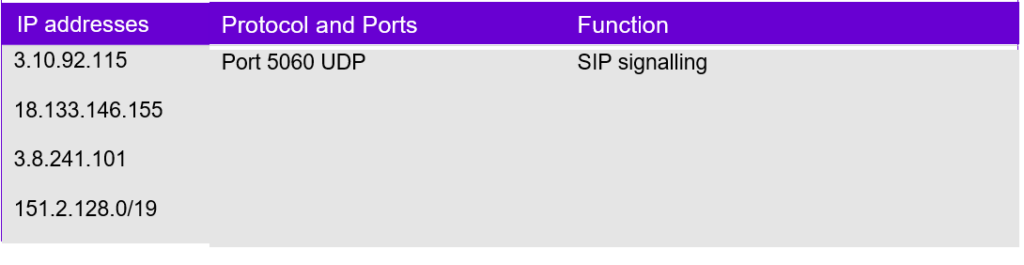
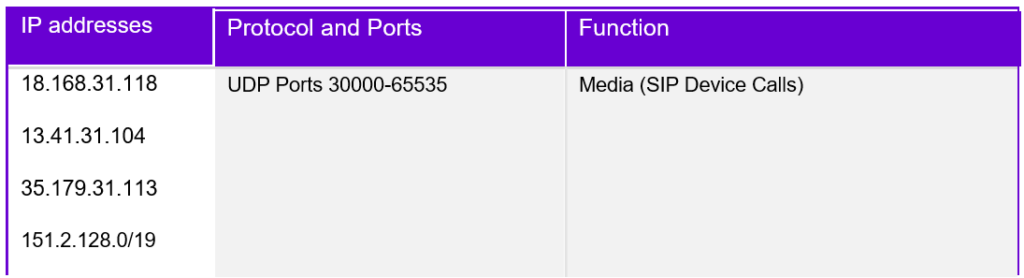
Media (SIP Device Calls) #
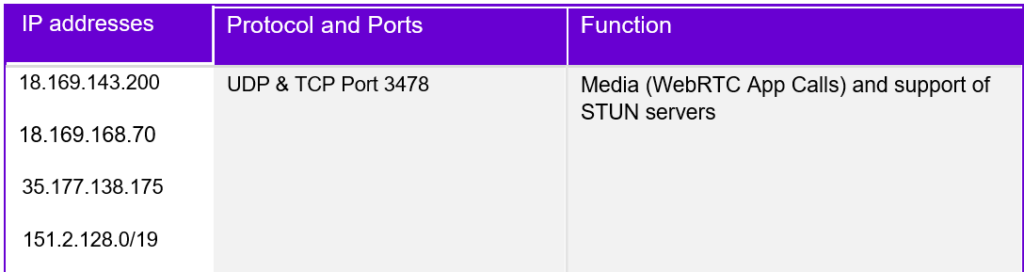
WebRTC Media & STUN Support #
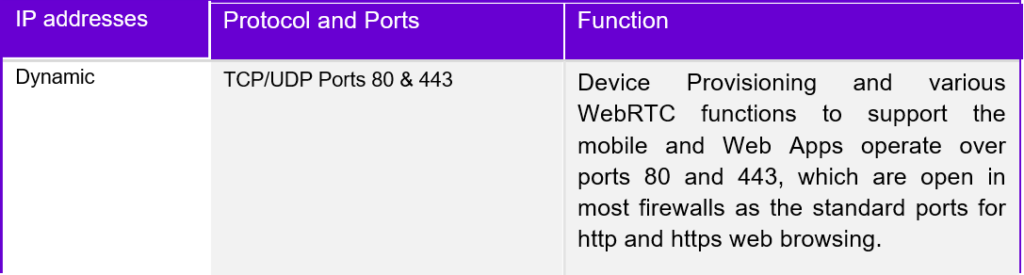
Device Provisioning and WebRTC Support #
SIP ALG #

SIP Application Layer Gateway (ALG) is common in many of today’s routers and in most cases enabled by default on enterprise, business and home broadband routers. Its primary use is to prevent problems associated to the router’s firewalls by inspecting VOIP traffic packets, and if necessary, modifying them to allow connection to the required protocols or ports.

On many business and home class routers Active SIP ALG will cause a mixture of problems by adjusting or terminating PhoneLine+ traffic packets in such a manner that they are corrupted and cause issues with the service, manifesting in a range of intermittent issues such as; one-way audio, dropped calls, problems transferring calls, handset dropping registration and making or receiving internal calls.

SIP ALGs should be disabled on all CPE routers, we will not accept any faults or issues raised against PhoneLine+ if a SIP ALG is enabled.

For instructions on disabling this feature please refer to the specific router user guide.

UDP NAT Timeouts #

Set UDP NAT Timeout > 300 seconds.

It is recommended that UDP NAT Timeout on the router is set higher than the SIP registration refresh interval for PhoneLine+ phones. That is higher than 300 seconds.

image_pdf
Updated on 04/01/2024
Fraud Management: PhoneLine+Fraud Management: PhoneLine+
Contents
  • Introduction
  • SIP Registration
  • Media (SIP Device Calls)
  • WebRTC Media & STUN Support
  • Device Provisioning and WebRTC Support
  • SIP ALG
  • UDP NAT Timeouts

Copyright © 2026 -  Gamma Telecom Ltd

Gamma API
We use cookies to measure performance and make improvements to this service. This includes page views, device/browser, location, and page interactions. We do not collect any information you upload to this site. By agreeing, you consent for your data to be used for this purpose.