
1. Feature Description #
The Fraud Management System (FMS) feature allows PhoneLine+ channel partners to monitor and automatically bar PhoneLine+ Customers based on a user defined monetary threshold, per Customer.
In buying PhoneLine+, the end user is removing the need to have a PBX on-site. In doing so, they access Gamma’s systems via secure portals, store their data behind Gamma’s firewalls, and receiving regular updates – all benefits of the economies of scales that Gamma enjoys compared to a site-based phone system.
However, avenues still exist that may allow a phone system to be hacked or abused, be that from an outside hacker or an employee of the Customer.
In releasing this automatic barring feature, Gamma reinforce their fraud management credentials, allowing their channel partners further peace of mind in the security of the PhoneLine+ product.
The service is available to all Channel Partners selling PhoneLine+, and is accessible only via the Partner management pages on the Gamma Portal, and not on the end-user facing clients and apps.
1.1. Functionality overview #
Once logged into the Gamma portal, the partner can configure the FMS functionality on a per Customer level.
The system monitors the spend per Customer by aggregating CDRs which have been matched and rated by our Billing system, and allocating them to timeslots. The cumulative total from the notional start time (i.e when the FMS was started) will be monitored.
When the total reaches the warning threshold (typically configured at 70% of maximum spend), the system will generate a warning email and SMS (where configured).
The partner can then choose to take some form of action, investigating with the end-user or raising the spend limit etc. If no alternative action is taken, the system will continue to monitor the spend until it breaches either the 24hr tracking threshold, at which point a ‘Restrict Service’ operation will be triggered automatically and no further outbound calls will be possible.
The system will automatically generate a further email and SMS (where configured) detailing the fact that this Customer has breached its limit. The email will also detail the current spend before call barring became effective along with a summary of the most recent call records.
Once the Customer has breached its limit and call barring has been applied, it will remain in this state until the call barring is removed by the partner.
Note 1: Calls to the Emergency Services will be unaffected.
Note 2: The operational requirements including scheduled polling, mediation and activation logic mean that the call barring can take up to an hour to take effect. The final spend may therefore over- run the configured spend limit; a fact that should be ‘factored in’ when setting individual spend limits.
Note 3: The CDR aggregation is reset after a barring event is triggered. Any CDRs landing after the call barring has been applied will be counted towards the new aggregation, despite potentially being made prior to the barring event.
Note 4: All calls originating from the endpoint will be included in the aggregated spend. It is expected that the total value of the calls will be higher than this email suggests because further calls are likely to be processing at the point the barring is triggered.
1.2. Aggregation method #
As and when Gamma’s alerting system becomes aware of calls being made it aggregates the value of the calls from each PhoneLine+ endpoint into hourly chunks.
After a call is completed and loaded into the system, it asks itself the following questions;
- Does the total value of the last 24 chunks (including the current one) now exceed the warning threshold? In which case an email (and SMS if configured) is sent.
Or
- Does that value now exceed the threshold for barring? In which case the endpoint is barred and a notification sent by email and SMS.
It takes time for the system to become aware of calls being made. For this reason the final cost of the traffic may be in excess of the barring threshold.
At the point barring is removed, the value of the previous 24 hourly chunks is re-set to zero.
This is perhaps easier to explain using a scenario. The following is explained in conjunction with the diagram on the following page.
Consider a new Horizon Customer that has been setup, and has quickly started making lots of expensive calls. The Customer is setup with fraud management enabled at time zero, with an automatic barring threshold of £500, and an alert threshold of 70% of this. Aggregation begins straight away.
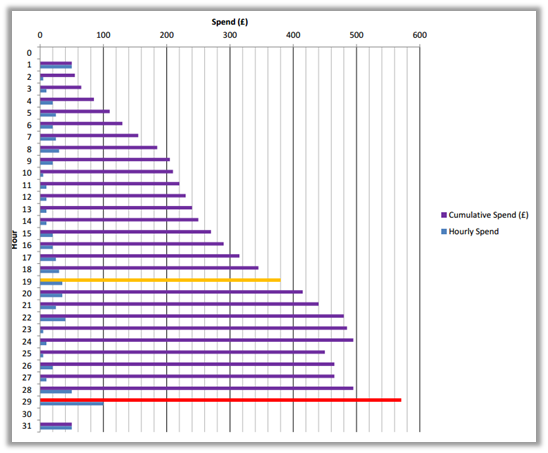
After 19 hours the user, who has been making calls consistently over the period, triggers an alert to the Channel Partner. This warns the Channel Partner of the usage, and that if they do not act, the end user’s Customer may get barred.
The Channel Partner does not edit the barring thresholds and, because the user has continued to make calls, 29 hours since the Customer was setup it gets barred. Even though in 29 hours the Customer has spent £680, because the aggregation considers only the last 24 hours (i.e. hours 6 – 29 inclusive) the Customer is barred having spent £570.
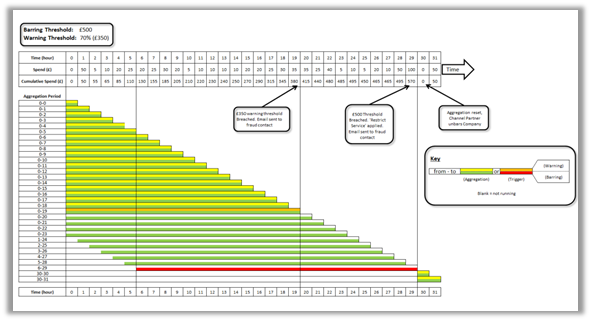
Spend per Hour against PhoneLine+ Customer, with highlighted ‘alert’ and ‘barring’ periods
1.3 Functional schematic #

2. Status information #
The current status of the Customer is displayed within the Manage Customer Section of the Gamma Portal.
3. Terms and Conditions #
- Gamma will only waive charges for calls that breach the configured threshold (see note 2) where they can be shown to be fraudulent.
- We reserve the right to withhold crediting in instances of multiple fraud management barring events on the same Horizon Customer.
- The use of the FMS feature is subject to the above terms and conditions and to the general provisions of the Channel Partner’s supply agreement (Telecommunications Services Agreement or Switchless Resale Agreement). In the event of a conflict with the supply agreement the above terms and conditions shall apply.
4. Partner notifications of limits breach #
If the Customer exceeds the 24 hour limit, it, and all associated users will be automatically barred from making any outbound calls, (with the exception of emergency service calls). An email will then be sent containing the following details and will be delivered to the address configured in the original warning and barring alerts:
- Action: All Calls Barred
- Threshold Breach Period
- Endpoint Identification
- Total Call Duration
- Total Call Cost
- Total Number of Calls
The email will contain an attachment with the relevant CDRs for the period covered. This detail can be used to assist in the determination of whether fraudulent calls have been made.
Along with the core details, we also look to provide some information to be used by the Channel Partner when diagnosing the traffic and action requiring having received the email, as follows:
“Please see attached for individual call details. The attachment only contains up to 100 records, but you can visit the Gamma Portal ‘Reporting > Traffic > Traffic Check’ for more details.
— Is The Usage Legitimate?
No — You can edit the automatic barring settings and the service restrictions on your PhoneLine+ Customer on the Gamma Portal under ‘Provisioning and Service Management > Voice Connectivity > Hosted > PhoneLine+, selecting the ‘Permissions for outbound calling’ option within the respective Customer, and then selecting the barring options required.
Yes – When the traffic from this Customer reaches the barring threshold they will be barred.
4.1 End user notification #
It is the partner’s responsibility to inform the end user as to the reasons behind their Customer being suspended.
5. Resetting after a breach #
In order to re-enable service on a suspended Customer, the partner must edit the ‘Automatic Barring’ option on the Manage Customer screens. The Partner may also choose to alter the thresholds at this point.
