
Technical Support #
The Gamma Ethernet service desk provides 24hr support from Monday – Sunday, including bank holidays.
Calls into the service desk are supported during these times.
Emails and fault tickets are monitored 8am-6pm Monday – Friday and 8am-4:40pm on Saturdays. We do not monitor emails and tickets out of hours. If customers experience a fault out of hours or there is an update provided on to a fault ticket, we encourage you to call into the service desk.
The Gamma managed Ethernet circuits include the Highlight service. This allows Channel Partners to monitor the Ethernet circuits and add appointed contacts who would be alerted if a circuit becomes unavailable / unreachable (only). It is the Channel Partner’s responsibility to add contacts to the Highlight service for notifications and alerting.
SNMP access to Gamma routers (read-only or otherwise) is not provided to the partner or the customer.
Fault Types #
Hard down
- Total loss of service in one or both directions (upload or download)
- Priority 1 fault which is defined in the Service Level Agreement (SLA)
- Please contact your account manager for more information on Ethernet Terms and Conditions which include the SLA or alternatively, this can be found in your Service Description Guide
Intermittent Connection
- Connection is dropping out intermittently
- Priority 2 or 3 fault, dependent on severity of impact to the end user
Slow Speeds
- Expected bandwidth speeds are not being achieved
- Can have several root causes
- Priority 2 or 3 fault, dependent on severity of impact to the end user
Packet Loss and High Latency
- Varied symptoms, most commonly experienced as slow speeds
- Can have several root causes
- Priority 2 or 3 fault, dependent on severity of impact to the end user
Hard Down #
A hard down fault is when an ethernet circuit loses connection in one or both directions. We run diagnostics available to us and work hard with our suppliers to ensure service is restored as quickly as possible.
Managed ethernet circuits are monitored 24hrs a day via Highlight and an alert will be sent if a service loses connection via email. It is the responsibility of the Channel Partner to set-up the email recipients to receive alerting from Highlight
We require several pieces of information to raise a ticket such as the service reference, customer details etc. Once the ticket is raised, the SLA clock starts. Detailed below are the first line checks we recommend being carried out before contacting the Gamma service desk.
Fibre (EAD) First Line Checks #
- When a circuit is hard down, we are likely to ask for
- Images of the ADVA and router, clearly showing the lights and connections between them.
- Below are examples of good images of an Openreach NTE (top) and a Virgin NTE (bottom)
-
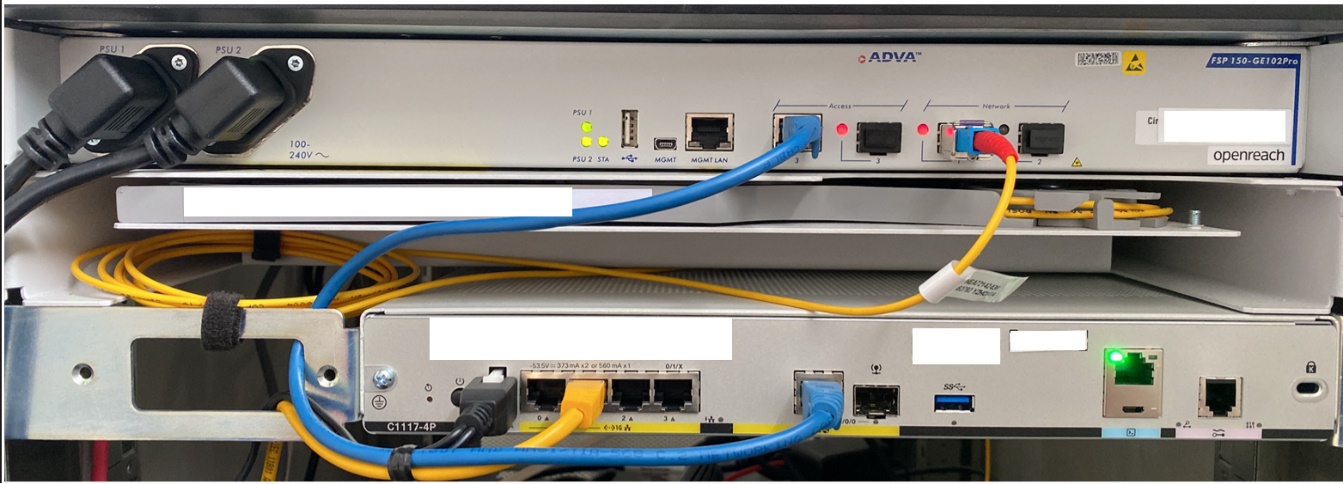
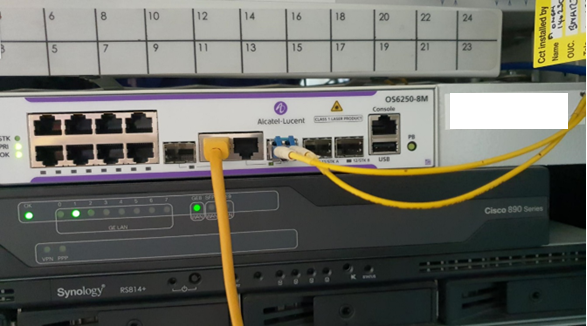
- Images like this enable us to identify potential setup issues more easily and where the fault is most likely to lie.
- If the circuit is provided on a 100Mb bearer, we may ask you to perform a laptop test. A laptop test is performed by connecting a laptop (or any other network device apart from a switch) directly into the ADVA. It does not need to be configured, only powered on. We can then check for a MAC address to narrow the fault down further.
- We may ask you to replace and/or reseat the cables between the ADVA and the router
- We may also recommend that you reboot the router
Hard Down Checklist
- Does the router and ADVA have power?
- Has the router been rebooted?
- Has the cabling between the ADVA and router been replaced?
- Have you taken images of the ADVA and router, clearly showing lights and connections?
- Do you have site access times and a site contact name & number? This is required to raise a fault to the supplier
Ethernet First Mile (EFM) First Line Checks #
- When a circuit is hard down, we are likely to ask for
- Images of the NTE and router, clearly showing the lights and connections between them. Below are examples of two different NTEs
-
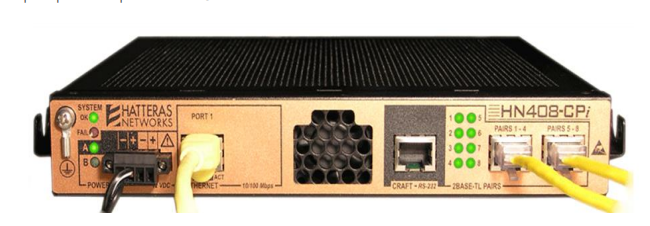
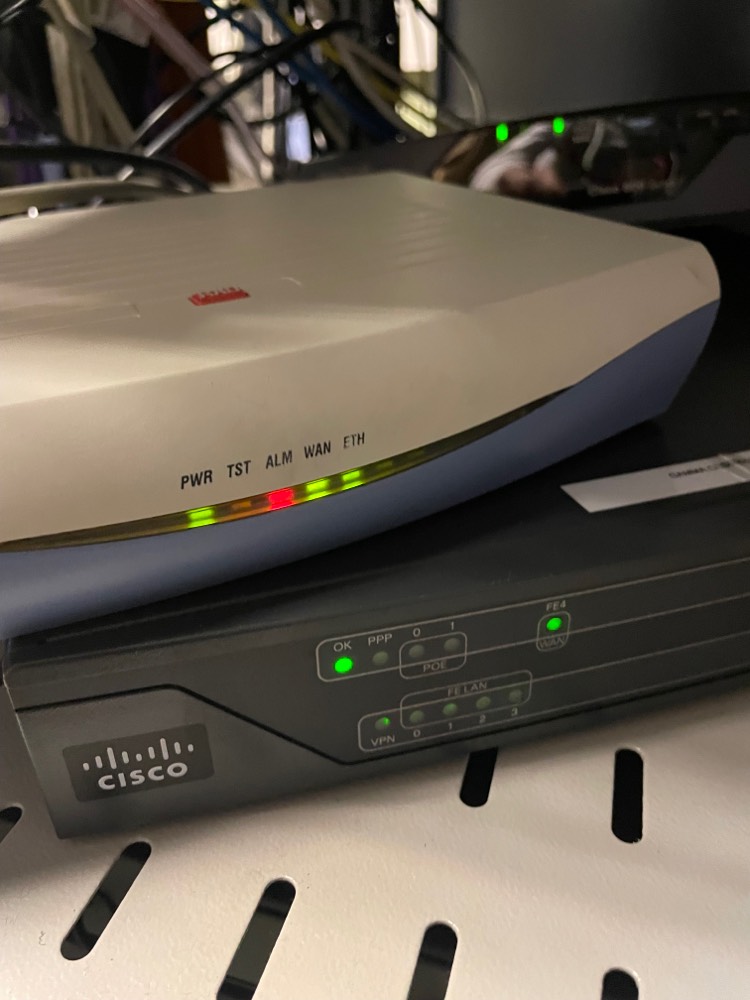
- Images like this enable us to identify potential issues more easily and where the fault is most likely to lie.
- If the circuit is provided on a 100Mb bearer, we may ask you to perform a laptop test. A laptop test is performed by connecting a laptop (or any other network device apart from a switch) directly into the ADVA. It does not need to be configured, only powered on. We can then check for a MAC address so we can narrow the fault down further.
- We may ask you to replace and/or reseat the cables between the ADVA and the router.
- We may also recommend that you reboot the router
- We may (at the advice of the supplier) ask for specific Y-cables to be removed from the wall socket for testing purposes
Hard Down Checklist
- Does the router and NTE have power?
- Has the router been rebooted?
- Has the cabling between the ADVA and router been replaced?
- Have you taken images of the ADVA and router, clearly showing lights and connections?
- Do you have site access times and a site contact name & number? This is required to raise a fault to the supplier
Intermittent Connection #
Intermittent connection faults can be caused by a variety of factors. Most commonly it is caused by loose or damaged cabling.
If the router has not been recently rebooted, Gamma is able to check the router logs for any port toggling if you can avoid rebooting,
Intermittent Connection Checklist
- Does the router and NTE have continuous power?
- Check LAN and WAN cables for damage, replacing any which require it
- Do you have site access times and a site contact name and number? This is required to raise a fault to the supplier
Slow Speeds #
Slow speeds can be caused by a wide range of factors including duplex, line faults and LAN issues amongst others.
Speed Test Method
Gamma request an Ookla speed as we deem this the most accurate. The test must be conducted directly from the Gamma router or customer router if wires-only, with the LAN disconnected.
- Connect a laptop directly into the managed router and assign it one of the usable IPs
- Download the Ookla app from speedtest.net. This is much preferable to using the web-based speedtest.net as it provides more accurate results. We will not accept web-based speed tests.
- Please upload a screenshot of the speed test results to the ticket
- Check router duplex settings – is it auto-negotiating? What speed is it negotiating?
Packet Loss and Latency #
- The SLA for latency is <20ms between the router and Gamma PE
- There are many variables which can cause packet loss, ranging from overutilisation, faulty equipment, MTU size etc
Packet Loss and Latency Check List
- Change cables
- Check SFP and fibre cable are properly seated
- Is the packet loss/latency to a particular site or sites? Provide traceroutes and ping
Ping
- Ping and traceroutes are both run from Command prompt.
- Type “cmd” into the search bar on windows and open command prompt
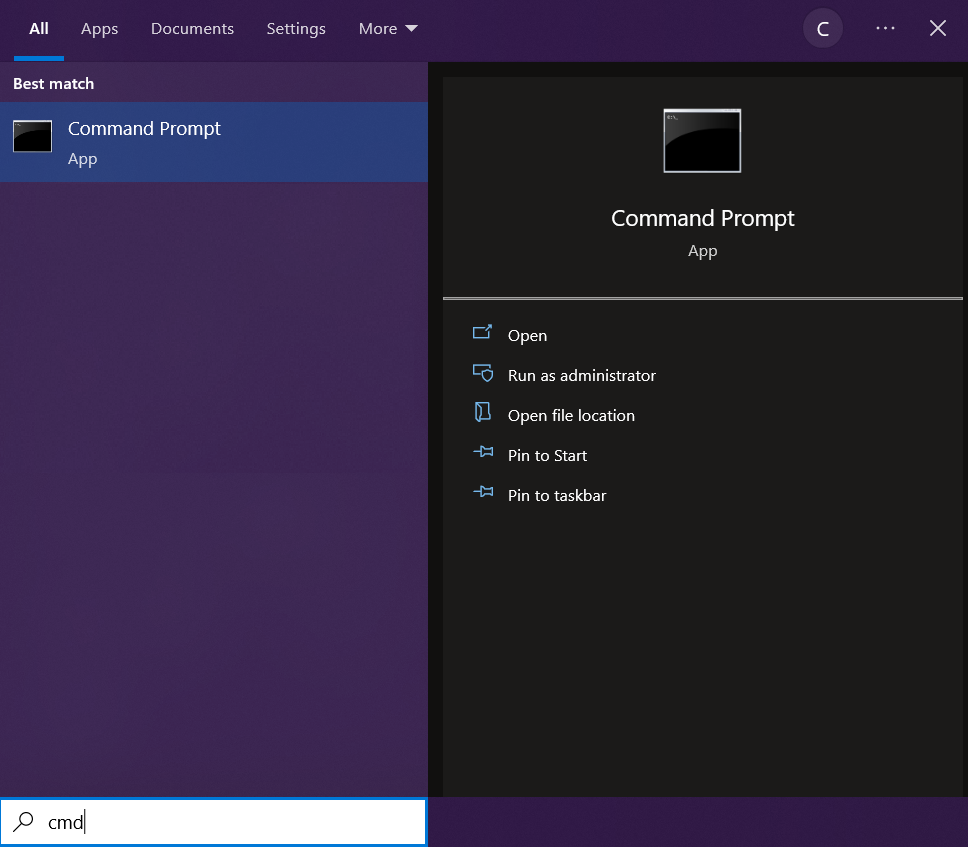
- Once in command prompt, type “ping” and a space, then the address of the site you are trying to
- reach e.g. www.bbc.co.uk
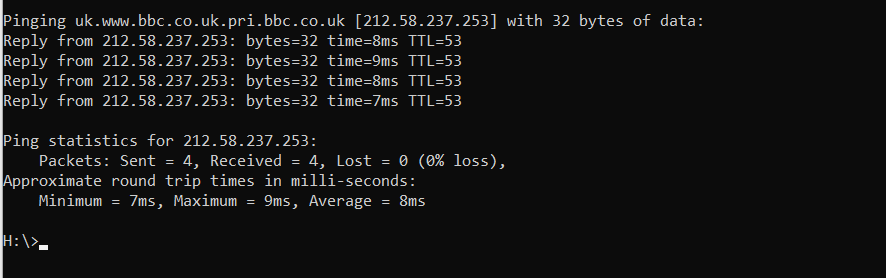
- We can see in the screenshot that we are able to reach the BBC website.
Traceroute
- Ping and traceroutes are both run from Command prompt.
- Type “cmd” into the search bar on windows and open command prompt
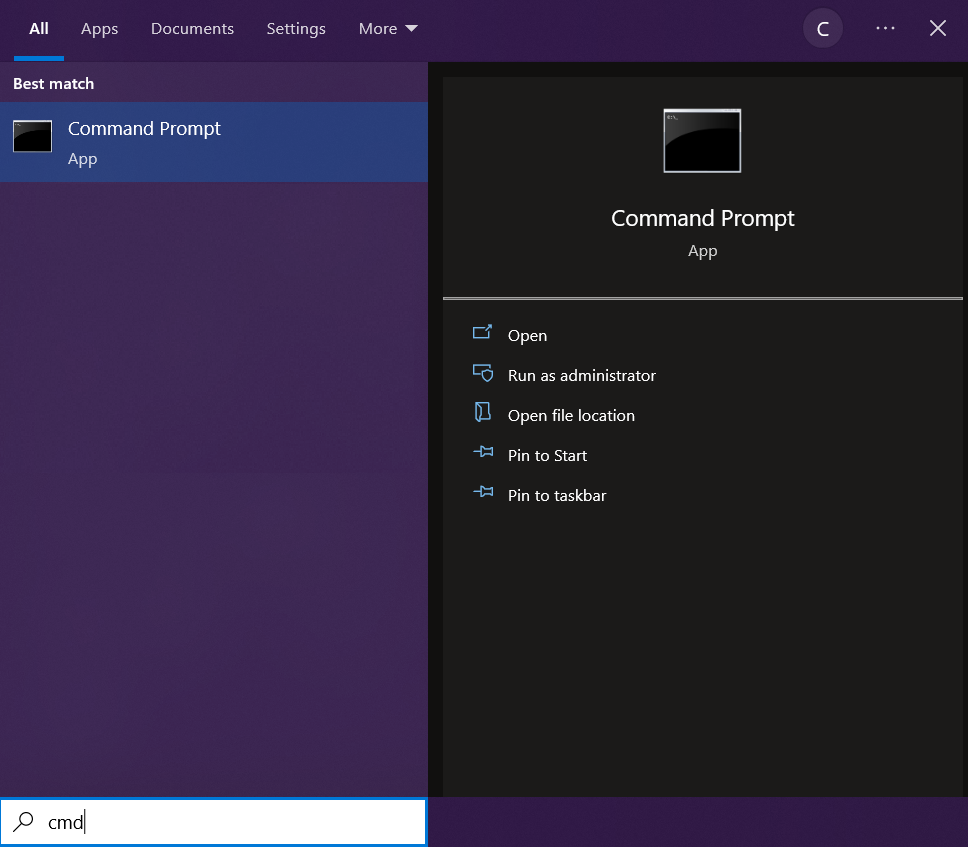
- To run a traceroute, type in “tracert” and a space, then the address of the site you are trying to
- reach e.g. www.bbc.co.uk.
- Each hop is tested three times
- An asterisk indicates the hop has timed out on that router and will attempt a different router on the next line.
-
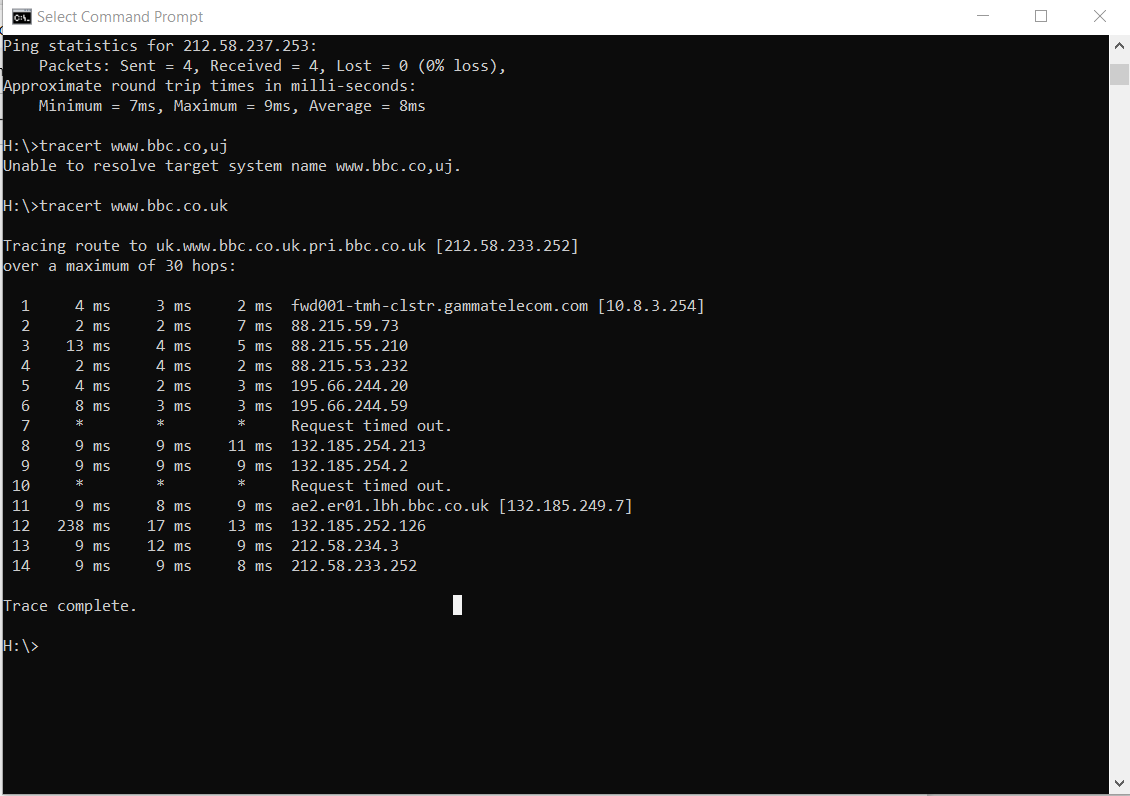
- We can see this trace to the BBC has successfully completed.
- Traceroutes and pings like this can help to identify where the issue lies by seeing where the hops
- fail.
