
A Hard Down fault is when an Ethernet connection goes down and there is no connection, either upstream or downstream (maybe both). We work hard with a number of different parties in the case of a hard down to make sure that your end user is back up and running as quickly as possible.
You can monitor all of the Ethernet circuits you manage using Highlight. Please consult the range of videos available on the Gamma Academy for further information about how to set up and use this service. You can also set up alerts and tailor these to your specific needs.
The clock for the Service Level Agreement only starts from when you’ve answered the questions below, and until then, we’ll classify the circuit as an “alert”.
Questions which you need to answer before we can move on and log the fault are:
- Is there power to the BT NTE?
- What LED’s are lit on the BT NTE?
- Is there power to the Gamma Managed router?
- What LED’s are lit on the Gamma Managed router?
- Is the Gamma Managed router cabled according to the handover documentation?
- Can you provide onsite contact details (name and number) and availability in case this has to go to an Engineer visit?
Use our Fibre (EAD) Hard Down step by step process to help you understand these questions, or use our EFM Hard Down step by step process if you have an EFM circuit.
Fibre (EAD) Hard Down #
If you’re end user is using a Fibre (EAD) circuit, they’ll be using different a different Network Termination Equipment (NTE) than an EFM circuit.

This is what EAD NTE looks like – it is a long white box with a few different sockets for different things. On the left we’ve got two power supply units plugged in. The “Access” ports are where the EU connects their CPE and the “Network” port is where BT’s fibre comes into the building.
This page is going to be split into the same sections that we will e-mail you. It is critical that these questions are answered correctly first time, as we want to get your circuit back up and running.
Is there power to the BT NTE?

Check that both power cables are plugged in correctly, and that the alarm lights for the PSUs are solid green.
What LED’s are lit on the BT NTE?

Network Alarms
LED | Description | Colour | Meaning |
Tx Port A | Network Fibre – port A status | Off | In combination with a Green/Red Rx LED, it may indicate loopback at one end as part of test traffic feature. |
|
| Off | In combination with a Red Ex LED, it may indicate a non-approved SFP module has been inserted. |
|
| Yellow | 10/100 Mbps |
|
| Green | 1000 Mbps |
Rx Port A | Network Fibre – port A status | Off | Link Down. |
|
| Green | Operating OK |
|
| Red | In combination with a Yellow/Green Tx LED indicates a low received optical power level at the SPF, this will be accompanied by a critical alarm LED. |
Active | Network Fibre A | Off | Link Down. |
|
| Green | Active Link |
|
| Yellow | Standby Link (resilient circuits only) |
LED | Description | Colour | Meaning |
Rate | Customer RJ45 Port | Off | 10Mbps |
|
| Yellow | 100Mbps |
|
| Green | 1000Mbps (although not actually available on RJ25) |
Lk | Customer RJ45 Port | Off | Nothing connected or CPE not seen. |
|
| Green | Active link |
|
| FlashesGreen | Active link passing data |
Tx | Customer optical port | Green | Acceptable SFP fitted |
RX | Customer optical port | Green | Active link |
|
| FlashesGreen | Active link passing data |
|
| Red | Link fail |
General Alarms
LED | Description | Colour | Meaning |
PSU 1 | PSU 1 alarm indicator | Off | No Power |
|
| Green | PSU OK |
|
| Red | PSU Fail |
PSU 2 | PSU 2 alarm indicator | Off | No Power |
|
| Green | PSU OK |
|
| Red | PSU Fail |
Fan | Status of Fan | Green | Fan OK |
|
| Red | Fan Fail |
Critical | Critical alarm indicator | Off | No critical alarms exist |
|
| Red | Critical alarms exist |
Major | Major Alarm Indicator | Off | No major alarms |
|
| Yellow | Major alarms exist |
Minor | Minor Alarm Indicator | Off | No minor alarms |
|
| Yellow | Minor alarms exist |
Is there power to the Gamma Managed router?
This image is a representational image. Your setup may look different to this, and the router may look slightly different. This is intended as a guide on what you’re looking for.
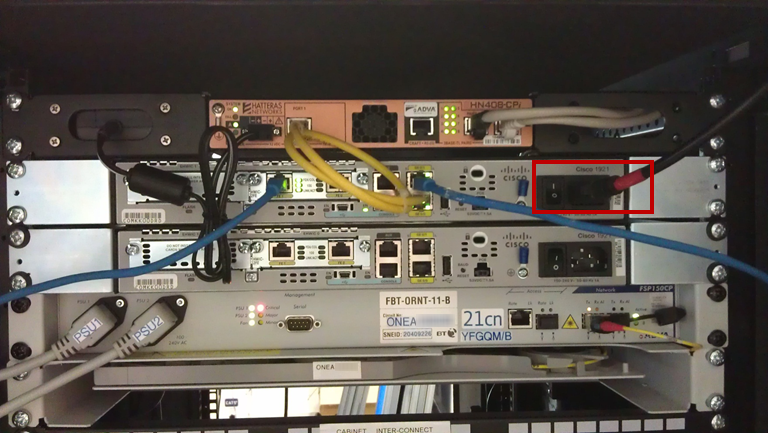
On this example, you can see that the power cable is plugged into the router, it is switched on and that there are lights on the router, indicating that there is power.
On the router below the one with power, you can see that there is no power cable there. If there is power going to the unit, the “Status” light will be lit green.
What LED’s are lit on the Gamma Managed router?
This image is a representational image. Your setup may look different to this, and the router may look slightly different. This is intended as a guide on what you’re looking for.
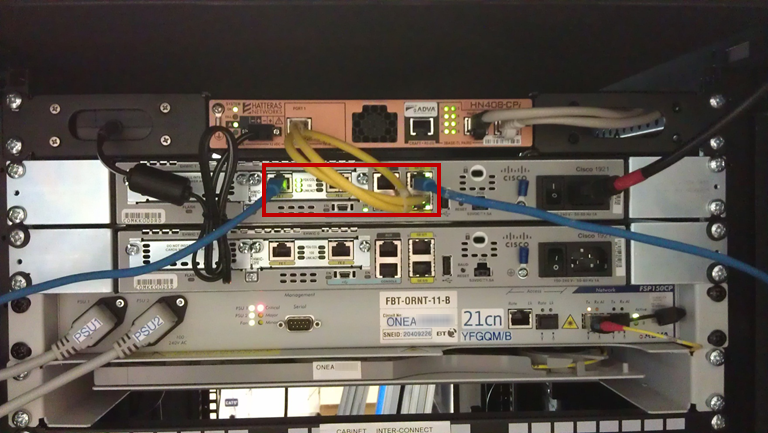
We also need to know if there are lights that represent GE 0/0 and GE 0/1.
Is the Gamma Managed router cabled according to the handover documentation?
When the service had been installed, you’ll have been given a handover document. Within this document, it’ll tell you what your specific router cable setup would be. You should check this document and the router to ensure that the cables are in the places that the document says they should be.
Can you provide onsite contact details (name and number) and availability in case this has to go to an Engineer visit?
We need this information so that if an engineer is sent out, the engineer knows who to contact and ask for when arriving on site. We’ll also need to availability of the on-site contact and when they’ll be on site, so that we can arrange for the engineer to turn up on site when the nominated contact is there.
What is the ONEA number on the NTE?
This image is a representational image. Your setup may look different to this, and the NTE may not actually be placed here.

Just so that we can make sure that the NTE is correct, could you also let us know what the ONEA reference is on the NTE.
EFM Hard Down #
If you’re end user is using an EFM circuit, they’ll be using Network Termination Equipment (NTE) than a Fibre circuit. You should have cables going into the Power unit, the Ethernet port and the pairs ports. The port that has “Craft” underneath it is disabled.
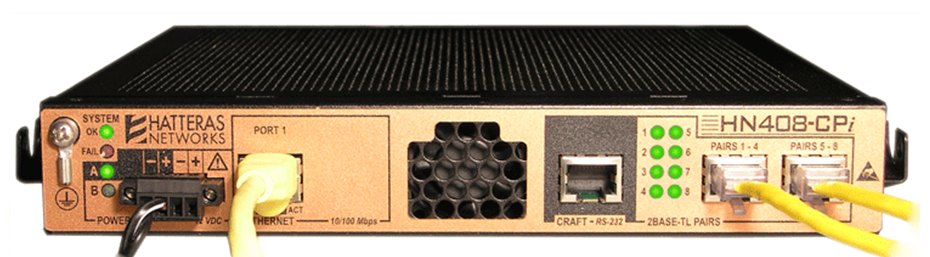
This is what an EFM NTE looks like – it is smaller than a Fibre NTE, with a copper plated back.
This page is going to be split into the same sections that we will e-mail you. It is critical that these questions are answered correctly first time, as we want to get your circuit back up and running.
Is there power to the BT NTE?
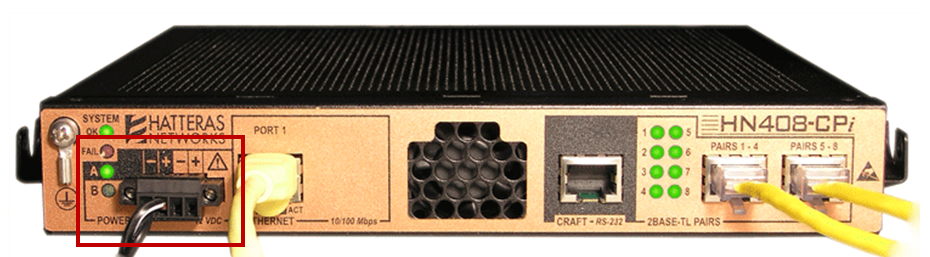
You should check that there power connection hasn’t come lose, and that there is a green light next to A . This will always be A as B is not used.
What LED’s are lit on the BT NTE?
LED | Description |
System Status OK | This light up be lit up and solid green. |
System Status Fail | If this light is on, you need to inform us. |
Power A | This light will inform you if there is power going into the NTE and should be solid green. |
Power B | This power supply is not used, so this light will always be off. |
Copper Pair status LEDs | The service could require any number from one to eight pairs. The number of LEDs lit should be the same number of pairs you got on the service. The LEDs will flash green to show that data is passing through the pair. |
Link | This LED lets us know that the router is connected into the NTE. This light should be solid green. |
Is there power to the Gamma Managed router?

On this example, you can see that the power cable is plugged into the router, it is switched on and that there are lights on the router, indicating that there is power.
On the router below the one with power, you can see that there is no power cable there. If there is power going to the unit, the “Status” light will be lit green.
What LED’s are lit on the Gamma Managed router?
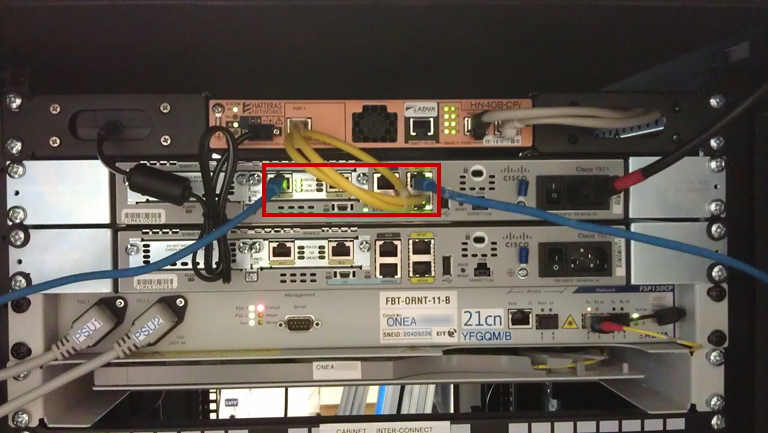
We also need to know if there are lights that represent Geo/0 and Geo/1.
Is the Gamma Managed router cabled according to the handover documentation?
When the service had been installed, you’ll have been given a handover document. Within this document, it’ll tell you what your specific router cable setup would be. You should check this document and the router to ensure that the cables are in the places that the document says they should be.
Can you provide onsite contact details (name and number) and availability in case this has to go to an Engineer visit?
We need this information so that if an engineer is sent out, the engineer knows who to contact and ask for when arriving on site. We’ll also need to availability of the on-site contact and when they’ll be on site, so that we can arrange for the engineer to turn up on site when the nominated contact is there.