
We realise circumstances may change and you may wish to modify your service to accommodate new customer requirements, for example an increase in the bandwidth.
This page will take you through a few key starting points to help process with an In-life Change
What you need to think about #
Changes on in-life services do require extra consideration and care, not least because we want to work with you to minimise any disruption to your customer use of the service.
As such, you should consider the following.
Is what is being asked for part of the Converged Ethernet Service Design?
Could the change be service impacting and are there any restrictions the customer would place on you as a consequence of this?
The time to agree and implement the changes with you.
Is your customer clear on what they want? If they change their mind once a change has been made, further changes are charged separately.
Is what the customer asking for part of the Service Definiition?
It is important to note that changing your service will require a one off cost and may also increase your monthly service rental.
How do I find out the cost? #
The total cost of the change does depend on the type of change you are trying to make.
To see our fixes prices, please see our price list.
Any changes which are to be managed out of hours are agreed based on complexity and time / day requested.
Fibre & FTTC: Change of bandwidth and moves from Wires-only to Managed CPE
You can use the Pricing Tool to determine the associated costs of this particular change. You can also use the pricing tool to see how different bandwidth options will affect your monthly service rental. To see how to use the Pricing Tool for this, please click here.
All other changes are priced and confirmed on application.
To request a change or discuss how a change could be implemented, your first port of call is the Solutions Order Administration team – ethernetorders@gamma.co.uk
How do I request a change? #
All changes are managed manually via our Solutions Order Administration Team and should be contacted in the first instance.
They can be contacted by emailing ethernetorders@gamma.co.uk or calling 0161 871 8711 option 1.
If you have used the pricing tool to specify the nature of your change, please reference the associated “REA” ID as part of your discussion with us.
This team will be responsible for capturing your requirements, bringing in other technical resources if required and formulating a Change Form which will form the basis of the change we will implement for you.
You will need to sign and return this form which confirms the change you wish to apply and any other associated information we both need to consider.
The lead times for standard changes begins once we have received a signed change form from you.
Change Type | Allowed | Lead time | Notes |
Bandwidth upgrade | Once a month | 5 working days |
Assumes spare capacity on existing bearer. Bearer upgrades are subject to standard new install lead times.
|
Bandwidth downgrade | Once a year | 5 working days | Where an additional change over above the allowed limit is required, then we will continue to bill at the previous bandwidth limit until the end of the annual billing cycle.Prices for Fibre and FTTC Services can be obtained from the Pricing Tool |
SIP/IA bandwidth split | Once a month | 5 working days |
Assumes spare capacity on existing bearer. Bearer upgrades are subject to standard new install lead times.
|
DHCP Pool | Once a year | 5 working days | Where an additional change over above the allowed limit is required, a one-off charge will be raised. Applies to Horizon configured services only |
New routed subnet | Once a year | 5 working days | Where an additional change over above the allowed limit is required, a one-off charge will be raised. |
How do I cancel an in-flight Order? #
To cancel any Ethernet order you have in-flight with Gamma, you can log into the Gamma portal and process your cancellation from there. To do this, navigate to your order in the portal by going to; Ethernet Order and Service Management >> Find your circuit using the search functionality >> select ‘Request Cancel’ from the actions drop down box.
Once in this menu, you will be able to select a list of cancellations from a drop-down list, please select the one that is relevant to you.
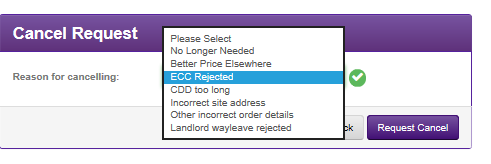
Once you have done this, select the request cancel button. You will then see a pop-up box appear, this box will show you what the cost will be for cancelling your Ethernet order and it will ask you if you want to proceed. If you are happy with the cost, select the ‘Yes’ button and your cancellation will be processed.
Please note: For more information around how we calculate our cancellation charges please see our “Converged Ethernet Service Description” on the Gamma Academy.
How do I cease an active circuit? #
The process for ceasing an active circuit is very similar to the process for cancelling an in-flight order, you have the ability to do this in the Gamma portal. To do this, navigate to your order in the portal by going to; Ethernet Order and Service Management >> Find your circuit using the search functionality >> select ‘Request Cease’ from the actions drop down box.
Once in this menu you will be able to select a requested cease date and a reason for ceasing. Please be aware when selecting a date to cease your service, you will only be able to select a date which is more than 60 days away, this is due to the SLA that in place around ceasing an active service.
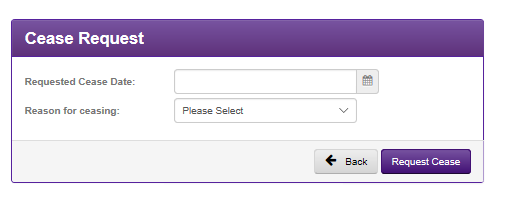
Once you have done this, select the request cease button. You will then see a pop-up box appear, this box will show you what the cost will be for ceasing your Ethernet service and it will ask you if you want to proceed. If you are happy with the cost, select the ‘Yes’ button and your cancellation will be processed.
Please note: For more information around how we calculate our cease charges please see our “Converged Ethernet Service Description” on the Gamma Academy.
In life changes to 4G Services #
Change alerts and caps
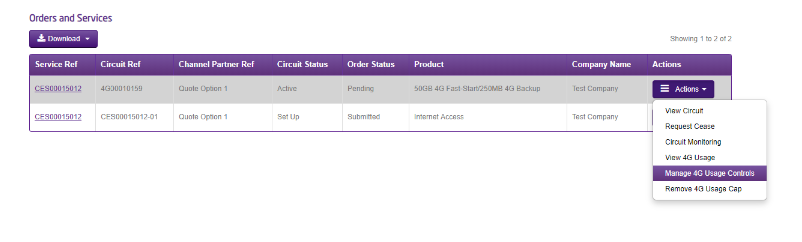
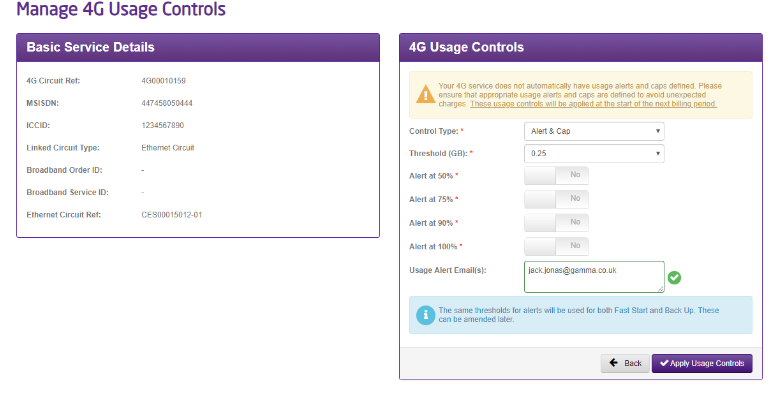
The alerts and caps that were set during provisioning can be changes in life. These can be accessed and edited from the portal. Please note that changes are implemented at the start of the next billing period.
Remove data cap
If a 4G sevice has reached its data cap but you wish to continue using data, this can be done by removing the data cap for the service. This is done by accessing the Manage 4G usage controls menu. Please note, if removed, all data usage is unlimited, and may therefore result is high data charges.
Remove Backup
To remove Backup from an existing service you will need to contact the Gamma Help Desk. This will involve ceasing the 4G service.
Change Fast Start data allowance
The Fast Start tariff includes an allowance of data built in. To change the Fast Start tariff to another data allowance during Fast Start please contact the Gamma Help Desk.
