A Channel Partner Migration should be, in the eyes of your customer, no different from porting their number in to the Gamma network. That said, when their number is already on the Gamma network but allocated to the account of a different Channel Partner we are often able to improve on our timescales because we do not need to rely upon the cooperation of other networks to process the requests.
The customer should be prepared for a short period of downtime whilst the numbers are migrated to their destination service account. The downtime should be minimal and is an unavoidable part of the migration process.
You can place a Channel Partner migration request through Numbering Navigator. This will send the request through to the Service Desk who will validate your request and schedule a time and date for your migration. Your request can be tracked in Provisioning & Service Management > Gamma Migrations > Manual Migration Search. You then should contact the Service Desk when you want the migration triggered.
The total lead time for a Channel Partner migration using the Numbering Navigator form is 10 working days.
Place my Channel Partner Migration #
Step 1
Log into the Gamma Portal and go to Help & Support and select Number Navigator.
If you don’t have this option, contact your Portal Administrator (Help and Support and Portal Administrators) or contact your Internal Account Manager.
Step 2
Select “I know which form I need, show me the list”

Step 3
Select “Channel Partner transfer form”
Step 4
When you select your Channel Partner account, the form will expand to show further fields for completion.
Enter the postcode of your customer and click the magnifying glass and then enter the address.
Select your target product.
Now enter your numbers. If you have single number(s) then use the “Add Number” button, and if you have a range of numbers click “Add Range” and enter the details. Click the purple tick button and then click Submit.
Once you press ‘submit’, you will be provided with an acknowledgement notification on screen along with a unique order reference number Your request can be tracked in Provisioning & Service Management > Gamma Migrations > Manual Migration Search.
Your order will now be sent to the Service Desk for processing.
Remember to process your migration batches separately if you are taking a staggered approach to migration. This means submitting a separate order form for each batch.
What happens after I’ve placed my migration? #
Both automated and manual migration orders can be tracked now in Provisioning & Service Management > Gamma Migrations.
Once your order(s) has been submitted, the Service Desk will review the order details. This is the stage at which we will accept or reject the requested migration(s) based on various factors but usually concerning the accuracy of data supplied and technical feasibility of the requested order.
Once your order(s) has been accepted, the Service Desk will send a losing notification to the losing channel partner.
In respect of Channel Partner migrations, you should contact the Migrations Team to specify the date you would like the migration to complete (earliest available date specified on the confirmation email).
Out of hours requests can be accommodated at the discretion of the Service Desk and will be dependent on resource availability. Out of hours appointments will incur additional costs, please see the Gamma Number Policy document for details.
An out of hours request must be agreed with the team in advance to ensure available resource to oversee the migration.
Gamma recommends that the number migration date is scheduled for the very end of your project when you are ready for the customer to go live in full on their new solution. At this stage, you should be satisfied that any other project components are complete and testing clearly.
As an added precaution, you may want to arrange for an engineering presence to be available at the customer site on the day of the migration to help service users with any issues. However, we strongly recommend that any associated works have been completed and tested well in advance of the migration date.
How do I search for a Channel Partner Migration Order I’ve placed via the Numbering Navigator? #
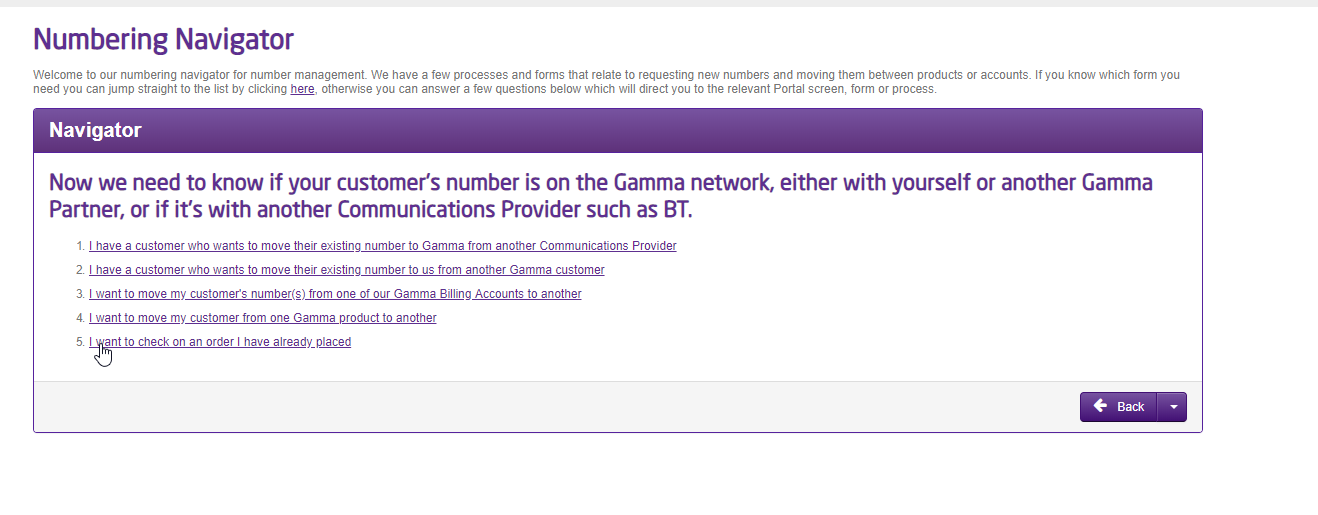
To search for a migration order placed via the Numbering Navigator we’ve added a new option called “I want to check on an order I have already placed”, this can be found under Numbering Navigator > I have a telephone number already which when selected will take you through to the “Migration Search Page” to track your orders. (Also accessible via Provisioning & Service Management > Gamma Migrations in the Gamma Portal menu.