
The number migration process is concerned with the movement of existing Gamma numbers from one service to another.
This may be a move from a current Channel Partner to another and/or a move from one Gamma product to another (for example SIP to inbound or one SIP endpoint to another). It may also be as simple as moving customer numbers from one of your own billing accounts to another.
The migration process is not to be confused with the ‘porting’ process whereby numbers are moved to Gamma from another network operator. There is a distinct process in place for number porting which should be followed in these scenarios. For more information on the porting process, please refer to your Business Development Manager or the Gamma Porting Desk.
Outline process #
The following diagram is intended to give you a 1-page snapshot of the basic flow of events associated with number allocation activities.
Where relevant, key lead-times are included on the process diagram and it is colour-coded to denote responsibility.
Number migration process stage 1 – preparation #
Preliminary questions #
We suggest that the following questions are raised during your initial fact-finding session with the customer.
Number detail | What are the numbers to be migrated? Are they geographic or non-geographic? |
Technology | What product hosts the numbers currently (e.g. SIP trunks/Horizon/Inbound) and what product are they moving to? What is the ID of the destination service (e.g. SIP endpoint) |
Current provider | Who hosts the numbers currently? The network operator is Gamma but are the numbers currently hosted by another Gamma reseller? If so, who? |
Downtime | There is likely to be a short period of downtime when the migration completes – what can the customer tolerate? When are their quiet periods? Do they need an out of hour’s migration? |
Migration Date | The migration of the numbers will usually drive the customer’s ‘go live’ date for their overall solution – what date is the customer aiming for and have you considered the migration lead-time? |
Complex requirements | E.g. does the customer wish to migrate all numbers to the same product/account at the same date/time or is a staggered approach required or an order split? |
Above all, it is imperative that you understand the whole end-to-end solution including what the customer wishes to achieve at each stage and at the end of the project and plan your migrations accordingly.
The avoidance of unnecessary date changes and migration rescheduling is advantageous for all parties.
The Number Management team will advise you on lead-times and help you to set customer expectations but will not be able to help you to make decisions on when migrations should be scheduled in order to best meet with the customer’s requirements.
Identify order type #
Using the data you collected in your ‘preliminary questions’, use the table below to determine the right type of order(s) for your customer’s numbering requirements.
Scenario | Order Type |
The number(s) is already on the correct Channel Partner account but needs to be moved to a different Gamma product ID | Product Transfer Request |
The number(s) is already on the correct product ID but needs to be moved to a different Channel Partner account | Channel Partner Transfer Request |
The number(s) needs to be moved to a different product ID and simultaneously moved to a different Channel Partner account also | Channel Partner Transfer Request* |
The number(s) are not currently on the Gamma network at all | Number Port** |
Nb. With the exception of migrations to a new Gamma Inbound service, the destination product must be in place and fully tested prior to completing number migrations to the service. It is the responsibility of the Channel Partner to ensure that this is the case.
*You will be able to migrate the numbers to a new product ID simultaneously with the Channel Partner account migration.
**Number ports are dealt with by the Gamma Porting team, not Number Management and therefore fall outside the boundaries of this user guide. Please refer to the Gamma Porting team for assistance: portenquiries@gamma.co.uk
Migration lead-times #
Once you know the type of migration you require, look up the lead-time below so that you can set expectations with your customer:
Order Type | Total Migration Lead-time |
Product migration | 3 working days |
Channel Partner migration | 10 working days* |
*upon agreement from the Gamma Product Management team. Internal Channel Partner migrations may be completed more quickly.
Migration scheduling #
You should now consider scheduling options for the number migrations in line with the lead-times indicated by the previous section.
You should consider whether your customer will be happy to schedule their migration completion in working hours or if you need to consider out-of-hours options and charges. Some of the key issues to consider when deciding this with the customer are as follows:
Issue | Description |
Type of end user business | How dependent are they on their incoming calls? What is the impact of downtime at certain times? Are they an emergency, ‘blue light’ service or involved with supporting the vulnerable? |
Busy call times | When are they busiest and when are their quiet times? Are there periods when their offices are closed and impact negligible? Can you interrogate their telephone system to obtain statistical data? |
Volume of migration orders | Is it physically possible to migrate them all in the same window? Do you need to split them up? If so which numbers should go at which times considering the findings from the previous question. Can you divide them in to batches to minimise the impact of downtime? |
The below table details the scheduling guidelines for migrations.
Order Type | Scheduling Description | *Available Timeslots | Cancellation/rescheduling notice period |
Standard Channel Partner Migration | Migration is scheduled for a set date, at least 10 w/ds from point of order. No time specified (unless out of hours required) | Migration may occur anytime between 08:00-18:00 on specified date | Min. 10 w/ds notice |
Standard Product migration | Migration is triggered as required by the Channel Partner at any point after the order has been prepared (2 w/ds from point of order) | Migrations can be initiated at any time between 08:00-17:00** by calling the Number Management team for immediate processing | Min. 2 w/ds notice |
Out of hours migration *** (Channel Partner or Product migration) | Migration is pre-arranged for the requested time and automatically triggered by the number management team at this time. | Mon – Fri 18.01-07:59 Sat – Sun anytime | Product migration – Min. 3 w/ds notice Channel Partner migration – Min. 10 w/ds notice |
*Available timeslots specified are always dependent on agreement from the Gamma Number Management team.
**The Number Management team is available until 6pm Monday-Friday (exc. bank holidays) but we recommend that orders should be triggered no later than 5pm in order to allow time for the team to oversee the migration to completion.
***Out of hours migrations carry an additional charge. See the ‘Charging’ section of this document for associated costs.
Remember that there will be some downtime when the migration completes which may mean a loss of service and the customer should be prepared for this. Different order and product types will be exposed to different levels of complexity and the expectation for downtime duration is therefore highly variable between orders. The Number Management team will help you to set expectations for downtime in respect of your own order upon request.
Consider that in the majority of telephony solution deployments, the number migration activity will inevitably drive the customer ‘go live’ date.
Think about any potential requirement for staggering migrations either because numbers are moving to different host services / Channel Partner billing accounts or because they need to happen at different dates / times. In either case, you will need to process each batch as a separate order with its own unique order ID.
Finally, take in to account that whilst out of hours migrations may seem less risky for the customer as their business is less active, Gamma is also likely to have less support in place at these times. If the migration does encounter problems (which is unlikely but possible), full support to resolve may not be available until 8am the next working day.
Charges apply for out of hours migrations. Please see the ‘Charging’ section of this document for pricing guidelines.
Preparation recap #
To consolidate, you should conclude the preparation stage having captured the following data from your customer:
What are the numbers to be migrated?
- What kind of migration is required? (e.g. Product, Channel Partner or both)
- When does the customer want the migration completed? Is this achievable with the stated lead-time?
- Is a specific day/date/time of day required to complete the migration? Is an out of hour’s migration required?
- Do you need to ‘stagger’ the migration of multiple numbers?
Check overall pricing and sign off with customer.
Number migration process stage 2 – order process #
Order placement #
You can order your migration as soon as the destination service is in place using the following guidelines:
Order Type | Process | Est. Lead-time (w/ds) |
Product Migration | Complete the online ‘Product Transfer’ form by following the questions on the Numbering Navigator found at: https://www.gamma-portal.com/numberManagement/decisionTreeInput.jspa | 3 |
Channel Partner Migration | Complete the online ‘Channel Partner Transfer’ form by following the questions on the Numbering Navigator found at: https://www.gamma-portal.com/numberManagement/decisionTreeInput.jspa | 10* |
*upon agreement from the Gamma Product Management team
Product Migration Tool #
Migrations can be placed with the tool at any time, but they are only processed between 08:00 and 16:30 weekdays if they are automatic (see exclusions). If you place an automatic order outside of these times then your order will be queue until 08:00 the next working day.
Automation Exclusions #
The following automation exclusions will raise a ticket to our Provisioning team who will be in contact with you shortly to discuss the migration requirements and plan this in with you.
- Migration requests that have more than 200 numbers
- Current product is Inbound
- Out of hours requests (subject to a charge. Details are in the Gamma Number Policy Document)
Preparation – Horizon Only #
Before you place the migration request you need to ensure that the numbers you wish to migrate have been unassigned from any users, call groups, voicemail portals or sites. Failure to do this will put the order in a “Pending CP Intervention” status and you will be sent an email asking you to remove the numbers before restarting the migration.
Place my migration #
Step 1
Log into the Gamma Portal and go to Provisioning and Service Management, Gamma Migrations and select Product Migration.
If you don’t have this option contact your Portal Administrator (Help and Support and Portal Administrators) or contact your Internal Account Manager.
Step 2
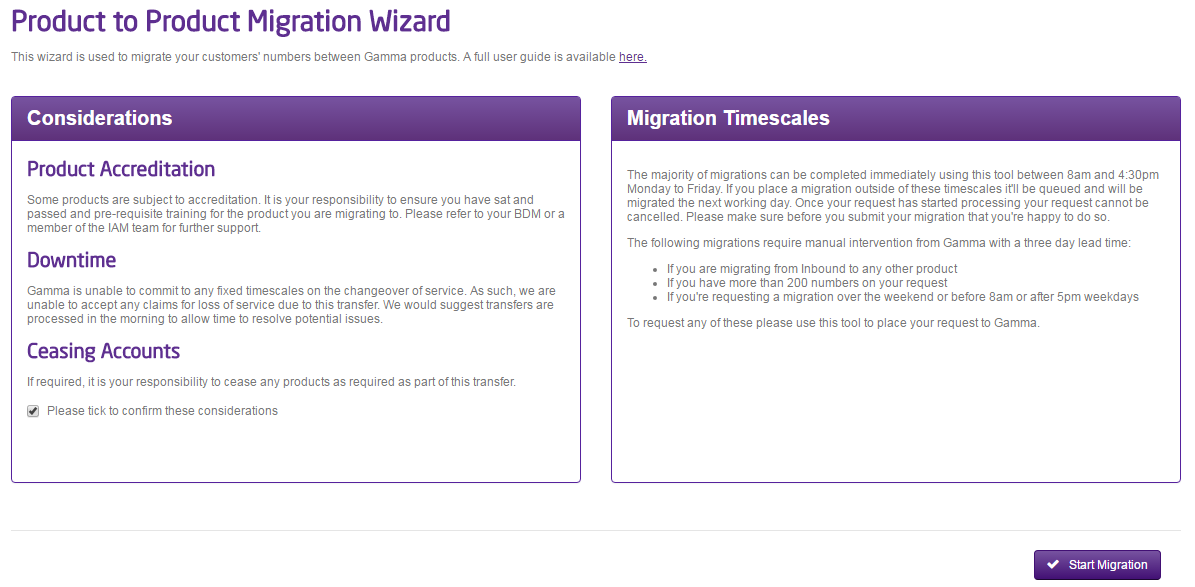
Please read the Considerations and Migration Timescales text. Both of these contain important information regarding your product migration. Select the tick box to confirm that you have read these and click “Start Migration”.
Step 3
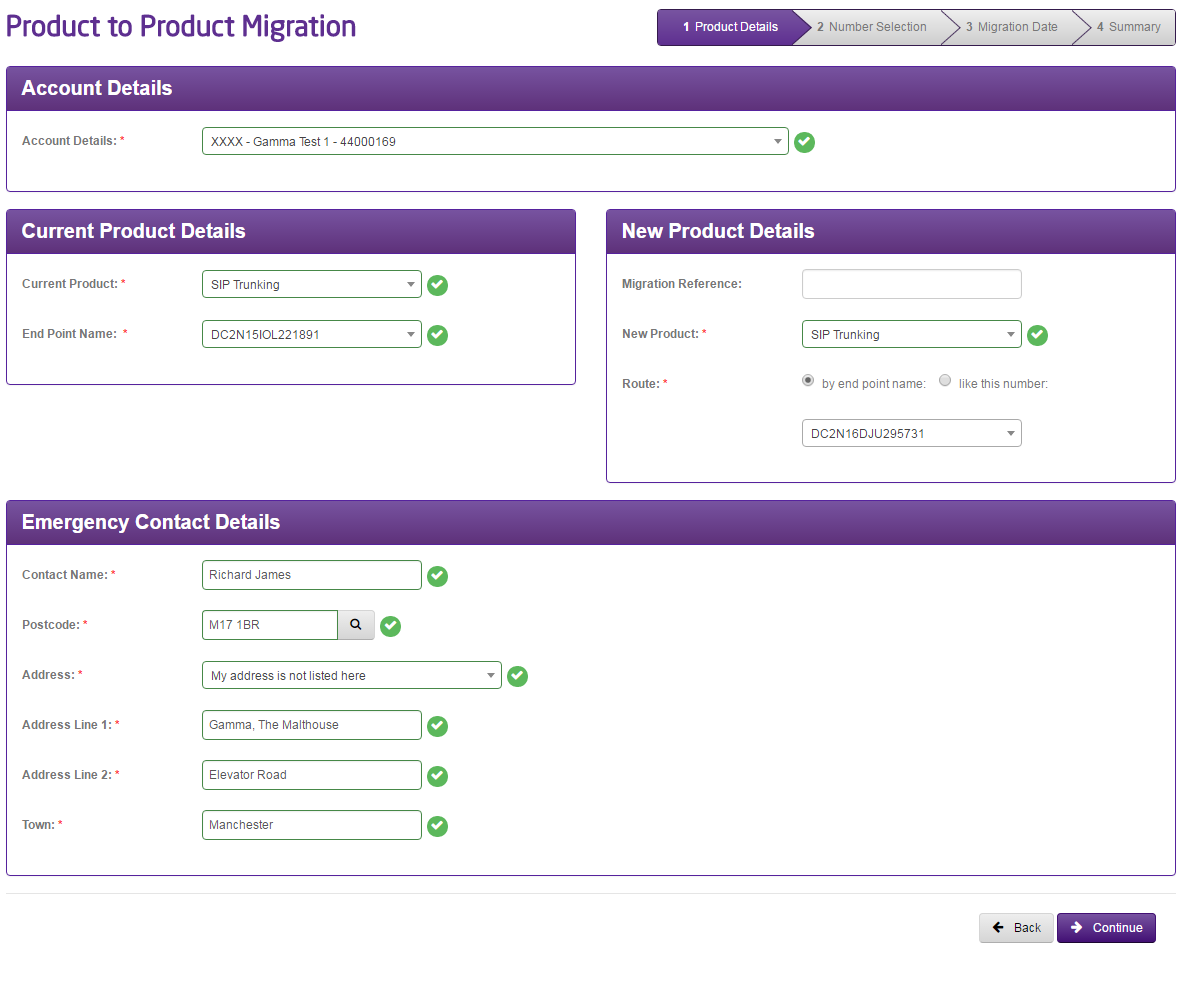
Select your account, current product and current product details where applicable (such as Horizon Company, SIP Endpoint, Inbound Company etc). Also select your new product and the new product details as well.
In most cases a product will only have one routing prefix with Gamma, however if we detect on the endpoint or company that you’ve selected that there are multiple route prefixes we will ask you to select a live number on your product that routes the way that you want your migrated numbers to route.
You can only migrate products between the same account. If you have multiple accounts and want to transfer to a product that is on a separate account you will need to use the Channel Partner Migration form on the Numbering Navigator
Enter the End User Emergency Service contact details, select the address and then click “Continue”.
Step 4
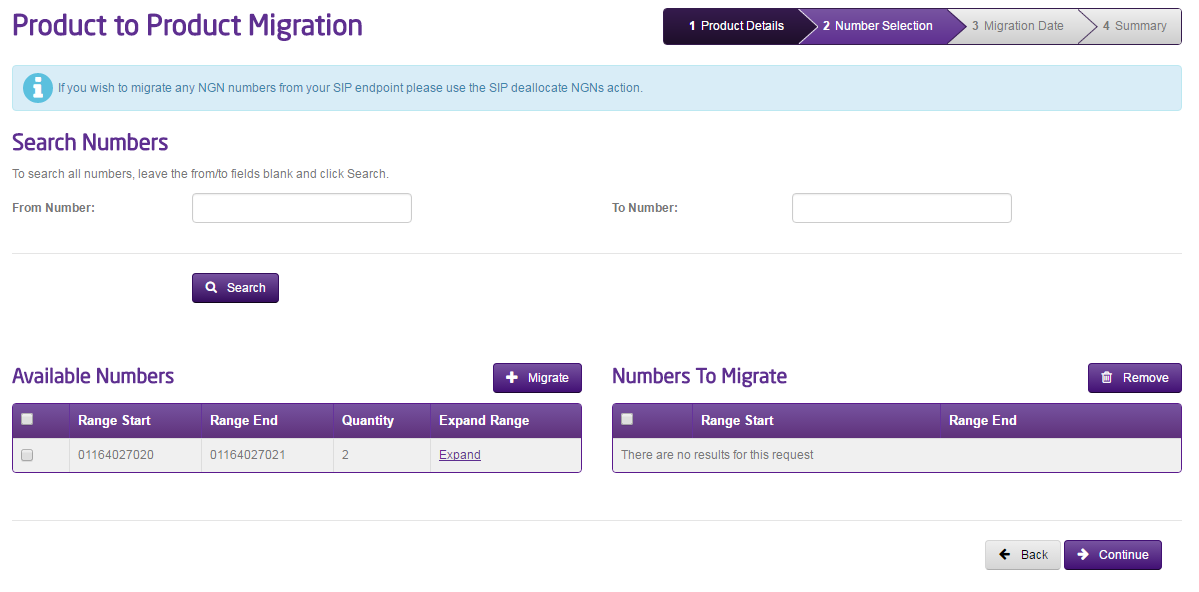
Search for the numbers that you want to migrate from your current product. If you want to migrate individual numbers with a range you can click on the “Expand Range” link to load up all the numbers included in that range, and select the individual numbers.
Click “Migrate” so the numbers you are migrating are in the right hand side table and click continue.
If you want to search for all numbers on the product, leave the “From Number” and “To Number” text boxes blank
Step 5
The tool will work out if you can migrate without the need of the Service Desk (“Standard” migration) or will ask you for a date and time when you’d like your migration to happen (“Non-Standard”). Standard migrations will typically complete within the hour.
Standard Migrations
Standard Migrations will go into a pending state for no more than 20 minutes. A migration will be in progress for typically a matter of minutes, but can take up to an hour depending on the size of your request and the volume of orders going through at any one time.
Non-Standard, From Inbound and more than 200 number migrations
If your migration request originates from Inbound, if you have more than 200 numbers on an order or if you want an out of hours migration then this will generate a request to the Gamma Numbers team who will then pick up your order and manage this for you. The team will be in contact as soon as they receive the migration request. Lead times for a product migration in these scenarios is 3 working days.

Step 6
Once you’ve gone through the migration pages, review everything on the Summary page.
Once you’re happy with the details here, click “Place Order”.
You will then be presented with a reference number for your migration. You can use this to track your migration progress by going to Provisioning and Service Management, Gamma Migrations, Manage Migration Orders.

Managing my migration #
Once you’ve completed your order and received your reference number, you can track progress using the “Manage Migration Orders” page.
Below are what each of the statuses mean:
Status | Meaning |
Pending Manual Intervention | Order is pending action by Gamma |
Complete | The order has been completed successfully |
Failed | The order has failed. Gamma are aware of the problem and will be in contact shortly. |
Pending | The order is waiting in a queue to be processed. |
Migration In Progress | The migration is being processed. |
Cancelled | The migration was cancelled |
Pending CP Intervention | The Channel partner needs to take some action. An email will be sent detailing exactly what it is that you need to do |
Restarting my migration #
If you need to restart an order that is in “Pending CP Intervention” status you can use the “Actions” drop down and select “Resume Migration”. This should be picked up within 20 minutes and completed within the hour.
Cancelling a migration #
If an order is in “Pending” or “Pending CP Intervention” status you will be able to cancel the migration request by using the “Actions” drop down and selecting “Cancel”. If the order is in any other status you will need to contact the Service Desk.
My Order has failed #
In the unlikely event that your order has failed an alert is sent to the Gamma support team immediately to pick up, and someone will be in touch. The Gamma support teams have all the tools required to resolve any possible failure as quickly as possible.
Place my Channel Partner Migration #
Step 1
Log into the Gamma Portal and go to Help & Support and select Number Navigator.
If you don’t have this option contact your Portal Administrator (Help and Support and Portal Administrators) or contact your Internal Account Manager.
Step 2
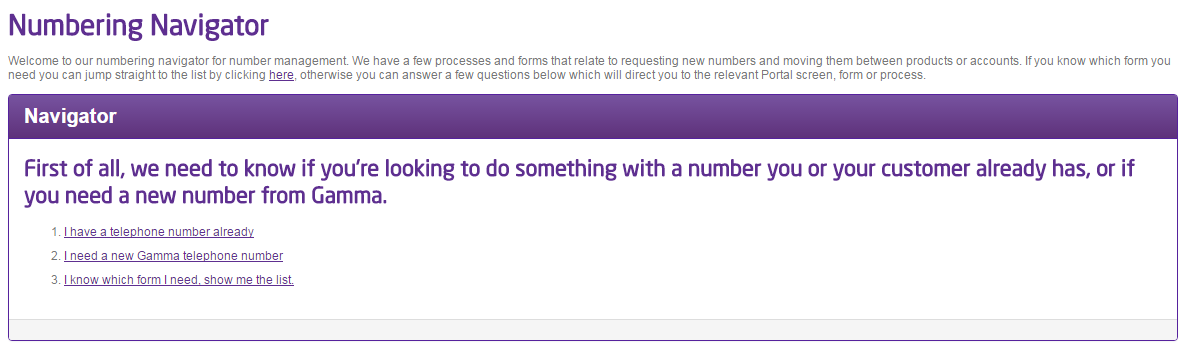
Select “I know which form I need, show me the list”
Step 3
Select “Channel Partner transfer form”
Step 4
When you select your Channel Partner account, the form will expand to show further fields for completion.
Enter the postcode of your customer and click the magnifying glass and then enter the address.
Select your target product.
Now enter your numbers. If you have single number(s) then use the “Add Number” button, and if you have a range of numbers click “Add Range” and enter the details. Click the purple tick button and then click Submit.
Once you press ‘submit’, you will be provided with an acknowledgement notification on screen along with a unique order reference number. Be sure to make a note of this reference number which should be used in any correspondence with the Service Desk regarding your request.
Your order will now be sent to the Service Desk for processing.
Remember to process your migration batches separately if you are taking a staggered approach to migration. This means submitting a separate order form for each batch.
What happens after I’ve placed my migration? #
Once your order(s) has been submitted, the Service Desk will review the order details. This is the stage at which we will accept or reject the requested migration(s) based on various factors but usually concerning the accuracy of data supplied and technical feasibility of the requested order.
Once your order(s) has been accepted, the Service Desk will send a losing notification to the losing channel partner.
In respect of Channel Partner migrations, you should contact the Migrations Team to specify the date you would like the migration to complete (earliest available date specified on the confirmation email).
Out of hours requests can be accommodated at the discretion of the Service Desk and will be dependent on resource availability. Out of hours appointments will incur additional costs, please see the Gamma Number Policy document for details.
An out of hours request must be agreed with the team in advance to ensure available resource to oversee the migration.
Gamma recommends that the number migration date is scheduled for the very end of your project when you are ready for the customer to go live in full on their new solution. At this stage, you should be satisfied that any other project components are complete and testing clearly.
As an added precaution, you may want to arrange for an engineering presence to be available at the customer site on the day of the migration to help service users with any issues. However, we strongly recommend that any associated works have been completed and tested well in advance of the migration date.
Number migration process stage 4 – pre-migration test plan #
As the migration process deals solely with numbers already successfully provisioned on the Gamma network, the risk of loss of service upon order completion (aside from the specified downtime) is negligible. As such, Gamma do not offer any pre-migration testing as part of the migration service.
We do recommend that the Channel Partner runs their own customer testing pre-migration to check that the host service is fully operational and configured to accept the new numbers coming across (eg. is there a customer pbx to be configured or any call-plans to be set-up in preparation and are these working as expected?).
Number migration process stage 5 – migration #
Migration completion & downtime #
The customer should be prepared for a short period of downtime whilst the numbers are migrated to their destination service account. The downtime should be minimal and is an unavoidable part of the migration process.
Completion confirmation #
The Number Management team will email you upon completion of the migration to confirm its success.
Once this confirmation has been received, the customer solution should be tested end-to-end as they are now fully live on the destination service. It is the responsibility of the Channel Partner to arrange appropriate solution testing with the customer.
Trouble-shooting issues & faults #
If all stages within this guide have been appropriately followed, it is very unlikely that the customer will experience loss of service post-migration (other than the minimal downtime associated with the migration itself).
If the customer does not have full service as expected following confirmation of migration completion, please refer to the Number Management team in the first instance for assistance.
The Number Management team will firstly double-check that the migration has completed in full and in line with the requested migration order and will take responsibility to rectify any issues which are uncovered as part of this process.
If the migration completion verification check is completed and fails to uncover any issues yet the customer still does not have service, it is most likely that there is a fault elsewhere within the customer solution/environment. This may or may not be associated with a Gamma product. At this stage, the Gamma Number Management team will be unable to assist further with fault diagnosis and the Channel Partner will need to instigate their own fault management processes in order to achieve resolution for the customer.
Customer communication plan #
The Number Management team will proactively communicate with you at the following project milestones:
Ref | Description | When? | How? |
01. | Acknowledgement of order & reference number | Upon order placement | On screen |
02. | Order confirmation / rejection. Lead-time set | Within 2 w/ds of acknowledgement | |
03. | Scheduling of migration dates / times | Driven by Channel Partner | Tel/Email |
05. | Confirmation of migration completion | Upon migration completion |
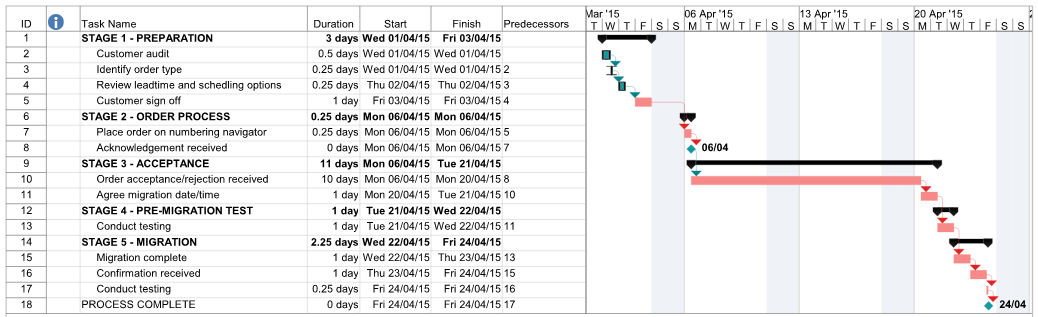
Example Project Plan #
For clarity and to help you organise the order of events for your own migration orders, we have included below an example of what a theoretical number migration plan may look like.
Checklist #
A summary table showing all items comprising the end to end migration process is shown below. Critical path items are highlighted in orange:
Task Ref | Stage Name | Task Name | Est. Duration |
2 | Preparation | Customer audit | 0.5 w/ds |
3 | Preparation | Identify order type | 0.25 w/ds |
4 | Preparation | Review lead-time & scheduling options | 0.25 w/ds |
5 | Preparation | Customer sign off | 1 w/d |
7 | Order process | Place order on Numbering Navigator | 0.25 w/ds |
8 | Order process | Acknowledgement received | 0 w/ds |
10 | Acceptance | Order acceptance / rejection received | 10 w/ds |
11 | Acceptance | Agree migration date / time | 1 w/d |
13 | Pre-migration test | Conduct testing | 1 w/d |
15 | Migration | Migration completion | 1 w/d |
16 | Migration | Confirmation received | 1 w/ds |
17 | Migration | Conduct testing | 0.25 w/ds |
