
The number allocation process is used by a Channel Partner when they have a customer requirement for new Gamma geographic or non-geographic numbers to be applied to their existing Gamma service.
The number allocation process is specific to the provision of ‘virtual’ Gamma numbers to be applied to Gamma cloud-based services (e.g. inbound, SIP, Horizon, Communicator, basic number translation).
This process is not appropriate for customers who wish to provision a new Openreach number directly on to a Gamma Wholesale Line Rental (WLR) service. There are specific number selection processes to be followed for WLR services. Please contact your Business Development Manager or the Gamma WLR service desk for more information.
Outline process #
The following diagram is intended to give you a 1-page snapshot of the basic flow of events associated with number allocation activities.
Where relevant, key lead-times are included on the process diagram and it is colour-coded to denote responsibility.
Number Allocation Process stage 1 – preparation #
Start by extracting as much information from the customer as possible. Understand upfront what their requirements are and why, as well as what level of tolerance / lenience they have towards meeting their precise specification.
Identifying this at the outset will allow you to prepare and plan their numbering request fully in advance and proactively highlight any potential issues / delays / additional costs before you get involved in the provisioning process.
Some key areas for consideration in your initial customer discussions are as follows.
Area codes & number types #
Firstly, establish which area code(s) / number type(s) are required to fulfil your customer request (e.g. 020, 0161, 0333, 0808 etc.)
Ensure you understand the ppm pricing implications for both the host of the number and any callers dialling in to the service as different number types will be subject to different pricing structures.
You are able to check the host ppm rates on your Gamma Channel Partner tariff but bear in mind that callers may be dialling in from other networks and that their ppm rates will be wholly dependent on their tariff arrangement with their network provider.
Your Gamma Business Development Manager will be able to provide you with advice and assistance on selecting the right number types for your customer requirement should you need it.
Conservation areas #
Once you have established the area code(s) / number type(s) required, you need to firstly check whether or not these number ranges are within either an OFCOM or Gamma specified conservation area.
Conservation areas are defined either by OFCOM or Gamma when demand for numbers within a specific area has become so great that available number stocks have been depleted to the extent that restrictions have been imposed.
If you require numbers which fall within an OFCOM or Gamma specified conservation area, you should be prepared for a number of possible issues as follows:
- You may be restricted on the volume of numbers you can request
- Large batches of uninterrupted consecutive numbers may not be available
- You may have to wait for spare numbers to be allocated by OFCOM (2 month lead-time for geographic numbers, 4 months for non-geographic numbers)
- No number selection options are available – you take the next available numbers from the pool.
- Additional charges may be levied
- You may be asked to provide a business case
A full, up to date list of both OFCOM & Gamma conservation areas can be found within the Gamma Number Policy at Annex A. The document is stored on the Gamma Academy Knowledgebase.
Restricted areas #
Certain number groups are for use only by specific groups of individuals and are not open for selection by all.
Number types concerned are as follows:
Number Type | Availability |
030 | Public sector bodies and not-for-profit organisations |
034 / 037 | Created as direct replacements for 084 and 087 numbers. A Channel Partner is only eligible for these numbers if they already own the corresponding 084/087 numbers and they must agree to supply them only to the end user who currently owns the 08 number |
If your customer requests any of these number groups and does not meet the qualifying criteria, you will need to decline the request and explain the reasons why. Other 03x numbers will be available for them to request.
Number selection #
Does your customer require a specific numbering formation over and above the area code? E.g. 0161 123 xxxx or 0161 area code with 77 somewhere in the dial string.
If the customer has specified the digits they require immediately after the area code (E.g. 0161 123 xxxx) then availability will depend on who owns that number range. OFCOM allocates number ranges to network operators using these digits so if the range is allocated to a network operator other than Gamma, we will not be able to secure it. You can check range owners at http://www.magsys.co.uk/
Clearly, the more defined the customer requirement, the trickier it will be to find a suitable match, so do encourage your customer to be as flexible as possible.
Please note that the number selection service is not offered for numbers within a Gamma or OFCOM conservation area.
Golden & platinum numbers #
Some Non-Geographic numbers may be identified by Gamma as ‘golden’ or ‘platinum’ numbers if they are particularly attractive. These numbers will carry an additional set up cost which will be applied whether you choose to ‘cherry-pick’ them from a range or are applying to purchase the entire range including the special numbers.
If you are purchasing a whole range of numbers and wish to exclude the special numbers, you can do so hence avoiding the additional golden/platinum number charge.
Number ranges containing golden and platinum numbers will not be readily available for selection on the Gamma portal so you will not purchase them by mistake. These ranges are withheld by Gamma and are only available for purchase via the number selection process.
Golden and platinum numbers are not specified on geographic numbers. You can still apply for specific numbering formations via the number selection process but there will be no additional charges above the standard number selection cost.
Volume request #
Next, consider the volume of numbers required within each area code.
Regardless of whether or not your desired area codes fall within a conservation area, you may be limited to requesting a maximum volume of numbers at any one time under business as usual processes.
The volume threshold varies from product to product and can depend on your current volume of numbers reserved vs utilisation.
If you are unable to process a request for the volume of numbers you require against your chosen product, you will need to either process multiple submissions on the portal (which may result in your number ranges not being consecutive) or apply for the numbers by following the questions and submitting a request on the numbering navigator (further details to be found in stage 2 of this process).
Additionally, if you require between 300-999 numbers within a single area code, you will be asked to provide a written justification for the request for review by the Gamma Operations Manager.
If you require 1000+ numbers, you will be asked to submit a formal business case for review by the Gamma Commercial & Regulatory Team as well as OFCOM (if applicable). The business case template can be found within the Gamma Number Policy at Annex B. The document is stored on the Gamma Academy Knowledgebase.
You should be prepared that high-volume requests may experience extended provisioning lead-times due to the review and approval process. If Gamma needs to apply to OFCOM to release additional number stock, then the lead-time will be significantly increased due to the OFCOM number allocation process which takes around 2 months for geographic numbers or 4 months for non-geographic numbers.
Directory entries #
Ask your customer if they expect any of their new numbers to be published in the telephone directory. If so, which numbers do they want published and under what name? What typeface do they require and how prominent do they want the advertisement to be?
The default will be that no directory entry is supplied by Gamma unless specifically requested.
If a directory entry of any kind is required, this is dealt with by the Gamma Porting Team: portingdms@gamma.co.uk. There are various options available, many of which will carry an additional charge. The porting team will advise options upon request.
Location information #
It is the Channel Partner’s responsibility to ensure that Gamma are correctly informed of the details of the host location for each new number being supplied. This is so that Gamma can update the emergency services databases with the correct address information in the event of a service user contacting the emergency services.
Clearly this information is potentially of paramount importance. Please ensure that you capture and specify accurate host number address details at the point of order and do not use a default or dummy address to save time.
It remains the Channel Partner’s responsibility throughout the lifetime of the numbering arrangement to inform Gamma immediately of any change to the numbers’ host address so that the emergency services databases can be maintained.
Preparation recap #
To consolidate, you should conclude the preparation stage having collated answers to the following questions from your customer:
- What area codes does your customer need?
- Are the chosen area codes in a conservation area?
- Has the customer requested restricted numbers?
- Does the customer have specific number format requirements?
- Has the customer requested a ‘golden’ or ‘platinum’ number?
- How many numbers does the customer require and do you need to complete a business case?
- What directory entries does the customer require?
- Where will the new numbers be hosted? Capture addresses.
Check overall pricing and sign off with customer.
Number Allocation Process stage 2 – order process #
Once you have captured the above information, you will have enough data to process your order.
Business as usual #
If your customer has not specified any number selection criteria and the volume of numbers required falls within the product thresholds published within ‘Volume request’ section of stage 1, you can fulfil your request via business as usual processes.
To do this, access your customer’s service selecting the appropriate product from the ‘Provisioning and Service Management’ menu on the homepage of the Gamma portal. From here, you can search within your Channel Partner account to access your customer’s service and submit a request online for the new numbers to be provisioned directly to the customer’s service.
The Gamma allocation system will instantly allocate the next available numbers in line with your area code/number type and volume/range specification.
This is by far the quickest way of provisioning new numbers and in most cases, the numbers will be live and available to use within the customer’s service within a couple of business hours.
The Channel Partner is expected to monitor progress of the application on the Gamma portal. The business as usual process in entirely automated. As such, there is no involvement or communication from the Gamma Number Management team and the Number Allocation process ends here.
Specific Geographic Number requests #
If you would like to search for a specific geographic number, then you can go to Gamma Number Search under Help and Support on the Gamma Portal. This will allow you to search for new available numbers and also view numbers currently allocated to your account that are not in use.
Select your account, area code, quantity of numbers required and whether you want to see numbers that are already allocated to your account but not in use with a product, or whether you want to see if the numbers are available.
You can also search for ranges by ticking the Number Range button.
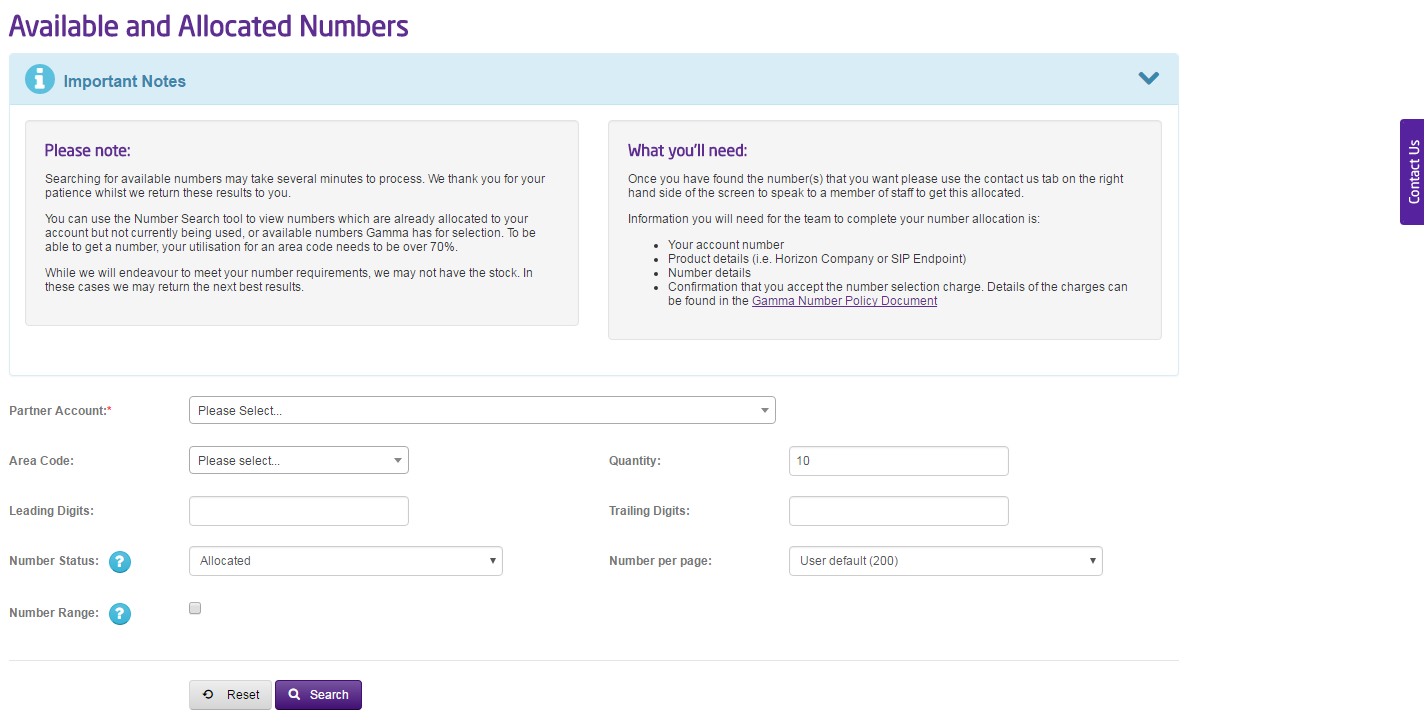
It’s worth keeping in mind that all providers are allocated number ranges so we might not have the range you’re looking for. You can see if a number is a Gamma number range (or even a valid number) by using our Range Holder Search tool.
Once you have identified the number(s) you want then you can use the “Contact Us” button and start a web chat with the team. They will allocate the number to your account. There is a charge for the numbers depending on the type and quantity of numbers. These charges can be found in the Gamma Number Policy Document
We will then submit a request to allocate the number to your account if the number is still available. Numbers are allocated on a first come first served basis.
Specific Non-Geographic Number Request #
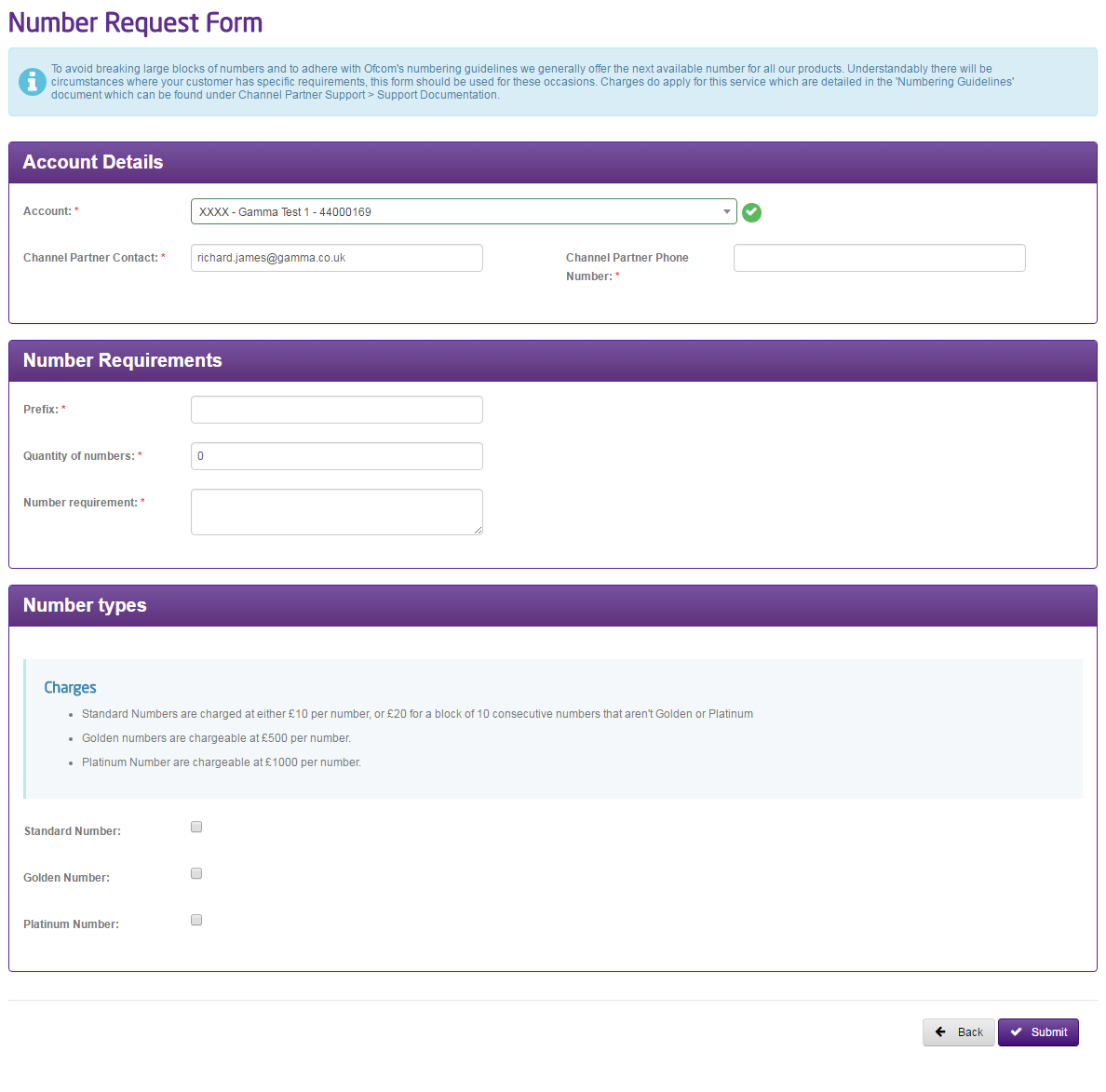
If you require a specific non-geographic number then you should complete the Non-geographic Number Form on the Numbering Navigator. This is available by going to Help and Support and Numbering Navigator and selecting option 3 (I know what form I need) and then select the “Non-Geographic Number” form. This form can also be used for Golden and Platinum numbers as well.
Golden & Platinum numbers #
Some Non-Geographic numbers may be identified by Gamma as ‘golden’ or ‘platinum’ numbers if they are particularly attractive. These numbers will carry an additional set up cost which will be applied whether you choose to ‘cherry-pick’ them from a range or are applying to purchase the entire range including the special numbers.
If you are purchasing a whole range of numbers and wish to exclude the special numbers, you can do so hence avoiding the additional golden/platinum number charge.
Number ranges containing golden and platinum numbers will not be readily available for selection on the Gamma portal so you will not purchase them by mistake. These ranges are withheld by Gamma and are only available for purchase via the number selection process.
Golden and platinum numbers are not specified on geographic numbers. You can still apply for specific numbering formations via the number selection process but there will be no additional charges above the standard number selection cost.
Number Allocation Process stage 3 – allocation of numbers #
The order generated by the Numbering Navigator will be received in to the inbox of the Gamma Number Management team, and in most cases will be retrieved and reviewed by a team specialist within 1 working day.
Your Number Management specialist will interrogate the pool of available numbers with a view to meeting your specification as closely as possible.
Numbering options #
Usually within 2 working days, you will receive an email from your Number Management specialist, confirming available numbering options. The email will contain the following
- Your unique order reference number
- At least 1 numbering option meeting as close as possible with your specification
- Any alternative numbering options
- Any alternative options should we be unable to meet your request (e.g. OFCOM application for more numbers) including associated lead-times and costs
Where your request included geographic numbers, the email will most likely confirm that the option(s) presented have been temporarily reserved to your Channel Partner account for 4 working days whilst you consider suitability with your customer.
If your request was for non-geographic numbers, there is no temporary reservation service available. As such, it is strongly advised that you consider options and make your selection as soon as possible to reduce the risk of another partner / customer selecting the suggested numbers in the meantime.
Number allocation #
Once you have chosen the required numbers, you should reply to the Number Management specialist’s email confirming your selection.
The Number Management team will typically reply within 2 working days to confirm that your chosen numbers have been allocated to your Channel Partner account ready for you to allocate to your customer service.
In the unfortunate and unlikely event that your chosen numbers are no longer available for selection, the Number Management team will readjust your options to you by email and the selection / allocation process starts again until you have successfully achieved allocation of numbers to your account.
At this stage, there is no risk of your chosen numbers being selected by another Channel Partner, although they have not yet been allocated to your customer’s service. As such, it is wise to either arrange for them to be moved to the service promptly, or ensure that other members of your organisation who have access to your Channel Partner account know that they are not to use them for another customer solution!
Making numbers live #
If you have specified on your order request that you would like your chosen numbers to go live on the customer’s service simultaneously with the allocation of the numbers to your account, your Gamma Number Management specialist will accommodate this as part of the service. This being the case, your allocation confirmation email will confirm that the numbers are live and ready for use on your customer’s host service.
Otherwise, the Channel Partner will need to arrange for the numbers to be allocated to the customer’s host service at a later date. If this is the case, the Number Management team will not be involved and the allocation of numbers to the customer service should be arranged with the appropriate Gamma order desk for the host service product.
We guarantee that numbers will be secured on your Channel Partner account for up to 3 months prior to you making them live on the customer’s service. Should the numbers remain unallocated to a customer service after this 3 month period, in some instances (conservation numbers for example), the Gamma Number Management team may decide to retrieve the numbers from your account in order to make them available for use by other customers.
Directory entry updates #
Once the numbers are live on your account, you should contact the Gamma Porting Team to add any directory entries if required.
The Porting team can be contacted at: portenquiries@gamma.co.uk and will process your request in accordance with their own processes and costs. This should have been scoped out ahead of order processing as detailed within Stage 1 – Preparation/Directory Entries.
Customer communication plan #
The Number Management team will proactively communicate with you at the following project milestones:
Ref. | Description | When? | How? |
01. | Acknowledgement of order & reference number | Upon receipt of order | On screen |
02. | Confirmation of available numbers or notification of any issues or delays and lead-time expectation set | Within 2 w/ds of receipt of order* | |
03. | Confirmation of number allocation | Within 2w/d of Channel Partner selection of numbers* |
*These timescales are offered on a best endeavours basis and spikes in workload may cause delays. Applications to OFCOM will take longer.
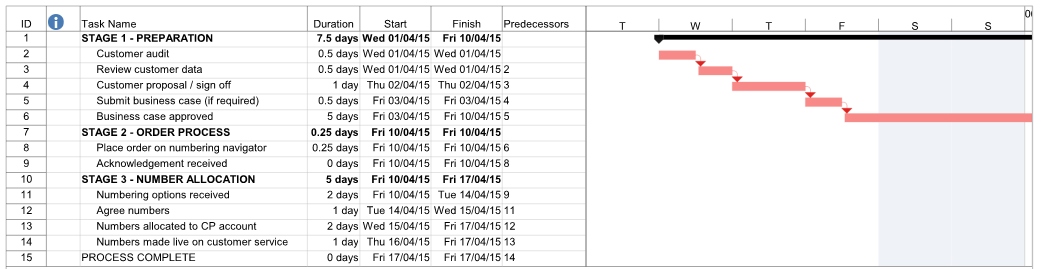
Example Project Plan #
For clarity and to help you organise the order of events for your own number allocation orders, we have included below an example of what a theoretical plan may look like.
Checklist #
A summary table showing all items comprising the end to end number allocation process is shown below:
Task ref. | Stage Name | Task Name | Est. Duration |
2 | Preparation | Customer audit | 0.5 w/ds |
3 | Preparation | Review customer data | 0.5 w/ds |
4 | Preparation | Customer proposal / sign off | 1 w/d |
5 | Preparation | Submit business case (if required) | 0.5 w/ds |
6 | Preparation | Business case approved | 5 w/ds |
8 | Order process | Place order on Numbering Navigator | 0.25 w/ds |
9 | Order process | Acknowledgement received | 0 w/ds |
11 | Number Allocation | Numbering options received | 2 w/ds |
12 | Number Allocation | Agree numbers | 1 w/d |
13 | Number Allocation | Numbers allocated to CP account | 2 w/d |
14 | Numbers Allocation | Numbers made live on customer service | 1 w/d |
