
Skip to content
  • Academy KB Home Redesign
  • Broadband Home
  • CCaaS
  • Channel Partner Support
  • Circle Loop Home
  • Collaborate
  • Connectivity
  • Courses
  • Documentation
  • Ethernet
  • FibreXchange
  • FUSION IoT
  • Gamma AI Concierge
  • Gamma Plus
  • Gamma SIP for Cloud Connect
  • Gamma SIP Global Communications Enablement
  • Gamma SIP Trunks for Genesys Cloud
  • Hannah – Homepage WIP
  • Home
  • Horizon
  • Horizon Contact
  • Horizon Forms
  • Horizon Service Description Home
  • Horizon with Webex
  • Inbound
  • iPECS
  • Knowledge Base Intro
  • Knowledgebase Directory
  • LoginPress
  • Microsoft
  • Microsoft Teams Direct Routing Home
  • Microsoft Teams Operator Connect
  • Mobile
  • Multiple KB
  • My Courses
  • No Access
  • No active page
  • Numbering and Porting
  • Phoneline+
  • Product Homepage
  • Quick Download Button
  • Release Notes
  • Release Notes
  • SIP Home
  • Test
  • UCaaS
  • User Account
  • Voice
  • Voice Enablement
  • Webex for Gamma
  • Webex for Gamma Release Notes
  • Gamma Academy Knowledge Base
Gamma Academy Knowledge Base
  • Cloud Calling and Collaboration
    • Webex for Gamma
    • Horizon with Webex
    • Horizon
    • Phoneline+
    • Operator Connect
    • Direct Routing
    • Inbound
    • Akixi CX Analytics
    • Red Cactus
  • Connectivity and Networking
    • Numbering and Porting
    • Broadband
    • FibreXchange
    • Ethernet
    • SIP Trunking
    • Gamma FUSION IoT
  • CX
    • Horizon Contact
    • AI Concierge
  • Mobile Services
    • Gamma Mobile
  • CyberSecurity
    • SafeWeb
  • Partner & Portal Support
Gamma Academy Knowledge Base

Provisioning and In-Life Changes

  • Numbering – Gamma Policy
  • Number and Porting Letter of Authority Help Guide
  • Porting and Migration Notifications
  • International Numbers
  • 999 Emergency Contact Details
  • Before Ordering
    • Charging
  • Number Management
    • Number Management activities
    • New Number Requests
    • Channel Partner Migrations
    • Product Migrations
    • Number Migration Process
    • Number Allocation Process
    • NTS (Number Translation Service)
  • Geographic Number Porting
    • Geographic Number Porting Preparation
    • Port Types and Timescales
    • Pre-Order Planning and Validation
    • Pre-Port Test Calls
    • Letter of Authority
    • Order My Port
    • Day of Port
    • Date Changes
    • Post Port Planning
    • Resubmit and Cancelled Orders
  • Non Geographic Number Porting
    • Non Geographic Number Porting Preparation
    • Pre-Port Test Calls
    • Letter of Authority
    • Order My Port
    • Date Changes
    • Day of Port and Cancelled Orders

Features

  • Audio Conferencing Process
  • Audio Conference Requests
  • Gamma Search
  • International Inbound Virtual Mobile Numbers

Technical Support

  • Porting Rejections
  • Nuisance and Malicious Calls
  • Numbering and Porting Glossary

Numbering and Porting Forms

  • Numbering and Porting Documents
  • Home
  • Home
  • Numbering and Porting
  • Provisioning and In-Life Changes
  • Geographic Number Porting
  • Resubmit and Cancelled Orders
View Categories

Resubmit and Cancelled Orders

Resubmit Orders #

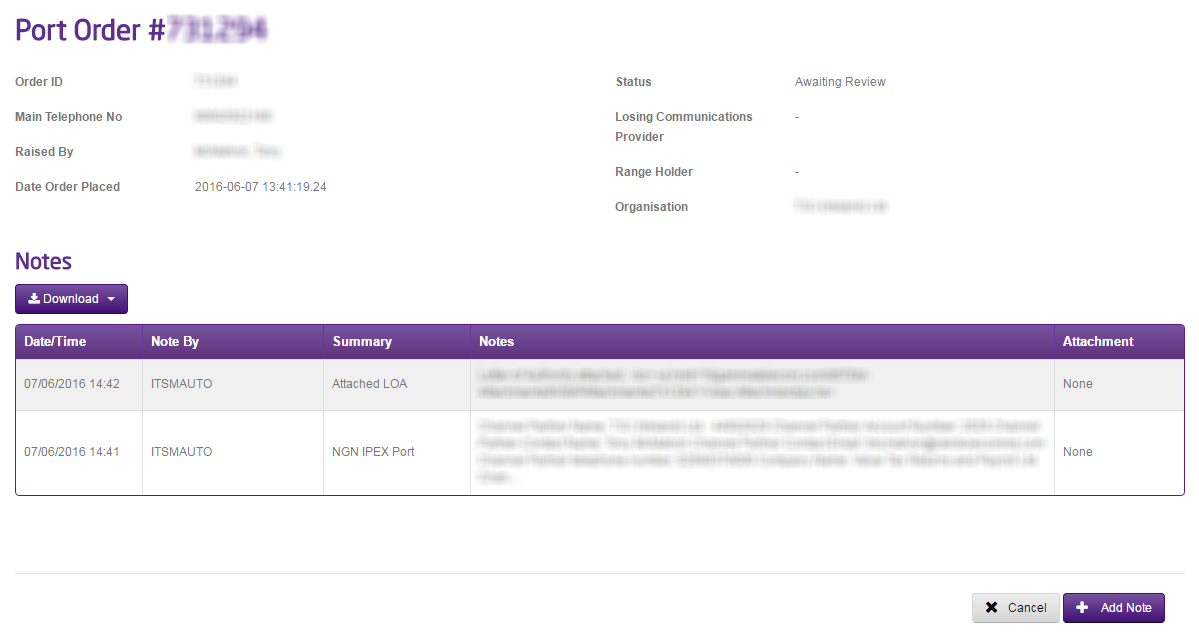
You can edit and resubmit an order using our Manual, Mixed Operator and IPEX Orders search. This is available on the Gamma Portal under Number Porting and IPEX and Manual Search.

If you don’t have this option, contact your Portal Administrator (Help and Support and Portal Administrators) or contact your Internal Account Manager.

Once you’ve located your Port Order you can click on the Order ID to load up the order. From here you can Add Notes by clicking the “Add Note” button. Enter the details you want to edit as a note and this will update your port order owner with the details so that they can make sure that it is represented with the losing communications provider in time.
Cancelled Orders #

An order can be cancelled for one of two reasons. These are:

  • Customer no longer wants the port to happen
  • The order has been in a rejected state and timed out (automatically cancelled).
    • Single line orders time out after 24 hours
    • Multi line orders time out after 48 hours

If you want to cancel a port order please contact our Porting Desk who will process the cancellation for you.

Updated on 23/01/2024
Post Port PlanningGeographic Number Porting Preparation
Contents
  • Resubmit Orders
  • Cancelled Orders

Copyright © 2026 -  Gamma Telecom Ltd

Gamma API
We use cookies to measure performance and make improvements to this service. This includes page views, device/browser, location, and page interactions. We do not collect any information you upload to this site. By agreeing, you consent for your data to be used for this purpose.