
Standard Non-Geographic Number Port #
Step 1
From the Gamma Portal, go to Number Porting, Non-Geographic Number Porting and select New Non-Geographic Number Port.
If you don’t have this option, contact your Portal Administrator (Help and Support and Portal Administrators) or contact your Internal Account Manager.
Step 2
You’re now at the beginning stage of ordering your Non Geographic Number Port.
Channel Partner Account Details #
Make sure that you’ve selected the right account that you want the number to port onto.
Next, enter the details of the person who is managing the port for your company. This could be yourself or another person in your company, but these three fields are required.
Project Details #
If you are using the Gamma Project Management service, then you enter the reference that your Project Manager has given you in the Project Reference field
Customer Account Details #
The account details are the billing details that the current communications provider has, and these must match what is on the letter of authority. If these don’t match, this will be rejected by Gamma on the basis that the range holder will automatically reject these details.
NGNs required for Porting #
You need to select what type of termination is required. The options that you’ve got for this are:
|
Termination Number(s) |
This is for a “simple translation”. This means you supply a number that you want the non-geographic number to point to. |
|
Wholesale Carrier |
This is an endpoint that you want the non-geographic number pointed to. We’ll provide all the support that is required for this, such as TAD numbers (these are Gamma numbers that we will use for translation of the non-geographic number) and provision accordingly for delivering your call from the non-geographic number to your desired located (jargon for call termination). |
|
Gamma SIP Trunks |
This option will display Gamma SIP Trunk Endpoints that have SIP Trunk Call Manager enabled on them. You can port your Non-Geographic Number directly onto SIP Trunk Call Manager without the need of a termination number. |
Once you’ve clicked “Add Numbers”, the lay out of the page will change depending on what termination option you’ve selected.
Termination Numbers #
Where you’ve already got a geographic number that you would like your non-geographic number to ring to (standard termination is the jargon that is used here), you’d select Termination Numbers. The page changes so that the non-geographic number is in its own text box, and has a termination number on the same row based on what you put in on step 4. Double check to make sure that the Termination Number is correct. Select the range holder from the drop down.
Wholesale Carrier #
Where you have a carrier endpoint that you would like the non-geographic number to point to, you’d select Wholesale Carrier.
Enter your live endpoint/interconnect reference details and whether you want a Gamma TAD. A Gamma TAD is a Gamma geographic number that will be provisioned on the endpoint/interconnect so the non-geographic number can terminate on. A Gamma TAD will be emailed to you once your order has been accepted.
Gamma SIP Trunks #
From this option you should select the Gamma SIP Trunk Endpoint you would like to port onto. Only endpoints that have SIP Trunk Call Manager will be displayed here.
Letter of Authority #
Now you upload your letter of authority that you’ve completed during your preparation work. Here, you should enter the address details of the current provider in the top left hand corner text box.
Then click “Browse” so that you can upload and attach the signed, company letter-headed letter of authority. Accepted format is PDF.
Enter the full name and date as provided on the letter of authority in the date of authorisation and full name text boxes.
Review your order before you submit it. This is your last chance to review your order, so it is vital that you do this now.
Click Submit. You’ll be provided with an order reference number for the non-geographic port order. Make a note of this reference and keep it safe – you’ll need this if you need to query your port with our porting team.
IPEX Non-Geographic Number Port #
Step 1
From the Gamma Portal, go to “Help & Support” and “Numbering Navigator”.
If you don’t have this option, contact your Portal Administrator (Help and Support and Portal Administrators) or contact your Internal Account Manager.
Step 2
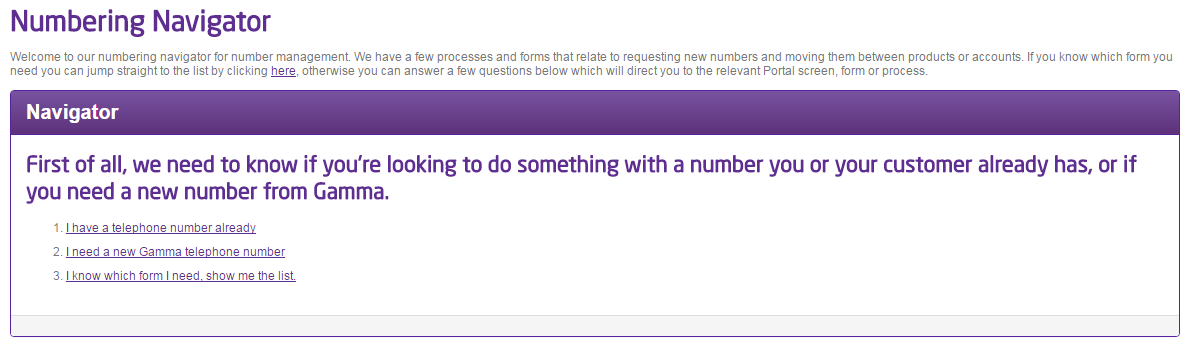
Select “I know which form I need, show me the list”
Step 3
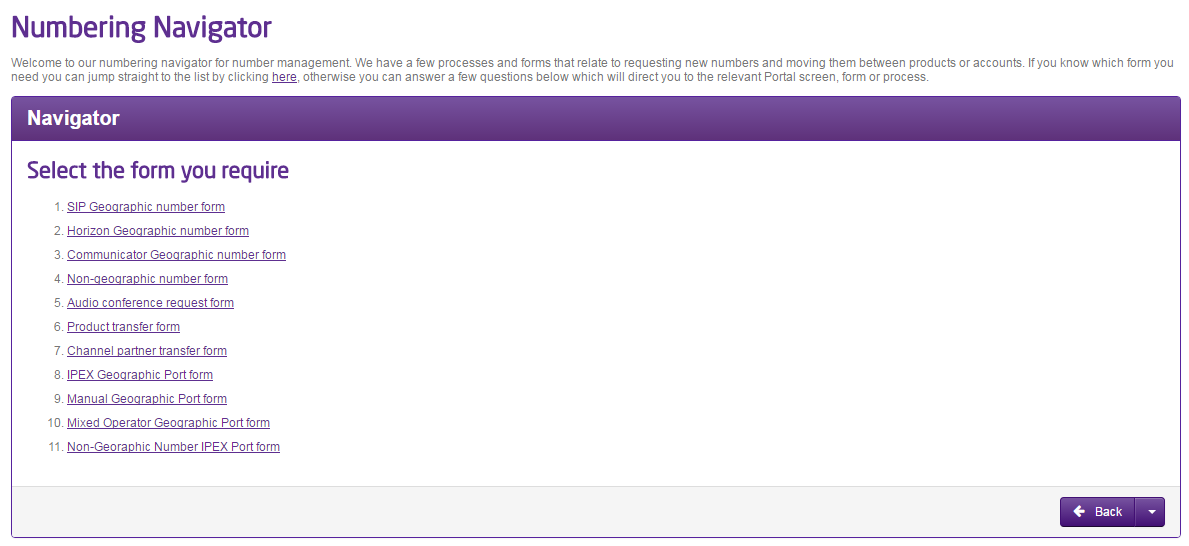
Select “Non-Geographic Number IPEX Port Form”
Step 4
Now you start completing your order
Channel Partner Account Details #
This section is where your details go (and not your end users), so put in the name of the person who is going to be managing the order for your company (this is probably going to be yourself), and the contact telephone number and email address.
Please note: When you place a port order on the portal, it will pre-populate with the contact details from your portal registration. Notifications will be sent to this email address alone.
Customer Details #
Enter your customer details in here. This is what will be sent to the Losing Communications Provider. If the port request is for a new address, record current (old) address in this section and new address including postcode in “Partner Notes” (section 15).
Order Details #
Select what termination is required, the current communications provider and expected minutes per month. You should also upload the Letter of Authority here.
You need to select what type of termination is required. The options that you’ve got for this are:
|
Termination Number(s) |
This is for a “simple translation”. This means you supply a number that you want the non-geographic number to point to. |
|
Wholesale Carrier |
This is an endpoint that you want the non-geographic number pointed to. We’ll provide all the support that is required for this, such as TAD numbers (these are Gamma numbers that we will use for translation of the non-geographic number) and provision accordingly for delivering your call from the non-geographic number to your desired located (jargon for call termination). |
Once you’ve clicked “Add Numbers”, the lay out of the page will change depending on what termination option you’ve selected.
Termination Numbers
Where you’ve already got a geographic number that you would like your non-geographic number to ring to (standard termination is the jargon that is used here), you’d select Termination Numbers. The page changes so that the non-geographic number is in its own text box, and has a termination number on the same row based on what you put in on step 4. Double check to make sure that the Termination Number is correct. Select the range holder from the drop down.
Wholesale Carrier
Where you have a carrier endpoint that you would like the non-geographic number to point to, you’d select Wholesale Carrier.
Enter your live endpoint/interconnect reference details and whether you want a Gamma TAD. A Gamma TAD is a Gamma geographic number that will be provisioned on the endpoint/interconnect so the non-geographic number can terminate on. A Gamma TAD will be emailed to you once your order has been accepted.
Enter the main telephone number and then all numbers that are under the main telephone number. You must specify if you want the numbers to port, cease or remain with the losing communications provider (the end user’s current communications provider).
Any numbers that are not attached to the main telephone number that you are wanting to port should be listed here as well.
Numbers #
Enter between 1 and 100 numbers for your port order (if you have more than 100 numbers you would have to submit multiple orders). Select the Range Holder of the number as well.
Supporting Comments #
This field is for any supporting information you believe may help with the port (more information is better than not enough information), and for where prompted earlier on in this guide.
When you click “Submit” you will be given a reference number for your order. This can then be managed using the IPEX and Manual Search facility in the Gamma Portal.
Losing Communications Provider Validation #
We will always send your port order off to the Losing Communications Provider first for validation. We should have an order either accepted or rejected within 24 hours.
If your order is a subsequent port and its accepted, we then forward this on to the Range Holder for their validation checks, which takes another 24 hours.
If we have not received an answer to your order within these timescales, we call this an “Unacknowledged Order”. We chase these orders up with the Losing Communications Provider or Range Holder.
Accepted Orders #
If your order is a Provide order, then you will only get one acceptance for an order. If the order is Subsequent then we need to get it accepted from the Losing Communications Provider AND the Range Holder. Once a port order is fully accepted you have your confirmed port date. You can change this date if you want using our Date Change process.
You will receive an email when your order is in an accepted state advising when you can complete pre port test calls for Gamma SIP Trunk termination, otherwise your order will go to Day of Port.
Rejected orders and Representing the orders #
A rejection can come from the Losing Communications Provider or Range Holder only for reasons on the actual order (and not to “save” a customer or because of debt reasons). If a port is rejected, you can edit and resubmit your order (“Represent” order). If you do this there are some tight timescales associated in getting the order back to the Losing Communications Provider and/or Range Holder. For non-geographic number port orders this is 24 hours from the time of rejection.
If you do not resubmit the order within 24 hours, then the order will cancel down and you will need to restart the order.
Resubmit an order #
You can edit and resubmit an order using our Non-Geographic Port Orders search. This is available on the Gamma Portal under No Search.
If you don’t have this option, contact your Portal Administrator (Help and Support and Portal Administrators) or contact your Internal Account Manager.
Once you’ve located your Port Order you can click on the Order ID to load up the order. From here you can Add Notes by clicking the “Add Note” button. Enter the details you want to edit as a note and this will update your port order owner with the details so that they can make sure that it is represented with the losing communications provider in time.
