
What is it? #
The Distribution control enables a customer to distribute calls across a number of sites on weighted basis.
The feature has two modes of operation:
Random distribution
Serial Distribution
Random distribution #
Use a Distribution control with the Node type set to Random to match call volumes to groups of agents with different resource levels. For example, you might have 5 staff answering calls with 3 at one site and 2 at another. The Distribution control could be used to split the calls 60/40 to ensure the call volume is matched to the resources available.
How it works #
The Distribution Control or Percentage Distribution algorithm is a randomised algorithm that works with no timeout, i.e. the algorithm is not reset at the end of each day or week or month. *please note this is based on the
In terms of the random nature of the algorithm, the customer should consider the following.
Percentage distribution will deliver calls to multiple end points and distribute then according to the percentage value defined for each Distribution node by the customer. Based on the percentage value defined in the Distribution node, the node is allocated a range of values, from 1 to 100. The below example explains further.
A working example: #
If Node A is set to 80% and Node B is set to 20%. #
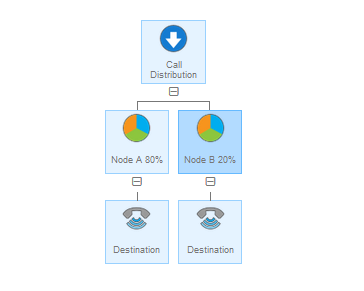
Then… #
Node A will be allocated the values of 1 through to 80 by the platform.
Node B will be allocated the values of 81 to 100 by the platform.
When a call arrives in the network, the platform needs to decide as to which Node the call is delivered to. It does this by randomly generating a value between 1 and 100. Based on the value generated the call is delivered to one of the two Nodes.
If the system randomly generates the value 79, the call will be delivered to Node A.
If the system then randomly generates the value 97, the call will be delivered to Node B, and so on.
As there are 4 times the number of values allocated to Node A in this example, therefore the probability is that more calls will be delivered to it than Node B. Over time we will see 4 times as many calls being delivered to Node B, or 80% of all calls.
The time over which this algorithm works has to work is important. The more calls that are delivered, the more accurate the algorithm will be (this is where the law of large numbers comes into play. This link describes this in detail – http://en.wikipedia.org/wiki/Law_of_large_numbers).
Serial Distribution #
Use Serial distribution where you need to spread incoming calls around a group of people so they each take a turn at answering calls. In this case each call goes to the next line in the series defined in the call plan. For example, in the call plan below the first call will route to the line with sequence number 1, the next call to sequence number 2 and so on. Once the highest sequence number is reached the routing will start at 1 again.
Note, for both Random and Serial if, the destination returns busy then the caller will simply hear an engaged tone, even if the other lines are free. If you require calls to hunt for an available destination, it is most likely a Hunt Group will be a better option.