
Skip to content
  • Academy KB Home Redesign
  • Broadband Home
  • CCaaS
  • Channel Partner Support
  • Circle Loop Home
  • Collaborate
  • Connectivity
  • Courses
  • Documentation
  • Ethernet
  • FibreXchange
  • FUSION IoT
  • Gamma AI Concierge
  • Gamma Plus
  • Gamma SIP for Cloud Connect
  • Gamma SIP for Cloud Connect
  • Gamma SIP for Genesys Cloud
  • Gamma SIP Global Communications Enablement
  • Gamma SIP Trunks for Genesys Cloud
  • Hannah – Homepage WIP
  • Home
  • Horizon
  • Horizon Contact
  • Horizon Forms
  • Horizon Service Description Home
  • Horizon with Webex
  • Inbound
  • iPECS
  • Knowledge Base Intro
  • Knowledgebase Directory
  • LoginPress
  • Microsoft
  • Microsoft Teams Direct Routing Home
  • Microsoft Teams Operator Connect
  • Mobile
  • Multiple KB
  • My Courses
  • No Access
  • No active page
  • Numbering and Porting
  • Phoneline+
  • Product Homepage
  • Quick Download Button
  • Release Notes
  • Release Notes
  • SIP Home
  • Test
  • UCaaS
  • User Account
  • Voice
  • Voice Enablement
  • Webex for Gamma
  • Webex for Gamma Release Notes
  • Gamma Academy Knowledge Base
Gamma Academy Knowledge Base
  • Cloud Calling and Collaboration
    • Webex for Gamma
    • Horizon with Webex
    • Horizon
    • Phoneline+
    • Operator Connect
    • Direct Routing
    • Inbound
    • Akixi CX Analytics
    • Red Cactus
  • Connectivity and Networking
    • Numbering and Porting
    • Broadband
    • FibreXchange
    • Ethernet
    • SIP Trunking
    • Gamma FUSION IoT
  • CX
    • Horizon Contact
    • AI Concierge
  • Mobile Services
    • Gamma Mobile
  • CyberSecurity
    • SafeWeb
  • Partner & Portal Support
Gamma Academy Knowledge Base

Provisioning and In-Life Changes

  • Before Ordering SIP
    • Gamma Combined Solution Customer Requirement Form
    • Number Requirements
    • Equipment Conformance List
  • Ordering SIP on the Gamma Portal
    • Place a New SIP Order
  • In-Life Configuration
    • Add or Remove Numbers to/from SIP
    • Migrating a Standard Build to Enhanced
    • Fraud Management
    • Call Line Identity (CLI) Rules
    • Change Access Type
    • Update Customer Premises Equipment (CPE)
    • Update IP Address
    • Privacy Settings
    • Codecs & Packetisation
    • Channels
    • Cease an Endpoint
    • Cease Call Manager
  • Service Acceptance Testing
    • Service Acceptance Testing Introduction
    • Stage 1 – SIP Trunking Acceptance Testing
    • Stage 2 – Enhanced Build Testing
    • Stage 3 – Capacity Acceptance (Load test)

Features

  • CLI Flexibility
  • Call Barring
  • Call Diverts

Advanced Features

  • [Legacy] Microsoft Lync / Skype for Business
  • 3cx SIP Configuration
  • SIP Trunk Call Manager Setup
    • Create or Upgrade a New SIP Trunk Call Manager Account
    • Bulk App User Creation
    • Create Users and Profiles
    • End User Call Management Features
  • SIP Trunk Call Manager (STCM) Advanced Features
    • End User Call Management – Additional Features
    • STCM Call Queue Settings & Behaviour
    • STCM Distribution
    • STCM Advanced Statistics & Push Reports
    • STCM Customer Fields
    • STCM Business Continuity
    • STCM Replace Announcements
    • STCM Limit Caller Admissions (LCA)
    • STCM Diverts Guide
    • STCM Setup Notifications for Billable Options
    • STCM Call Plan Validation Errors

Technical Support

  • Diagnosing Faults
    • SIP Health Check
    • Advanced Diagnostics
    • I Have a Problem With Call Quality
    • I Have a Problem With Call Routing Issues
    • Raising a fault
  • Technical Information
    • SIP Infrastructure Upgrade
    • SIP Trunking Infrastructure Upgrade
    • MSX 11&12 IP Address Change Process Guide for Customers
    • PCI Compliance
    • Nuisance and Malicious Calls
    • Hacking
    • DTMF
    • Fax
    • Mass Calling Event
    • Failover on Resilient SIP Designs
  • International Support
    • International SIP FAQ Guide
    • International Equipment Conformance List

Service Description

  • SIP Service Description

T&Cs and SLAs

  • Gamma SIP Trunks Terms and Conditions
  • SIP and Microsoft Teams Phone SLAs
  • SIP Trunks Voice Traffic Policy

SIP SLAs

  • Gamma SIP Trunks – 2025 SLAs
  • Gamma SIP Trunks – 2024 SLAs
  • Gamma SIP Trunks – 2023 SLAs
  • Gamma SIP Trunks – 2022 SLAs
  • Gamma SIP Trunks – 2021 SLAs
  • Gamma SIP Trunks – 2020 SLAs
  • Gamma SIP Trunks – 2019 SLAs
  • Gamma SIP Trunks – 2018 SLAs
  • Gamma SIP Trunks – 2017 SLAs
  • Home
  • Home
  • SIP Trunking
  • Advanced Features
  • SIP Trunk Call Manager Setup
  • Create or Upgrade a New SIP Trunk Call Manager Account
View Categories

Create or Upgrade a New SIP Trunk Call Manager Account

Upgrading an existing SIP Trunk to STCM #

Locate the STCM service #

On the Gamma portal, go to: Provisioning & Service Management > Voice Connectivity > Gamma SIP Trunks > Service Management.
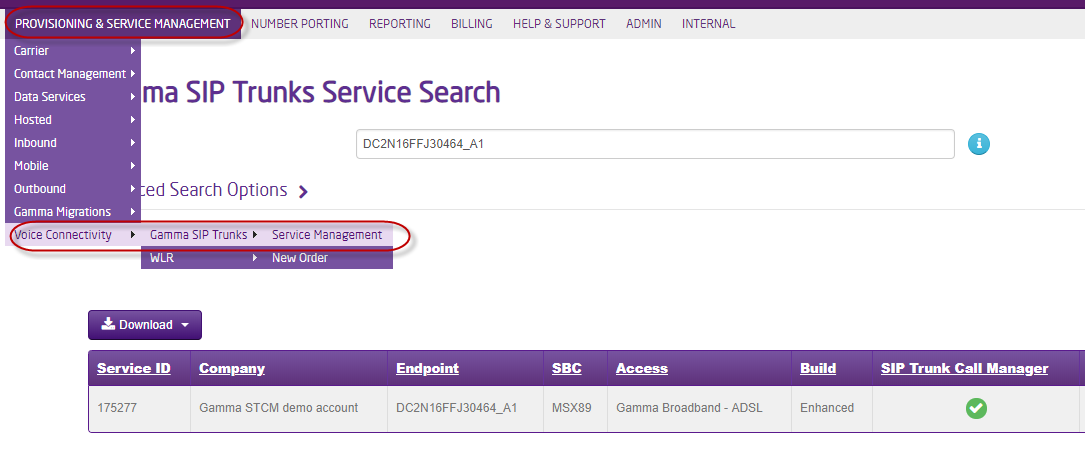
Search for the SIP Trunk service. *Tip the Endpoint will be the quickest method, but you can also use the customer name or a DDI.
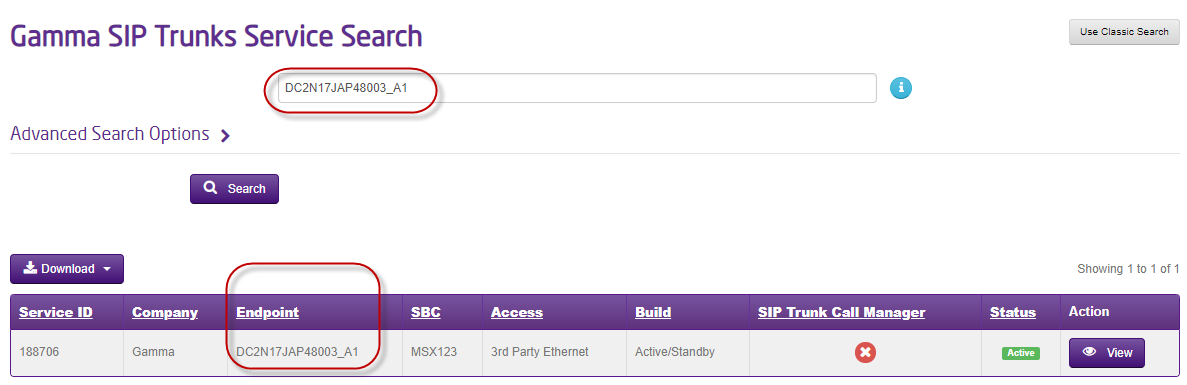
View the service #

Select View

Make the upgrade #

Under the Actions Menu, select Upgrade to SIP Trunk Call Manager Service
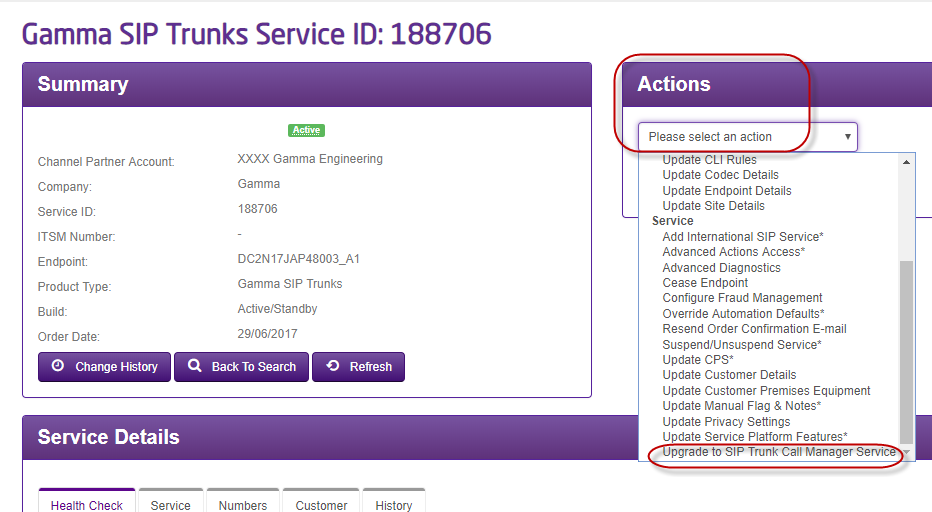
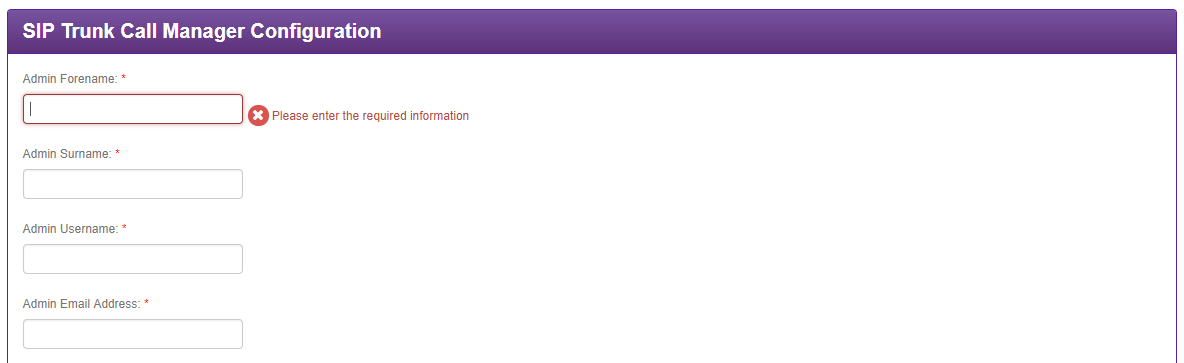
You will then be taken to the set-up page

You can now create the account, by populating the account details. *Tip – the user details sets up the first admin for the account. Additional admins and other users can be created later on.
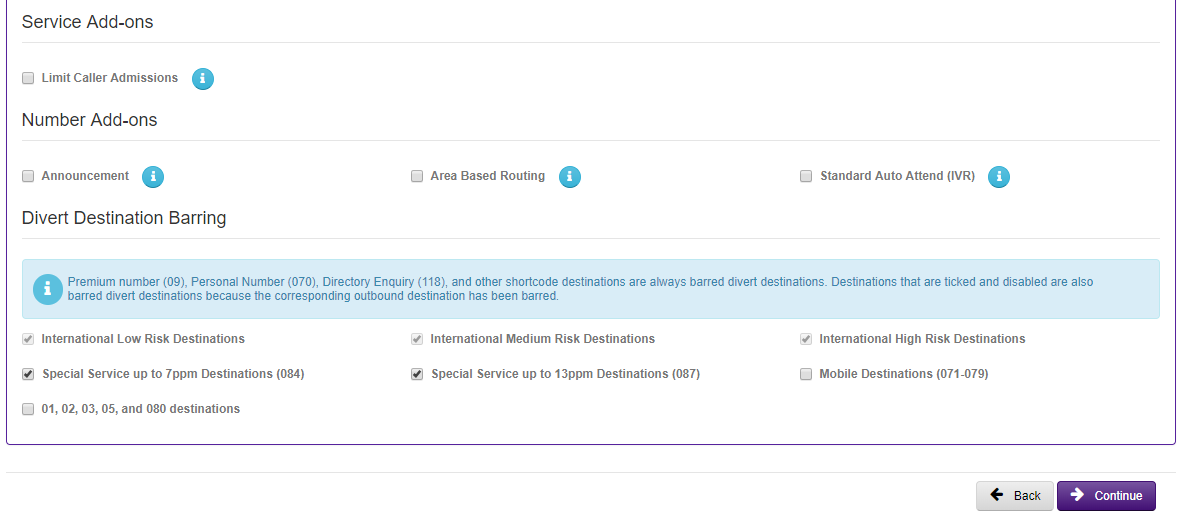
You can now also select any optional required features. *Tip – at this stage you are just making these available in the end customer portal. An admin will also need to make these available to be used when they create other users. Once used, then then become chargeable.
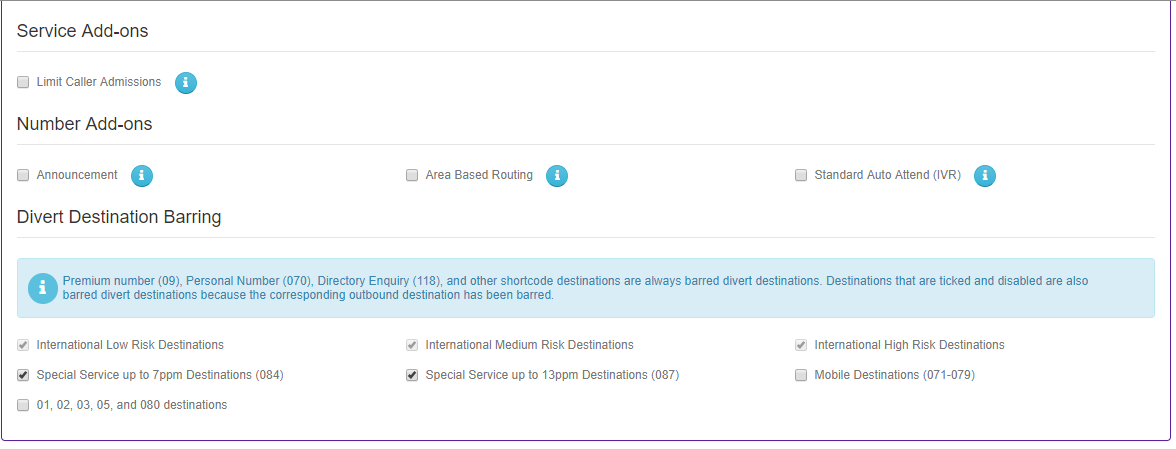
Agree to the T&C’s

And click Continue to submit the upgrade.

Updating the SIP Service to SIP Trunk Call Manager will take a short time to complete. Although this change should not be service-impacting, it is recommended that this change is made when the SIP service is quiet.

For new SIP orders #

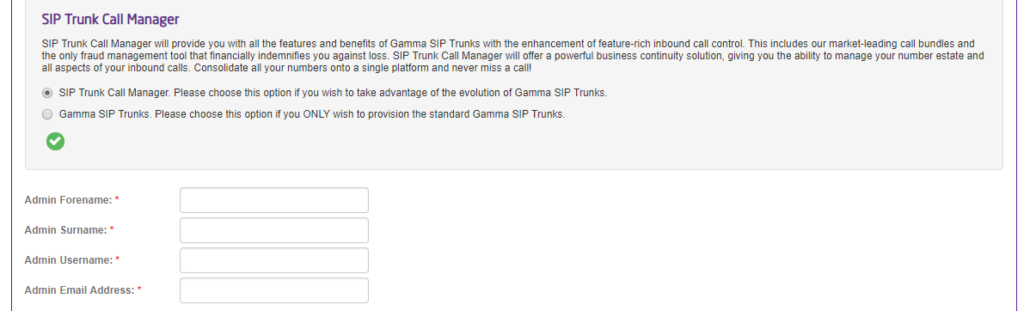
When you get to section of your SIP order you can select to include SIP Trunk Call Manager. As per below screen shot:

If you choose yes you will be presented with the following screen to complete. You should do this as per steps 6-7 above.
image_pdf
Updated on 10/01/2024
End User Call Management FeaturesBulk App User Creation
Contents
  • Upgrading an existing SIP Trunk to STCM
    • Locate the STCM service
    • View the service
    • Make the upgrade
  • For new SIP orders

Copyright © 2026 -  Gamma Telecom Ltd

Gamma API
We use cookies to measure performance and make improvements to this service. This includes page views, device/browser, location, and page interactions. We do not collect any information you upload to this site. By agreeing, you consent for your data to be used for this purpose.
