
View Service #
How to check view mobile services
Step 1
From the Gamma Portal go to Provisioning and Service Management >> Mobile >> Live Service Management.
Step 2
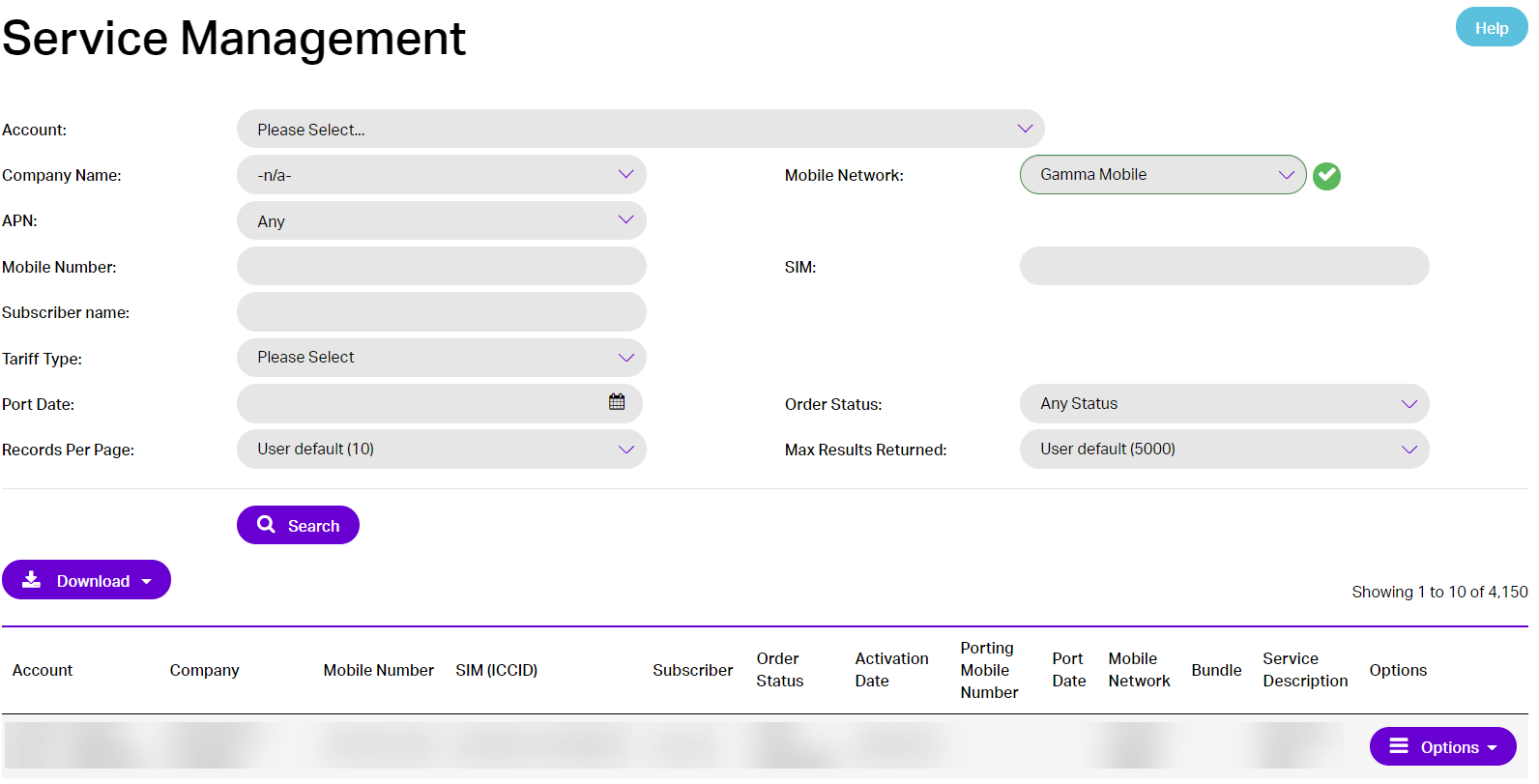 Select the Partner Account and search for the Mobile Number(s).
Step 3
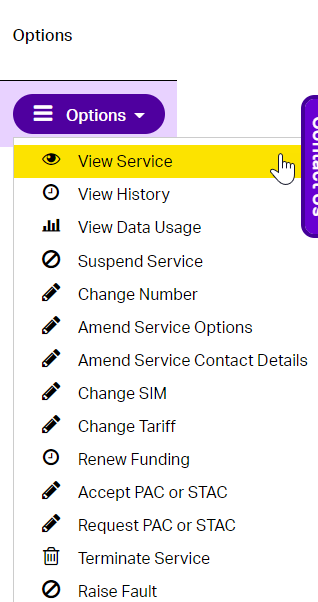
Select “View” from the drop-down “Options” menu next to the Mobile Number(s).
Step 4
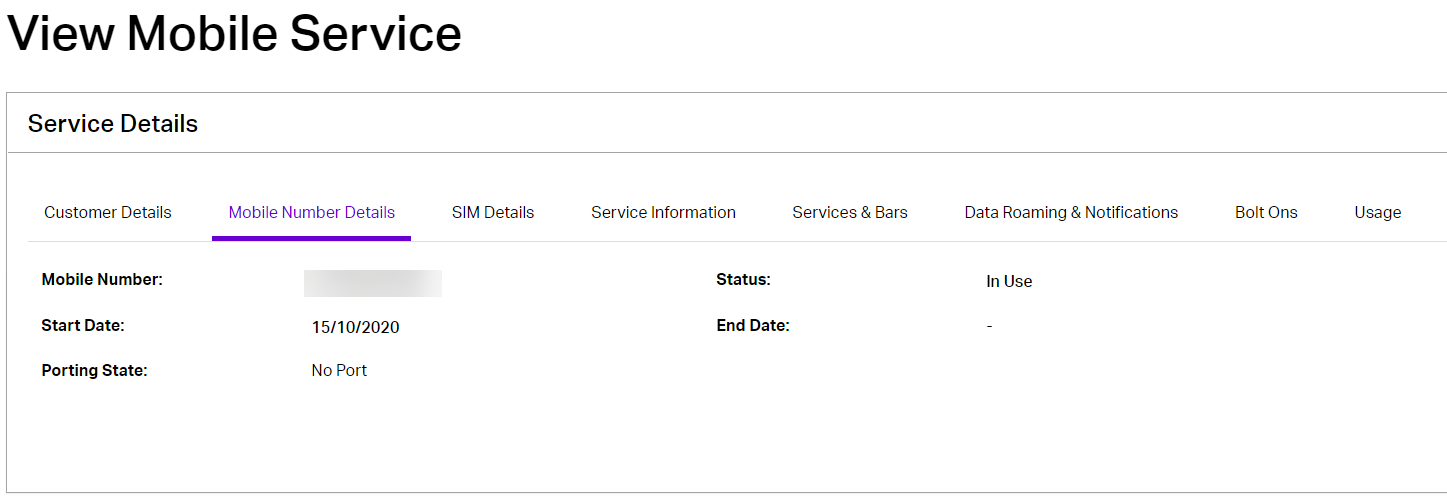
This will take you to the View Mobile Service page that will give you an overview of the Mobile Number(s) Details including the IMSI, IMEI and PAC.
Step 5
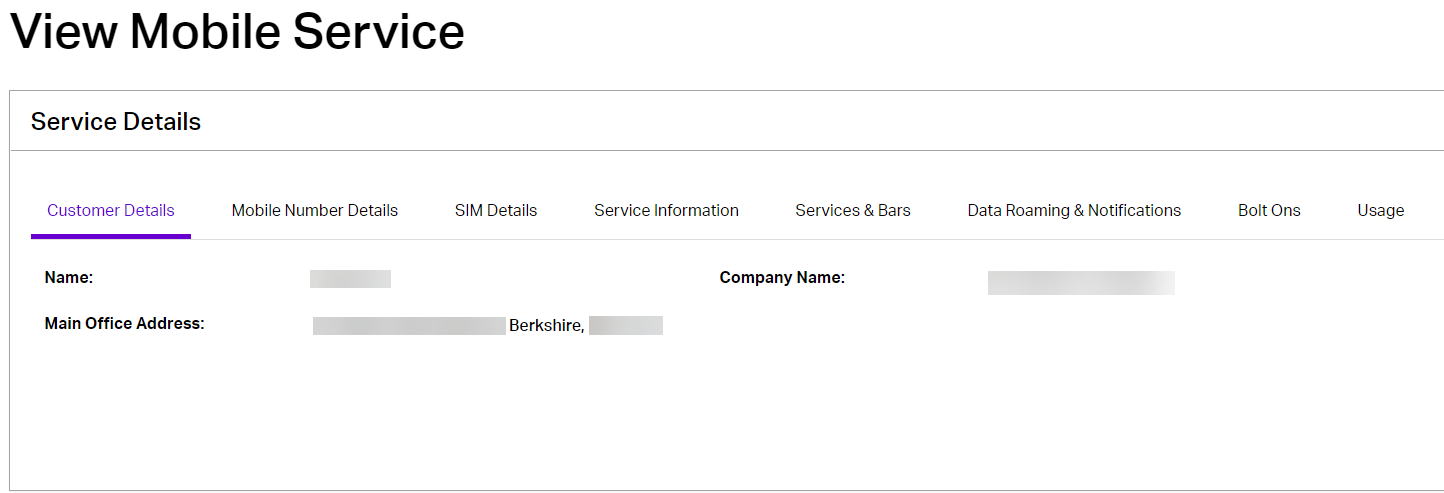
Using the tabs along the top of the View Mobile Service page you can also select the Customer Details tab, this page will show the Name, Company Name and Main Office Address.
Step 6
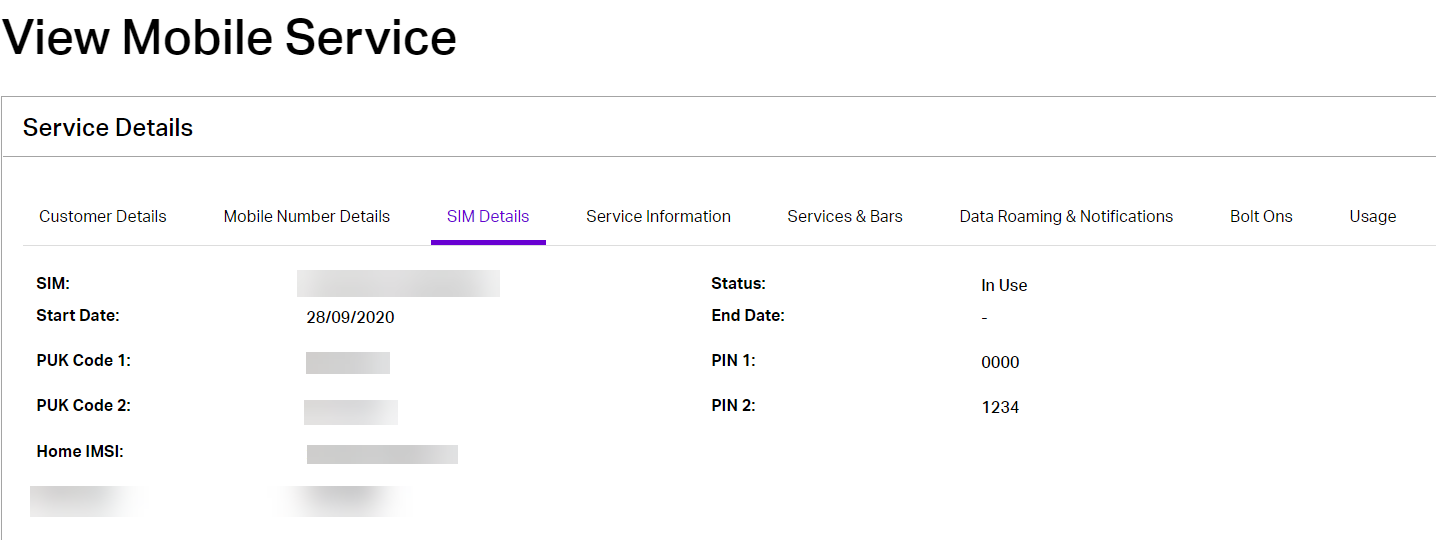
On the SIM details tab, you will see the SIM (ICCID) number, the Network, Start dates, Status, PUK and PIN codes.
Step 7
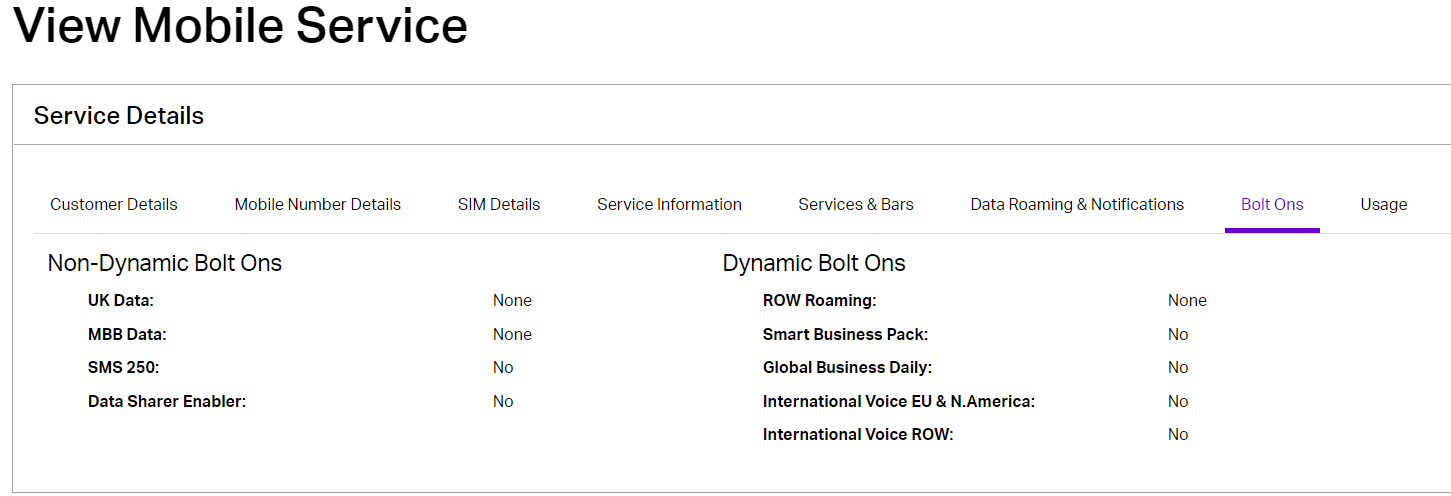
On the Bolt-Ons Details tab, you can see the different Dynamic and Non-Dynamic Bolt-Ons. Dynamic bolt-ons are only charged when the associated traffic is used.
Step 8
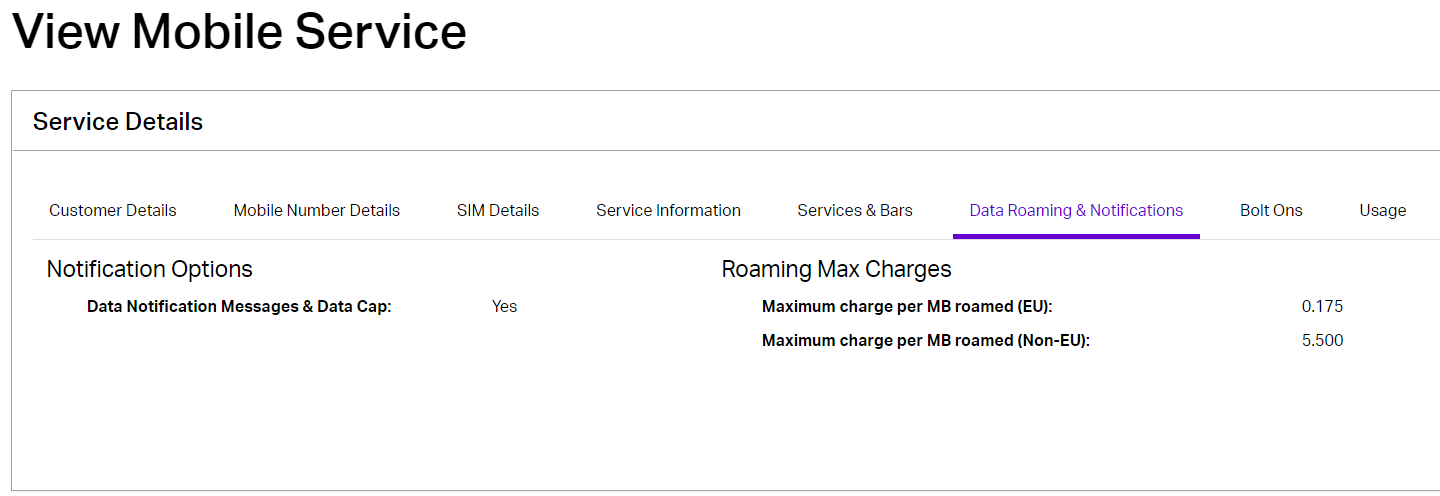
On the Data Roaming Notifications tab, you will see Data notifications are active.
Step 9
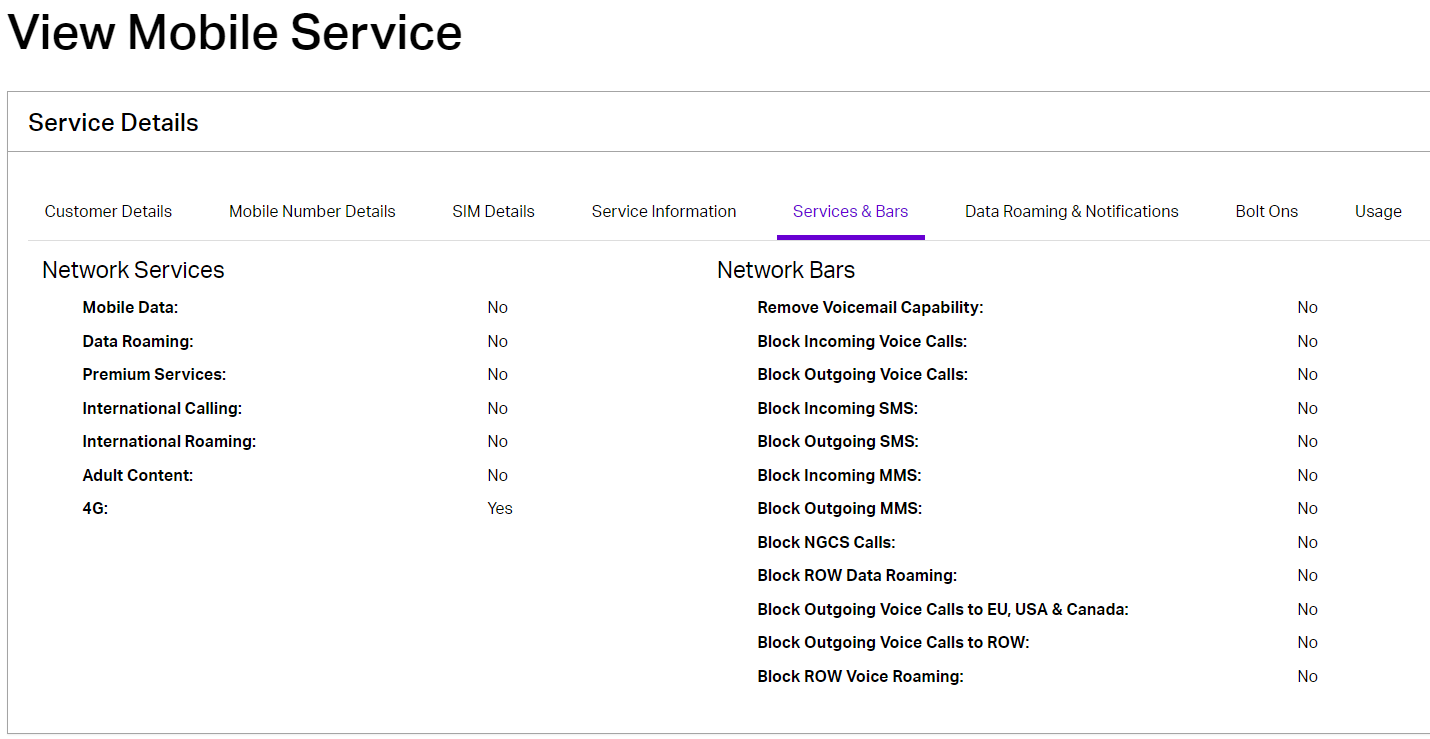
On the Services & Bars tab, you will see the Networks Bars and Services that are active.
Check Data Usage #
How to check data usage
Step 1
From the Gamma Portal go to Provisioning & Service Management >> Mobile >> Live Service Management.
Step 2
Select the Partner Account and search for the Mobile Number(s).

Step 3
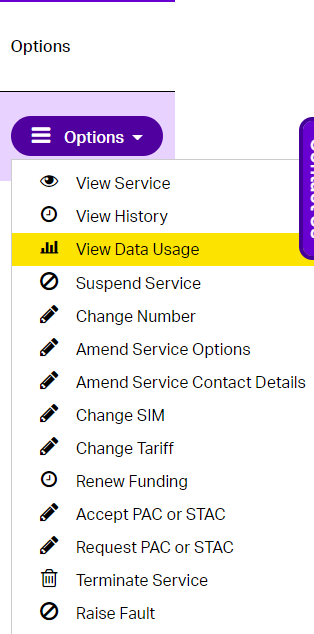
Select “View Data Usage” from the drop-down “Options” menu next to the Mobile Number(s).
Step 4
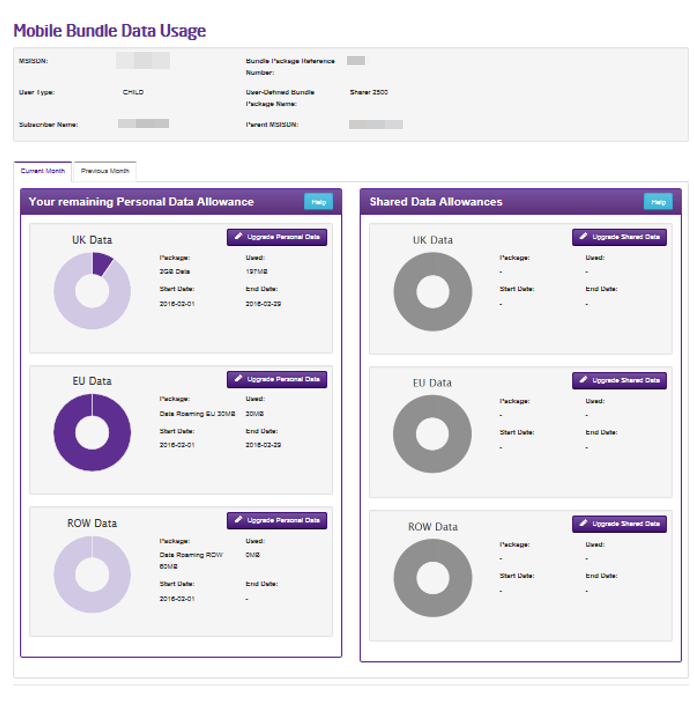
Only where the user has an individual bolt-on or a shared bolt-on is that bolt-on highlighted. The usage shown is just the usage consumed from the bolt-on. PAYU or out of bundle data is not shown.
On the Mobile Bundle Data Usage page you will be able to check and monitor data usage both personal and shared. The picture to the right demonstrates this.
- On the UK Data section you can see the Bolt-On has been partially used, indicated by a dark purple segment.
- On the EU data section, you can see by the full ring being dark purple that the Bolt-On has been completely used.
- On the ROW Data You can see that the Bolt-On is unused.
- You can see from the greyed out rings on the Shared Data Allowances that there are no shared Bolt-Ons for this user.
Usage Management #
Controls #
The following controls have been introduced to help Channel Partners manage usage:
Tab Name | Control Name | Description |
Data | Combined UK & EU Data | Control enables Channel Partners to “Alert” or “Alert & Cap” when usage (within the UK & EU) reaches a given threshold for the selected Mobile Number. Supported thresholds (GB): 0.25GB to 5GB (in increments of 0.25GB) 5GB to 15GB (in increments of 1GB) 15GB, 20GB, 30GB & 40GB to 2000GB |
Data | ROW Data | Control enables Channel Partners to “Alert” or “Alert & Cap” when usage (outside the EU) reaches a given threshold for the selected Mobile Number. Supported thresholds (GB): 0.25GB to 10GB (in increments of 0.25GB) |
Voice | Combined UK & EU Voice | Control enables Channel Partners to “Alert” and/or “Cap” when usage (within the UK & EU) reaches a given threshold for the selected Mobile Number. Supported thresholds (in Minutes): – Any value greater than 30 Notes: – An alert will be sent when the Cap threshold is reached – This control is not currently supported on the Gamma Mobile Network |
Voice | ROW Voice | Control enables Channel Partners to “Alert” and/or “Cap” when voice usage (outside the EU) reaches a given threshold for the selected Mobile Number. Supported thresholds (in Minutes): – Any value greater than 30 Notes: – An alert will be sent when the Cap threshold is reached – This control is not currently supported on the Gamma Mobile Network |
Dynamic Bolt-Ons | Smart Business Pack – NGCS | Control enables Channel Partners to specify the maximum number of automated NGCS Top-ups which should be allowed for the selected Mobile Number. Automated NGCS Top-ups occur at 250-minute intervals. As such, UK originated calls to NGCS number ranges will be blocked after: 250 mins (where a value of 1 is selected) 500 mins (where a value of 2 is selected) 750 mins (where a value of 3 is selected) etc. Alerts are triggered both when the final top-up is started and has been entirely consumed. This control is designed to work in conjunction with the Smart Business Pack bolt-on. NB: This control is not currently supported on the Gamma Mobile Network |
Dynamic Bolt-Ons | International Voice to EU, USA and Canada | Control enables Channel Partners to specify the maximum number of automated “International Voice to EU, USA and Canada” Top-ups which should be allowed for the selected Mobile Number. Automated “International Voice to EU, USA and Canada” Top-ups occur at 250 minute intervals. As such, UK originated calls to EU, USA and Canada will be blocked after: 250 mins (where a value of 1 is selected) 500 mins (where a value of 2 is selected) 750 mins (where a value of 3 is selected) etc. Alerts are triggered both when the final top-up is started and has been entirely consumed. This control is designed to work in conjunction with the “International Voice to EU, USA and Canada” bolt-on. NB: This control is not currently supported on the Gamma Mobile Network |
Dynamic Bolt-Ons | International Voice to ROW excl. Sat, Cuba | Control enables Channel Partners to specify the maximum number of automated “International Voice to ROW excl. Sat, Cuba” Top-ups which should be allowed for the selected Mobile Number. Automated “International Voice to ROW excl. Sat, Cuba” Top-ups occur at 250-minute intervals. As such, UK originated calls to ROW will be blocked after: 250 mins (where a value of 1 is selected) 500 mins (where a value of 2 is selected) 750 mins (where a value of 3 is selected) etc. Alerts are triggered both when the final top-up is started and has been entirely consumed. This control is designed to work in conjunction with the “International Voice to ROW excl. Sat, Cuba” bolt-on. NB: This control is not currently supported on the Gamma Mobile Network |
Dynamic Bolt-Ons | Global Business Daily – Data | Control enables Channel Partners to prevent any data usage beyond the daily data allowance. The Global Business Daily bolt-on consists of the following daily data allowances: Business Zone – 500MB Zone C – 50MB Zone D – 5MB This control is designed to work in conjunction with the “Global Business Daily” bolt-on. |
Dynamic Bolt-Ons | Global Business Daily – Voice | Control enables Channel Partners to limit voice usage beyond the daily voice allowance. The Global Business Daily bolt-on consists of the following daily voice allowances: Business Zone – 200 mins Zone C – 20 mins Zone D – 5 mins This control is designed to work in conjunction with the “Global Business Daily” bolt-on. NB: This control is not currently supported on Connect services |
NB: The “ROW Data” and “Global Business Daily – Data” cannot be provisioned together – they are mutually exclusive.
Implementation #
Where a customer has both EU data notifications & capping enabled and then provisions a roaming Usage Management control, their EU data capping preferences will be overridden in the respective zone. For example, if the “Combined UK & EU Data” control is provisioned and customer roams in the EU, the £45 cap will not apply – the customer will be able to consume data up to their defined Usage Management allowance (at which point data will be capped). However, if the same customer does not have a “ROW Data” control provisioned and roams outside the EU, they will be able to use data up to the £45 cap.
Please note, settings can be edited repeatedly during the month, but all changes to Usage Management settings are queued until the next billing period and will not take effect until the 1st of the following month. If a service has a status of Suspended on the 1st of the month, any queued Usage Management settings will be skipped. Such Usage Management settings will remain Pending until the first billing period following service reactivation.
All Data is home routed, therefore data-based Usage Controls will work in real-time. However, Voice controls are subject to latency (of on average 30-40 minutes).
Portal Screens #
How to access Usage Management settings #
Step 1
From the Gamma Portal go to Provisioning & Service Management >> Mobile >> Live Service Management
Step 2
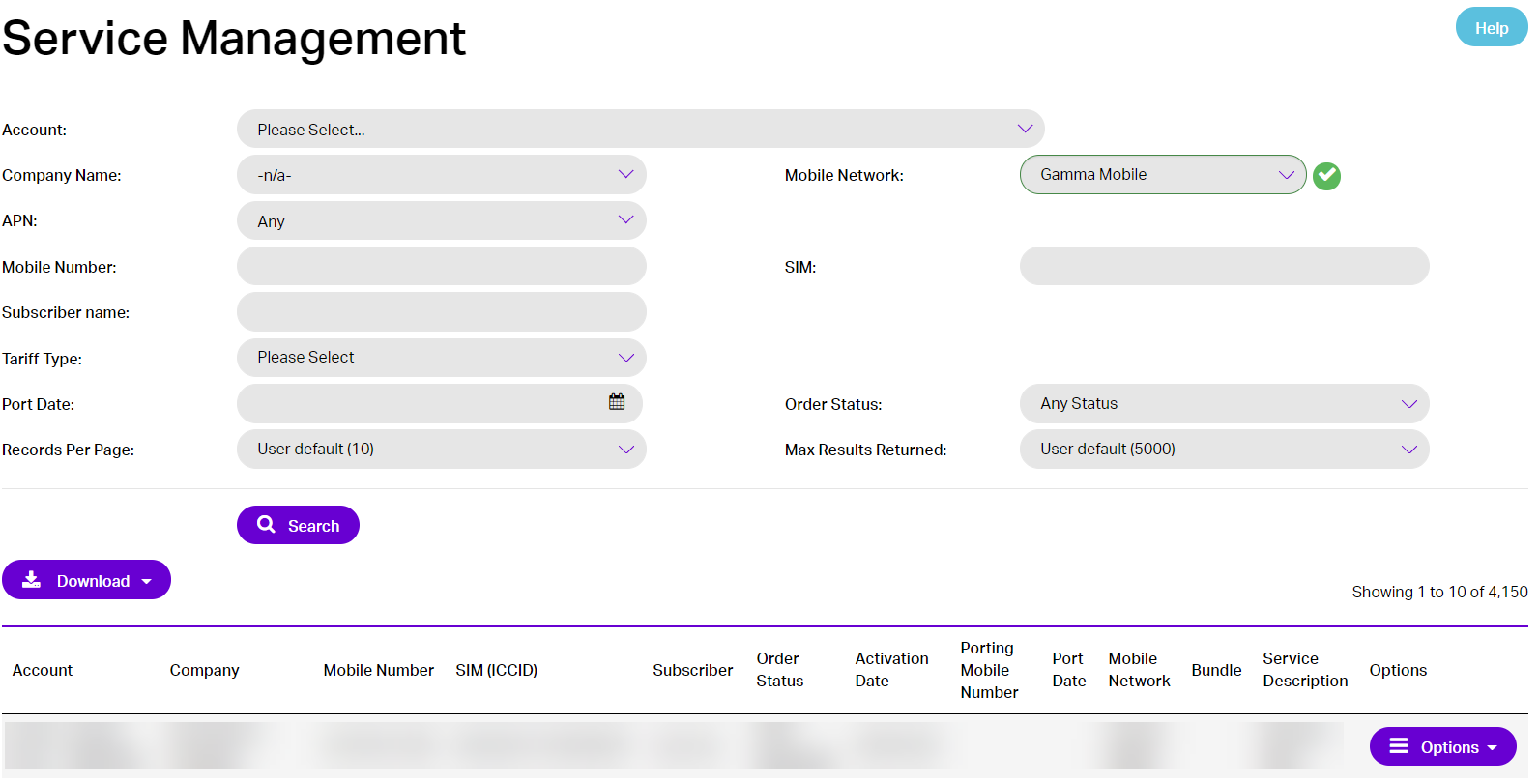
Select the Partner Account and search for the Mobile Number(s).
Step 3
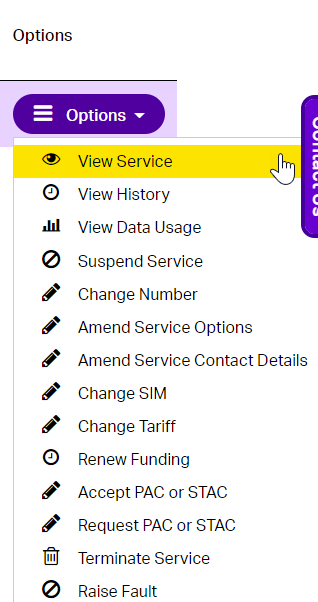
Select “View Service” from the drop-down “Options” menu next to the Mobile Number(s).
Step 4
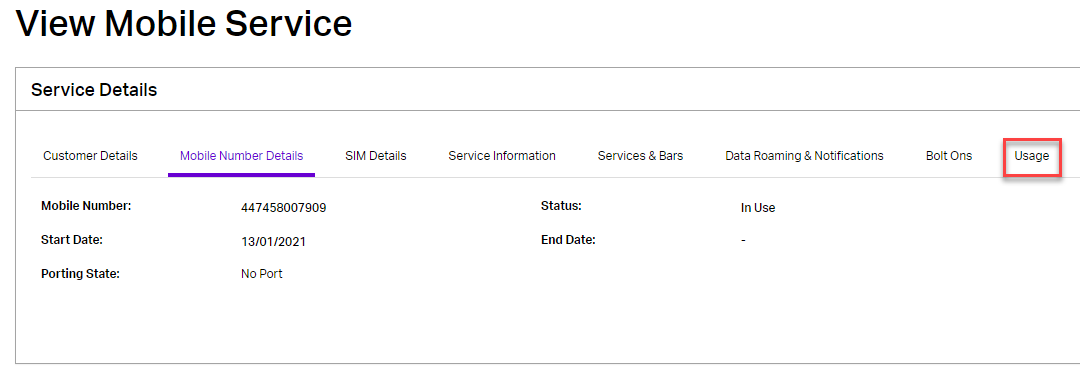
Select the “Usage” tab on the View Mobile Service screen
Step 5
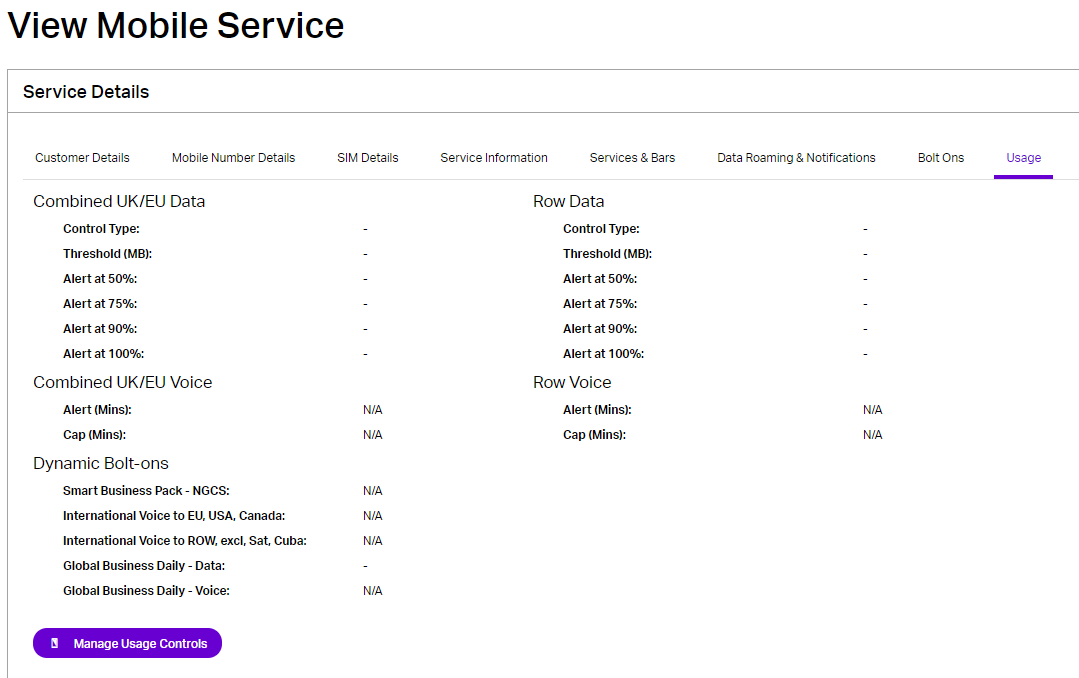
The “Usage” tab provides details of the Usage Management controls which are currently active on the network.
NB: Any queued Usage Management settings are not visible on this tab.
Step 6
Select the “Manage Usage Controls” button to see all Usage Management controls (including queued settings, email/SMS notification preferences) for the selected Mobile Number.
Usage Management Screen #
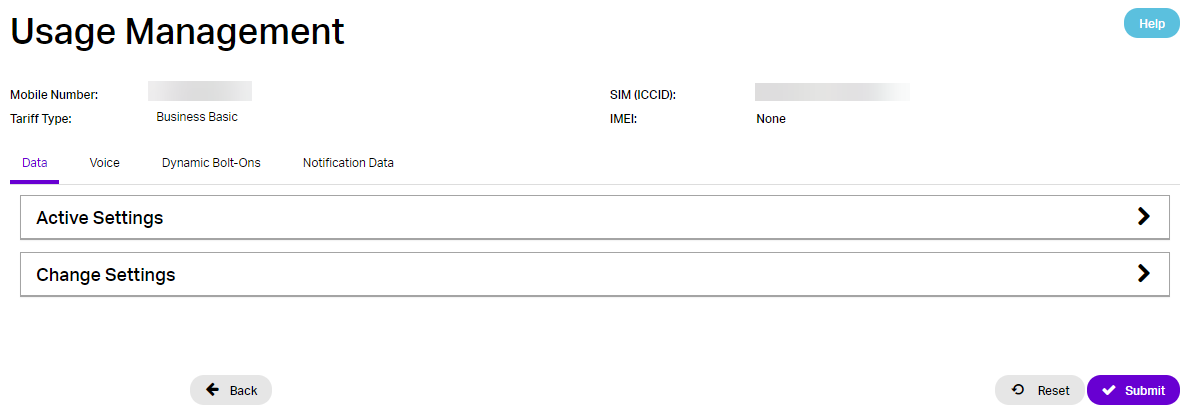
The Usage Management screen consists of:
- A top-panel which displays the Mobile Number, SIM (ICCID), Tariff Type and IMEI for the selected mobile service
- A tabbed container with the following different tabs:
- Data
- Voice
- Dynamic Bolt-Ons
- Notification Data
- A Back button – to return to the Live Service Management screen
- A Reset button – to undo any changes which have been made since the screen was loaded
- A “Disable Usage Management Controls” button – to disable all controls for the remainder of the current month
- A “Submit” button – to commit any changes which have been made since the screen was loaded
Usage Management – Data Tab #
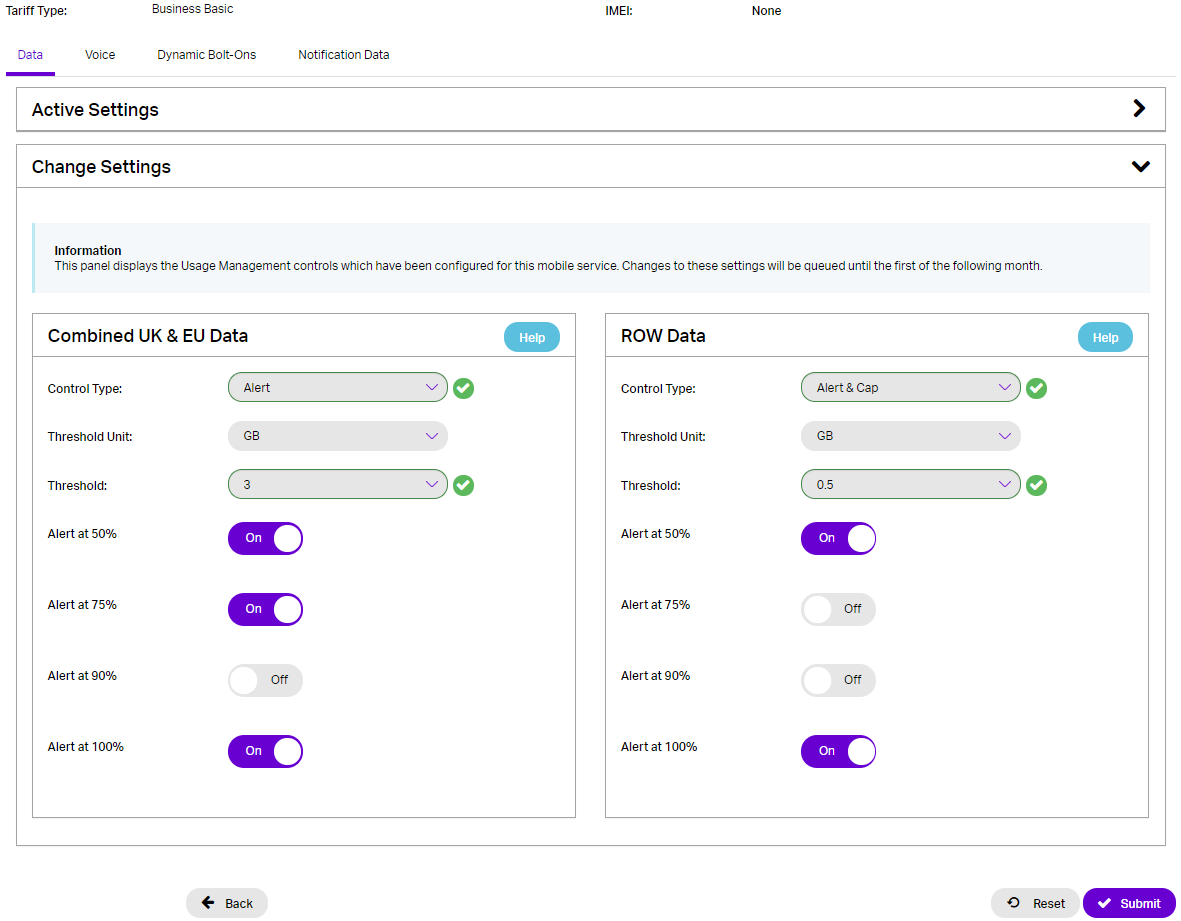
The “Data” tab on the “Usage Management” screen consists of two minimised accordion panels, named “Active Settings” and “Change Settings”, which are minimised by default.
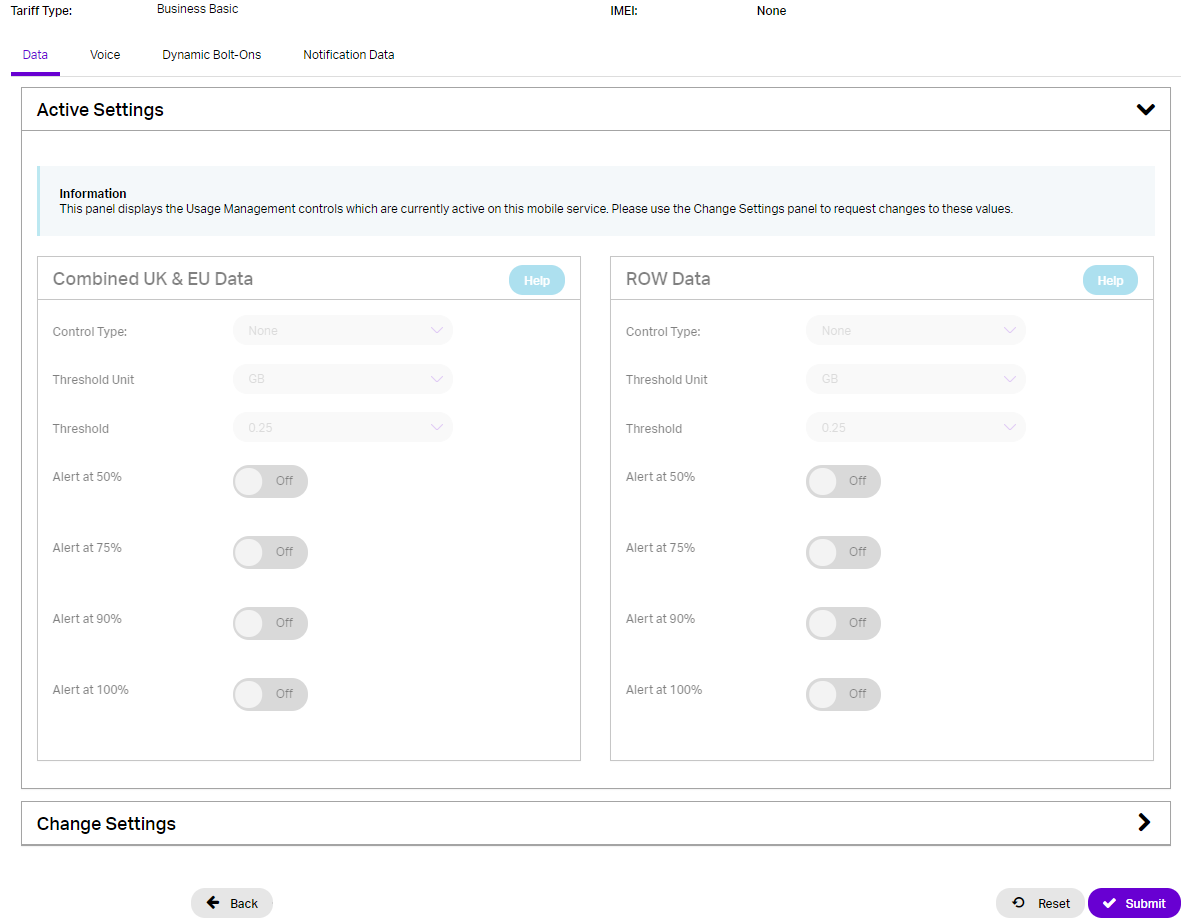
The “Active Settings” panel, when expanded, displays the current status of the “Combined UK & EU Data” and “ROW Data” controls on the network (in read-only panels):
The “Change Settings” panel, when expanded, displays editable panels for the “Combined UK & EU Data” and “ROW Data” controls, with either:
i) the current settings on the network (where no changes have been requested previously this month)
ii) settings which have been requested earlier this month, but are currently queued until 1st of following month
Usage Management – Voice Tab #
The “Voice” tab on the “Usage Management” screen consists of two minimised accordion panels, named “Active Settings” and “Change Settings”, which are minimised by default.
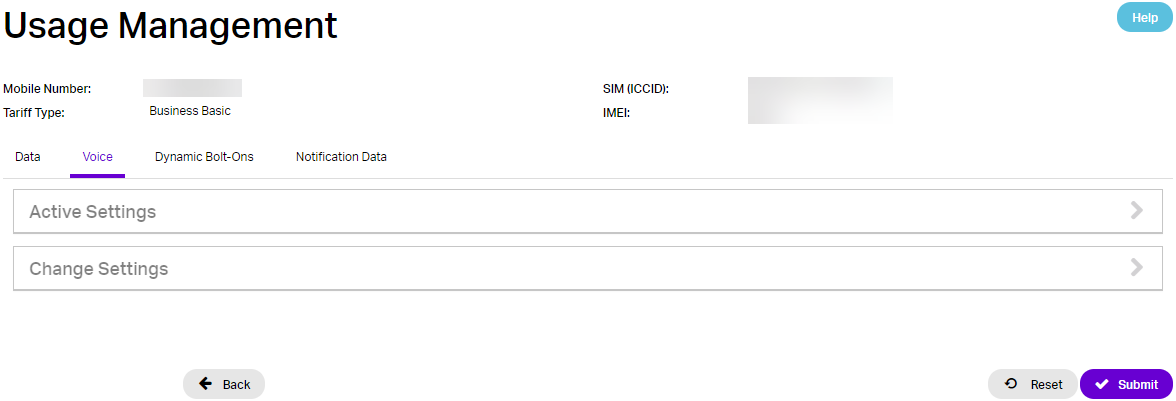
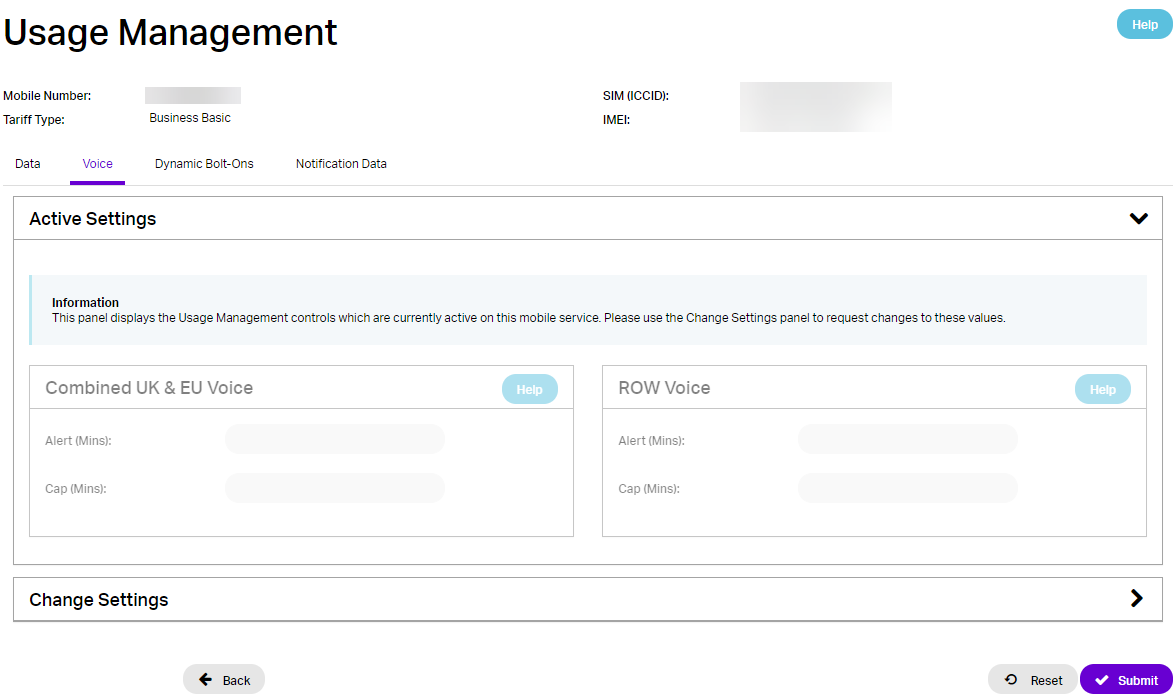
The “Active Settings” panel, when expanded, displays the current status of the “Combined UK & EU Voice” and “ROW Voice” controls on the network (in read-only panels):
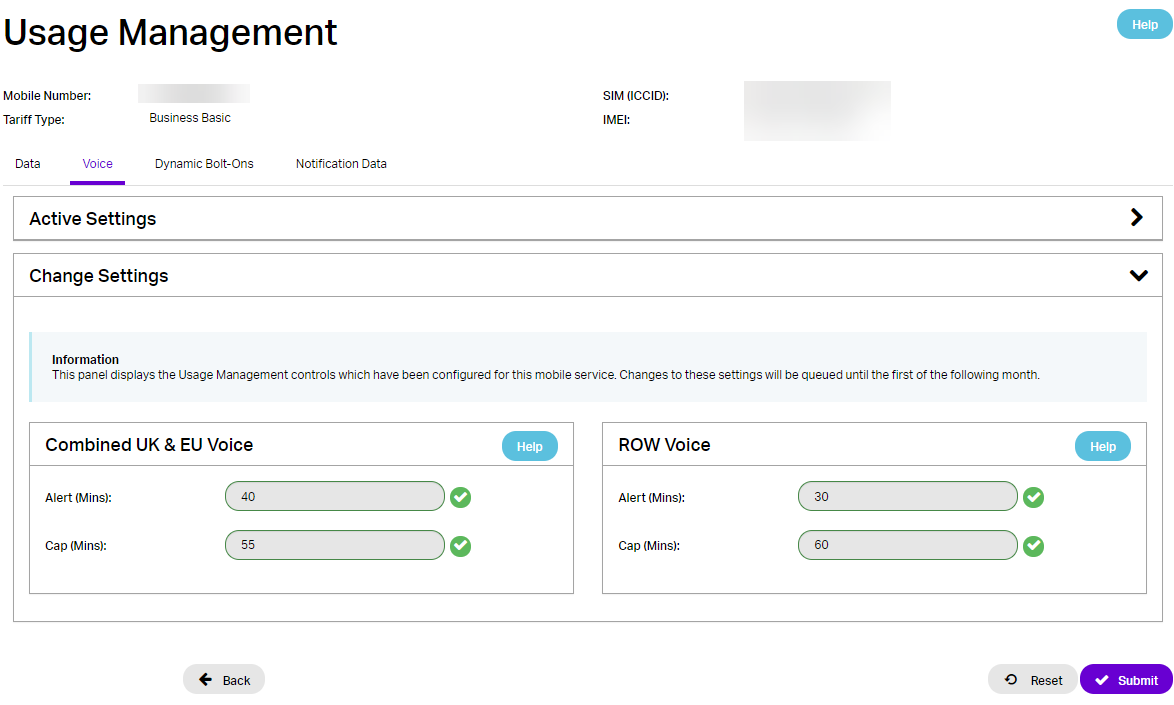
The “Change Settings” panel, when expanded, displays editable panels for the “Combined UK & EU Voice” and “ROW Voice” controls, with either:
i) the current settings on the network (where no changes have been requested previously this month)
ii) settings which have been requested earlier this month, but are currently queued until 1st of following month
iii) these settings will appear greyed out if the subscriber is provisioned against the Gamma Mobile Network
Usage Management – Dynamic Bolt-Ons Tab #
The “Dynamic Bolt-Ons” tab on the “Usage Management” screen consists of two minimised accordion panels, named “Active Settings” and “Change Settings”, which are minimised by default.
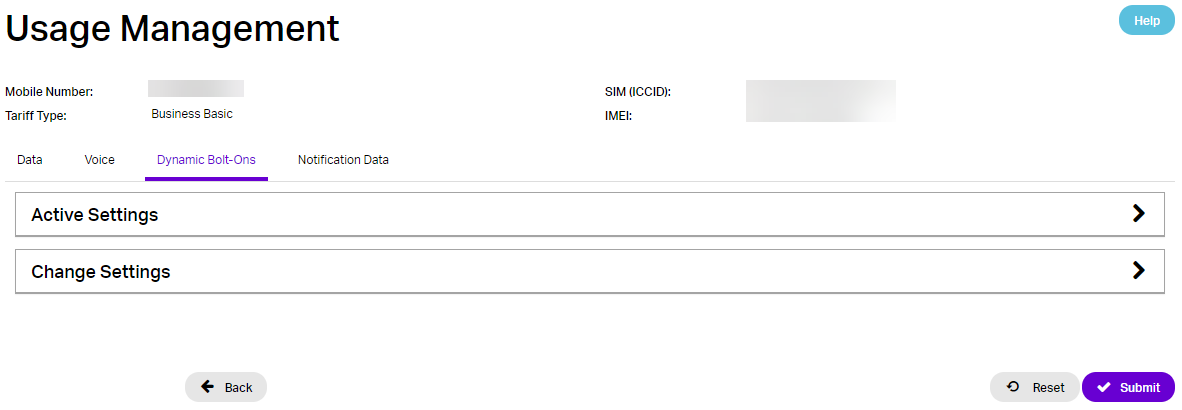
The “Active Settings” panel, when expanded, displays the current status of the Dynamic Bolt-On related controls on the network (in read-only panels):
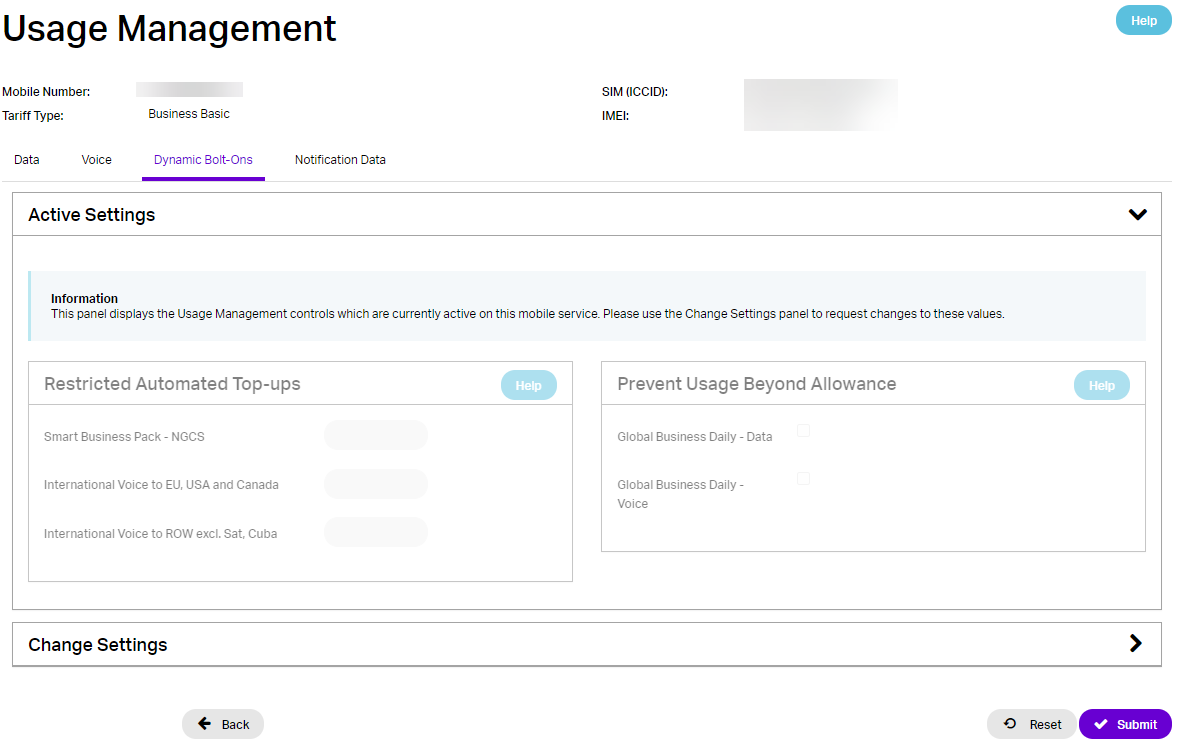
The “Change Settings” panel, when expanded, displays editable panels for the Dynamic Bolt-On related controls, with either:
i) the current settings on the network (where no changes have been requested previously this month)
ii) settings which have been requested earlier this month, but are currently queued until 1st of following month
iii) these settings will appear greyed out if the subscriber is provisioned against the Gamma Mobile Network
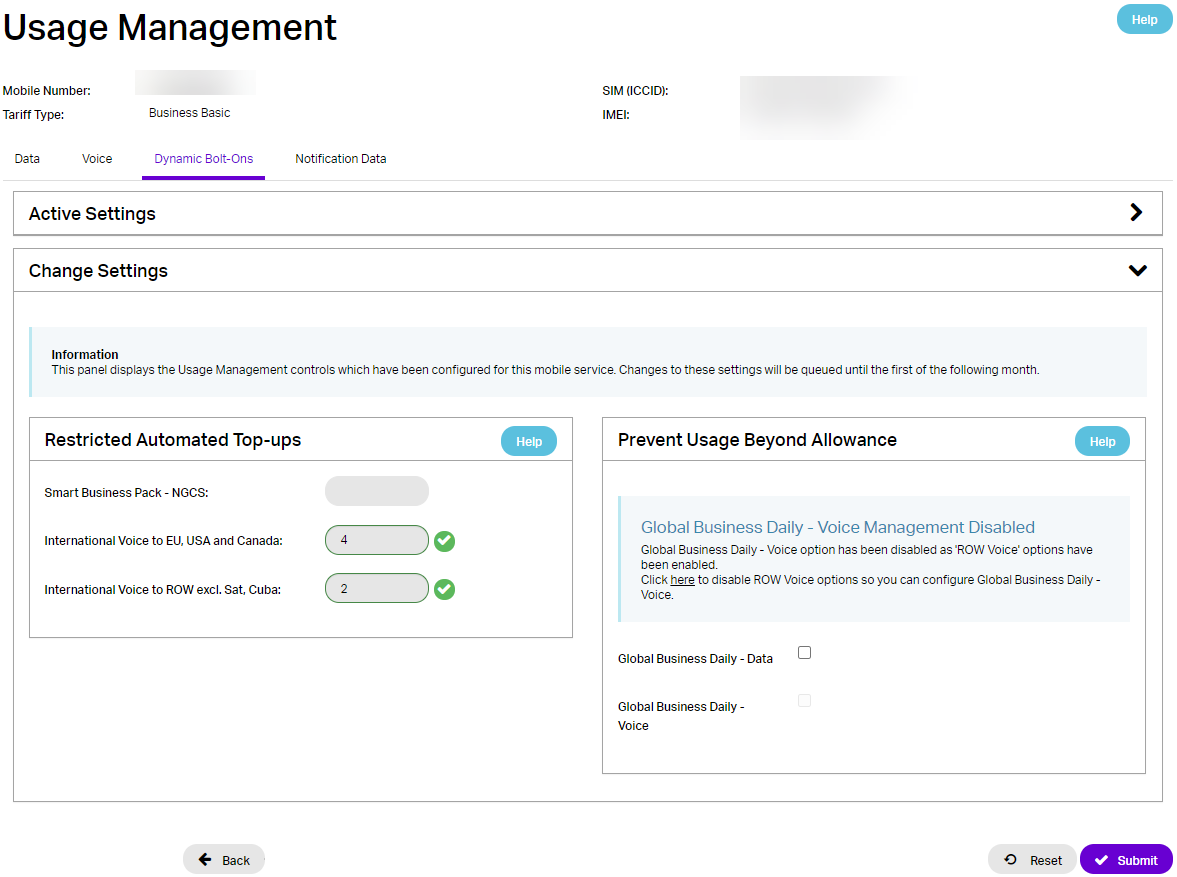
NB: This screenshot shows that the “Global Business Daily – Data” control is not available because the “ROW Data” control is already provisioned (on the Data tab).
Usage Management – Notification Data #
The Notification Data tab enables the Channel Partner to specify the appropriate recipients and notification types to apply for all usage controls:
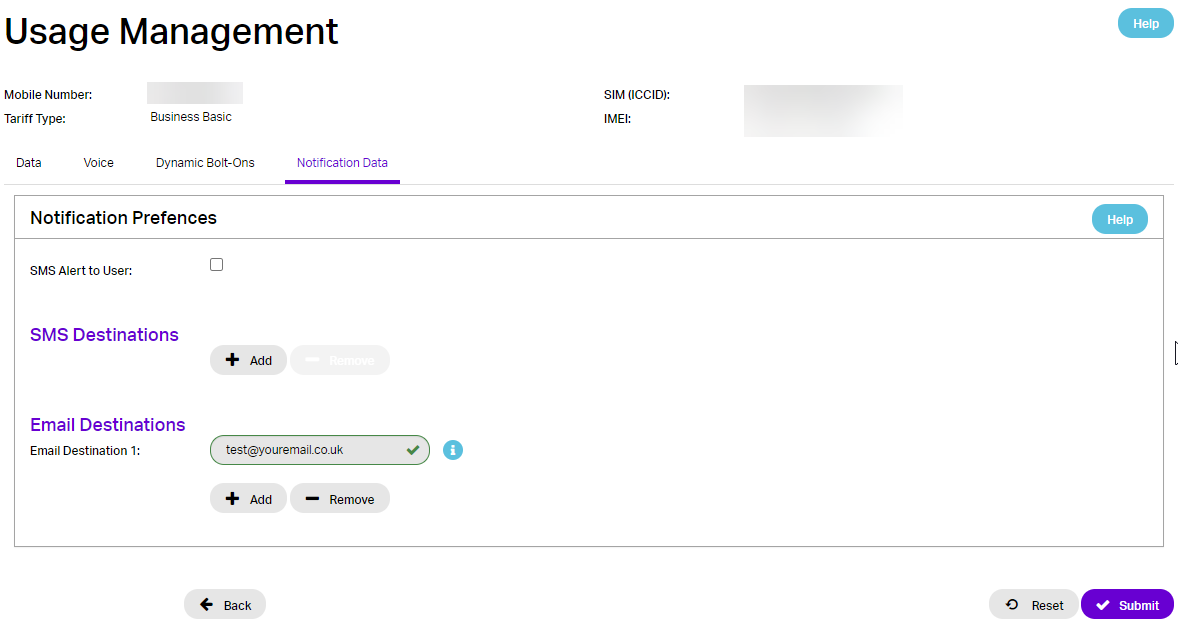
SMS Alert to User – when ticked will result in an SMS being sent to the Mobile Number associated with the control.
SMS Destinations – Up to 4 Mobile Numbers (in addition to the Mobile Number associated with the control) can be configured to receive SMS notifications.
Email Destinations – Up to 4 Email recipients can be configured to receive email notifications.
Usage Management – History #
Additional development is in progress to include Usage Management related information within the Mobile History page.
Billing limits and Mobile Usage Control Management #
Gamma provides a number of ways in which you can help your customer to carry on with their day-to-day work safe in the knowledge that while they are taking care of business and you are taking care of their spend. Our Mobile Usage Control Management, which includes Automatic Capping and Alerting, gives you and your customer maximum flexibility in how, when and who usage alerts go to with the added reassurance of an automatic cap being applied at a sensible level for your customer.
Below is a matrix of the types of usage controls that can be applied as well as the other measures that we have in place to help you and your customer work with confidence.
Provided you have set a capping threshold for a traffic type we will not charge you more than that cap.
Traffic Type | Control Measure(s) | Notes |
UK/EU Data | Set a cap threshold, in GB, on the usage management screens on the Gamma Portal. Alerting is available when usage reaches 50%, 75%, 90% and 100% of the threshold. | Our data capping and alerting happens in real time. This means that once the threshold has been reached, we can cap that usage even in mid-session |
| UK/EU Voice calls | Set a cap and/or alert threshold, in minutes, on the usage management screens on the Gamma Portal We also provide Business Extra tariffs which includes Unlimited calls to UK 01/02/03 and 07 numbers | Latency in producing voice CDRs means usage could go beyond the cap limit but Gamma will not charge for overage above the caps set in Portal |
| NGCS Non -geographic voice calls | First provision the Smart Business Pack for your subscribers. This enables the NGCS – 08xx – 250mins dynamic bolt-ons Set a maximum number of automatic top-up, bolt-ons of 250 minutes of NGCS calls allowed on the usage management screens on the Gamma Portal | The NGCS 250 mins Dynamic bolt-ons is only charged when an NGCS call is made When the NGCS bolt-on limit is reached the next minute of NGCS call triggers an automatic top-up of an additional 250 minutes of NGCS calls Latency in producing voice CDRs means an auto top-up beyond the maximum could be triggered but Gamma will not charge for any top-ups above the limit set in Portal |
| International voice calls | First provision the UK to EU, USA and Canada 250mins dynamic bolt-on and the UK to ROW excl SAT, Cuba 250mins dynamic bolt-on Set a maximum number of automatic top-up, bolt-ons of 250 minutes of international calls allowed on the usage management screens on the Gamma Portal. (UK to EU, USA and Canada separately to UK to ROW) | The International voice Dynamic bolt-ons are only charged when an international call is made When the UK to EU, USA and Canada bolt-on limit is reached the next minute of international call to these destinations triggers an automatic top-up of an additional 250 minutes. The UK to ROW 250 minute bolt-on works in the same way Latency in producing voice CDRs means an auto top-up beyond the maximum could be triggered but Gamma will not charge for any top-ups above the limit set in Portal |
| Roaming Data | ROWSet a cap threshold, in GB, on the usage management screens on the Gamma Portal. Alerting is available when usage reaches 50%, 75%, 90% and 100% of the threshold | Our data capping and alerting happens in real time. This means that once the threshold has been reached, we can cap that usage even in mid-session |
| Roaming Voice | ROWSet a cap and/or alert threshold, in minutes, on the usage management screens on the Gamma Portal We also provide Global Business Daily Traveller bolt- ons which includes an allowance of voice calls (the allowances size is dependent on the country the subscriber is roaming in). When a subscriber exceeds this allowance, an automatic top- up is triggered. A maximum number of automatic top-up allowed can be set on the usage management screens on the Gamma Portal | Latency in producing Roaming voice CDRs means usage could go beyond the cap limit but Gamma will not charge for overage above the caps set in Portal. Excluding Global Business Daily Traveller caps |
Frequently asked questions #
Setup #
Are the Mobile Usage Control Management per subscription or can we apply this across an entire business in one go?
Usage controls are applied to individual subscribers.
After setting up the alerts and caps on the Gamma Portal how long before they take effect?
Requests are queued until the next billing month, the data/call usage counter will start on the 1st of the month following the request. No capping and alerting will be in place from the date the request is made on the Portal until the 1st of the following month. This complies with the legislation.
Any changes to bill limits are queued until the next month with the choice to leave any current capping and alerting in place or disabling the current Mobile Usage Controls so no capping and alerting will be in place until the following month.
Why is the request queued until the following month?
Unfortunately, our current system cannot count data that has previously been consumed and the counter is reset on the 1st of every month. We are currently implementing an upgrade program and as part of this we will be able offer this feature.
How is shared data handled?
Because the real-time rating engine we use does not currently have a concept of group or shared data it is handled at an individual level. We suggest that you set alerts on the individual levels which would indicate if anyone is using excessive amounts of the shared data. Then make a quick check of the data usage screen in the portal.
Capping #
Will capping cut off the data session immediately?
Yes, when a subscriber reaches their data threshold the cut off is immediate.
Will capping cut off the voice session immediately?
Yes, the call will be cut off immediately. However, because of normal call duration and latency of CDRs it is highly unlikely to happen.
Can capping be removed if triggered?
When a user has reached their capping limit the cap can be removed on the Portal to allow the user to continue using data/call that month. The capping and alerting remain in place going forwards i.e. if they reach the cap limit the following month the user will be capped again.
What is the latency of voice calls?
It varies, however, there is on average of 30 -40 minutes. We suggest you build this into any capping amount.
Alerting #
How are the users alerted?
You can alert four different mobile numbers by SMS and four different email addresses. If you wish to send notifications to the device user, we recommend alerting the end user by SMS ensure this is received when data has been capped.
Roaming #
Will Gamma absorb the cost of late landing roaming call data?
Gamma will write off the cost roaming voice calls if caused by late landing call data. Provided the Channel Partner has set up Usage Controls on the Gamma portal.
Bill limits and regulations #
What are the bill limit requirements?
The legislation requires that a bill limit is offered to all customers taking out a mobile phone contract on or after 1 October 2018 and to all customers renewing any existing contract from this date. This is a legal obligation and form Section 124S of the Communications Act 2003.
To which customers do bill limits apply?
The requirement to provide a bill limit applies to all business customers regardless of the size company.
Can EU capping and control management run at the same time?
Where a customer has EU data notifications & capping enabled and then provisions a roaming Usage Management control, their EU data capping preferences will be overridden in the respective zone. For example, if the “Combined UK & EU Data” control is provisioned and customer roams in the EU, the €50 cap will not apply – the customer will be able to consume data up to their defined Usage Management allowance (at which point data will be capped). However, if the same customer does not have a “ROW Data” control provisioned and roams outside the EU, they will be able to use data up to the €50 cap.