Please note on Windows 8 handsets other than the Nokia Lumia MMS does not work when using a Gamma SIM. Although the settings can be manually entered into the handsets the message will not be sent. We are currently working to resolve this issue and will post an update here when we have one.
We are seeing that the use of OTT (Over The Top) messaging services such as Whatsapp (200 million users) and BlackBerry Messenger (25 million users) to start to gain more traction in the market place and until we have a resolution suggest that your customers use a service like this to send MMS. There are other benefits to this service such as group chat, free SMS and location services.
Setting up Call Waiting on a Handset #
Call waiting tells you (with a soft dual bleep), if someone is trying to call you whilst you are already on a call.
You can set up and use call waiting with the following commands:
- to activate – enter *43# followed by SEND
- to accept the incoming call and end the original call – press 1 then SEND
- to hold the original call and accept the incoming call – press 2 then SEND
- to swap between calls – press 2 then SEND
- to end present call and return to holding call – press 1 then SEND
- to cancel – enter #43# then SEND.
Data Dongles and Laptop IMEIs #
Instructions for obtaining the IMEI from data dongles and laptops:
- There may be a label on the dongle or on the underside of the laptop displaying the IMEI.
- If using Dell Mobility broadband file > Device properties
- If using Windows with a dongle Control Panel > phone & Modem > properties > diagnostics > Query Modem
International Mobile Equipment Identity (IMEI) #
What is the IMEI used for?
- The IMEI is a 15 digit number which is the unique indentifier for every mobile handset and device.
- The first 8 digits of the IMEI identify the make & model of the handset, the rest of the digits are unique for that device.
- The IMEI is used by the network to track the device and is used to blacklist stolen handsets even if the SIM is changed.
How can I find out what my IMEI is?
- It can be found by keying *#06# into the device (if the device is a handset).
- It can also usually be found inside the device, behind the battery.
#
Handset Support #
The support for handsets, including BlackBerry and other Smartphones, is the full responsibility of the Channel Partner, though we do have some guides available for a wide range of handsets on the Gamma website (gamma.co.uk/support/mobile-guides/).
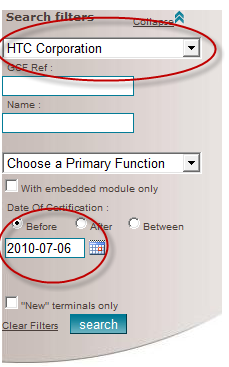
To find out the handsets supported on Gamma mobile please click here: GCF Forum (http://www.globalcertificationforum.org/devices/certified-devices.html)
Please note that as shown in the picture below you will need to alter the search settings to find all handsets released for use.