
General Overview #
The SIM cards are provided (and owned) by Gamma Telecom. Each SIM has its own unique identity number called the Integrated Circuit Card ID (ICCID). The ICCID is 19 digits in length and is printed on the SIM card. Once the SIM order is complete the ICCID numbers will be allocated to your reseller account in the Gamma Portal.
Gamma SIMs are available in a triple format. Regular, Micro and Nano sizes are included on a single SIM.
Following the SIM order, Mobile Numbers need to be allocated to your account.
SIM Order Process #
Ordering SIMs is done from the Gamma Portal.
Step 1
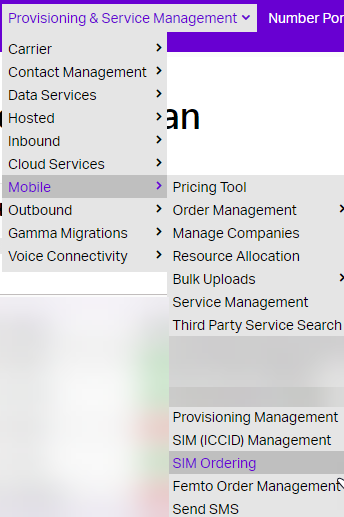
From the Gamma Portal, go to Provisioning and Service Management, Mobile > SIM Ordering.
Step 2
After selecting this you will need to fill in the details and click submit, please note that the SIM quantity will need to be in 50s. After submitting this will be sent to the team to process.

Ordering SIMs from Gamma Telecom #
1. Gamma SIMs cost £3.00 each, exclusive of VAT.
2. The minimum order size of SIMs is 50, this then increases in increments of 50 e.g. 100, 150, 200.
3. Orders over 1000 SIMs will require internal approval from your BDM, this does not affect the below process for Resellers although this will delay the delivery of the SIM cards.
4. The default allocation of Mobile Numbers is equal to the SIM order size.
5. It is unlikely that deviations from this rule will be accepted. Any such deviations will require internal approval.
When do I use this?
You need to order a batch of SIMs. You will need to have received an order of SIMs before you can provision services on the Gamma Portal.
Mobile Number Allocation #
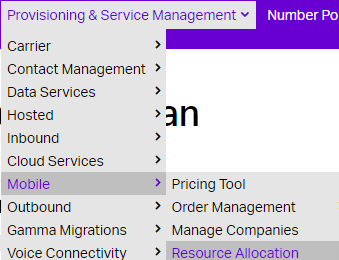
To allocate Mobile Numbers to your account go to the Gamma Portal and select Mobile > Resource Allocation from the Provisioning and Service Management tab.
Fill in the form below selecting your account in the “Target Account” field and the quantity of Mobile Numbers required in the “Number to Allocate” field. You will only be able to allocate Mobile Numbers up to the quantity of available SIMs in the account, if you attempt to allocate more an error message will inform you of the maximum quantity of Mobile Numbers that can be allocated.
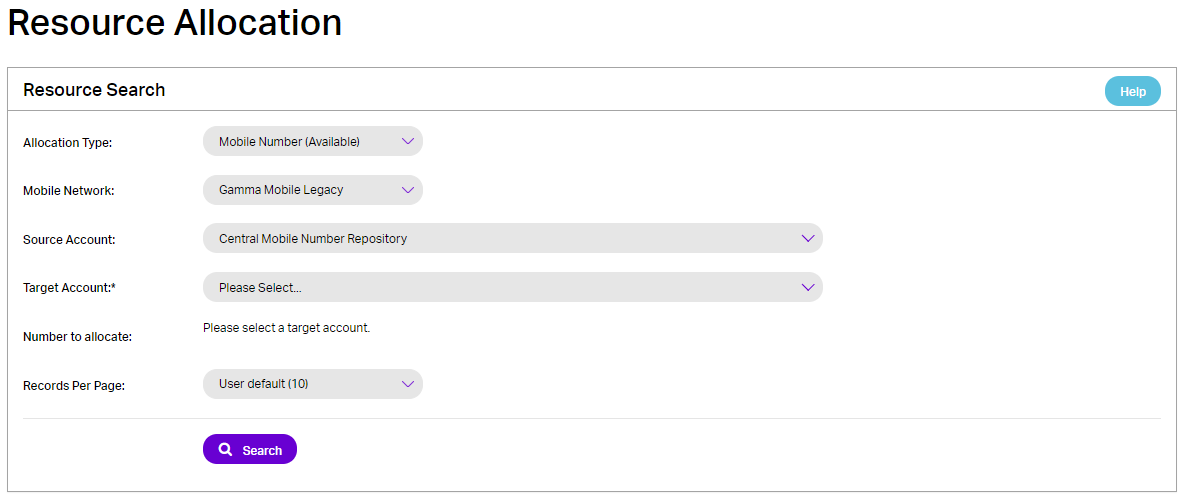
Once the form is submitted the Mobile Numbers to be allocated will be displayed. Press continue and a confirmation screen will be displayed.
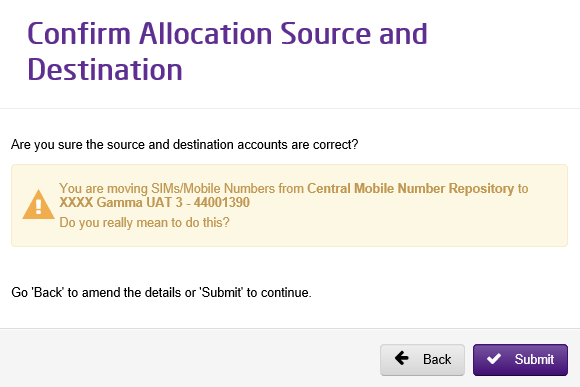
The details should be checked and then once “Submit” is clicked the Mobile Numbers are allocated to the target account.
