
Skip to content
  • Academy KB Home Redesign
  • Broadband Home
  • CCaaS
  • Channel Partner Support
  • Circle Loop Home
  • Collaborate
  • Connectivity
  • Courses
  • Documentation
  • Ethernet
  • FibreXchange
  • FUSION IoT
  • Gamma AI Concierge
  • Gamma Plus
  • Gamma SIP for Cloud Connect
  • Gamma SIP Global Communications Enablement
  • Gamma SIP Trunks for Genesys Cloud
  • Hannah – Homepage WIP
  • Home
  • Horizon
  • Horizon Contact
  • Horizon Forms
  • Horizon Service Description Home
  • Horizon with Webex
  • Inbound
  • iPECS
  • Knowledge Base Intro
  • Knowledgebase Directory
  • LoginPress
  • Microsoft
  • Microsoft Teams Direct Routing Home
  • Microsoft Teams Operator Connect
  • Mobile
  • Multiple KB
  • My Courses
  • No Access
  • No active page
  • Numbering and Porting
  • Phoneline+
  • Product Homepage
  • Quick Download Button
  • Release Notes
  • Release Notes
  • SIP Home
  • Test
  • UCaaS
  • User Account
  • Voice
  • Voice Enablement
  • Webex for Gamma
  • Webex for Gamma Release Notes
  • Gamma Academy Knowledge Base
Gamma Academy Knowledge Base
  • Cloud Calling and Collaboration
    • Webex for Gamma
    • Horizon with Webex
    • Horizon
    • Phoneline+
    • Operator Connect
    • Direct Routing
    • Inbound
    • Akixi CX Analytics
    • Red Cactus
  • Connectivity and Networking
    • Numbering and Porting
    • Broadband
    • FibreXchange
    • Ethernet
    • SIP Trunking
    • Gamma FUSION IoT
  • CX
    • Horizon Contact
    • AI Concierge
  • Mobile Services
    • Gamma Mobile
  • CyberSecurity
    • SafeWeb
  • Partner & Portal Support
Gamma Academy Knowledge Base

Provisioning and In-Life Changes

  • Before Ordering Mobile
    • Mobile Short Codes
  • eSIM Functionality
    • Viewing eSIM stock whilst provisioning
    • Viewing SIM Type and Service Provider Name (SPN)
  • Configuring and Ordering Mobile
    • Quick Start Guide to Provisioning Mobile
    • Ordering Sims and Mobile Numbers
    • Mobile – Add Company
    • Mobile Provisioning Process (Including Ports)
    • Mobile – Activating a Service
    • Mobile Data and MMS Settings (Including APNs)
  • In-Life Mobile Configuration
    • Mobile Managing Companies
    • Mobile – Manage Phone Service
    • Porting a Number Onto an Active Gamma Mobile Connection
    • SIM Swap to the Enhanced Gamma Mobile Service
    • Mobile Roaming
    • Block Outgoing Calls
  • Configuring and Ordering Manage My Mobiles
    • Configure Manage My Mobiles Portal
    • Manage My Mobiles – New Company Provision
    • Manage My Mobiles – Allocating Numbers
    • Manage My Mobiles – Existing Company Provision
    • Manage My Mobiles – Tracking Your Order/Actions
  • In-Life Configuration - Manage My Mobiles
    • Manage My Mobiles Portal
    • Manage My Mobiles – Manage a Person
    • Manage My Mobiles – Groups
    • Manage My Mobiles – Branding
    • Manage My Mobiles – Audit Log
    • Manage My Mobiles – Call Forwarding Options
    • Manage My Mobiles – Statistics
    • Manage My Mobiles – Alert Types
    • Cease Manage My Mobiles

Features

  • Mobile Inactive Number Search
  • Mobile Usage Control Management
  • Gamma Roaming Countries and Networks

Technical Support

  • Guides for Problems with Mobile
  • Lost and Stolen Phone Help
  • Mobile Known Behaviours
  • Gamma Mobile FAQs
  • Mobile Glossary
  • Handset Support
    • Handset Support iOS
    • Using Nokia Lumia with Gamma SIM
    • Using MMS on Windows 8 Devices

Service Description

  • Gamma Mobile Service Descriptions

Mobile SLAs

  • Mobile SLAs
  • Home
  • Home
  • Gamma Mobile
  • Provisioning and In-Life Changes
  • In-Life Mobile Configuration
  • Porting a Number Onto an Active Gamma Mobile Connection
View Categories

Porting a Number Onto an Active Gamma Mobile Connection

Please be aware that the calendar that shows available porting dates when validating your PAC does not take into account Bank Holidays currently. Please keep this in mind when validating PACs.

Step 1

You need to obtain a PAC and Mobile Numbers (mobile telephone number) from your customer. Your customer does this by contacting their current provider and requesting a PAC.

If your customer is using the same mobile telephone, you will be requested to enter the IMEI during the provisioning process. To get this, ask your customer to type in *#06# on their telephone keypad.

Step 2

Make sure that you’ve got an available Mobile Number that you can activate with your customers details. This won’t be their permanent number, but we need a temporary number during the port process.

Step 3

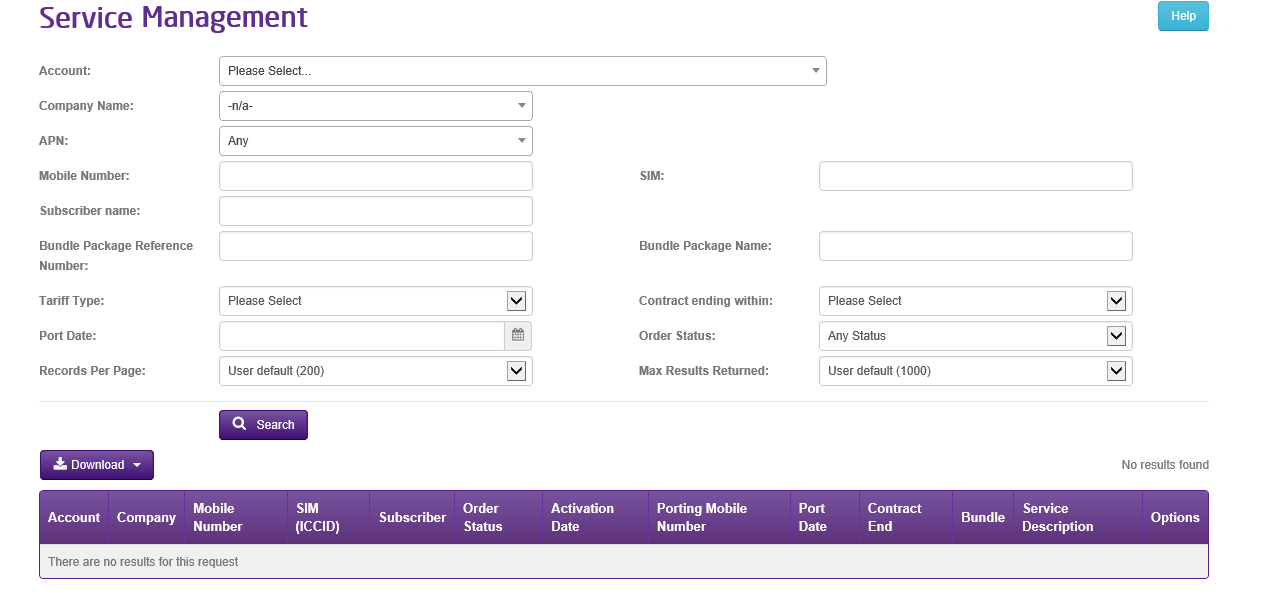
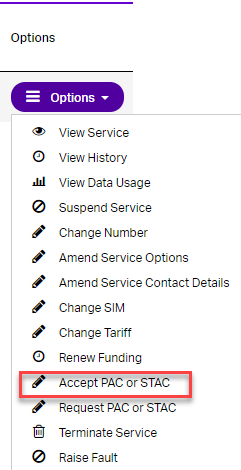
The next step is to validate the PAC and choose a port date, this is done by going to Provisioning & Service Management > Mobile > Live Service Management. Then you will need to select the relevant account and select search. Then use the options tab to select port in Mobile Number(s).
Step 4

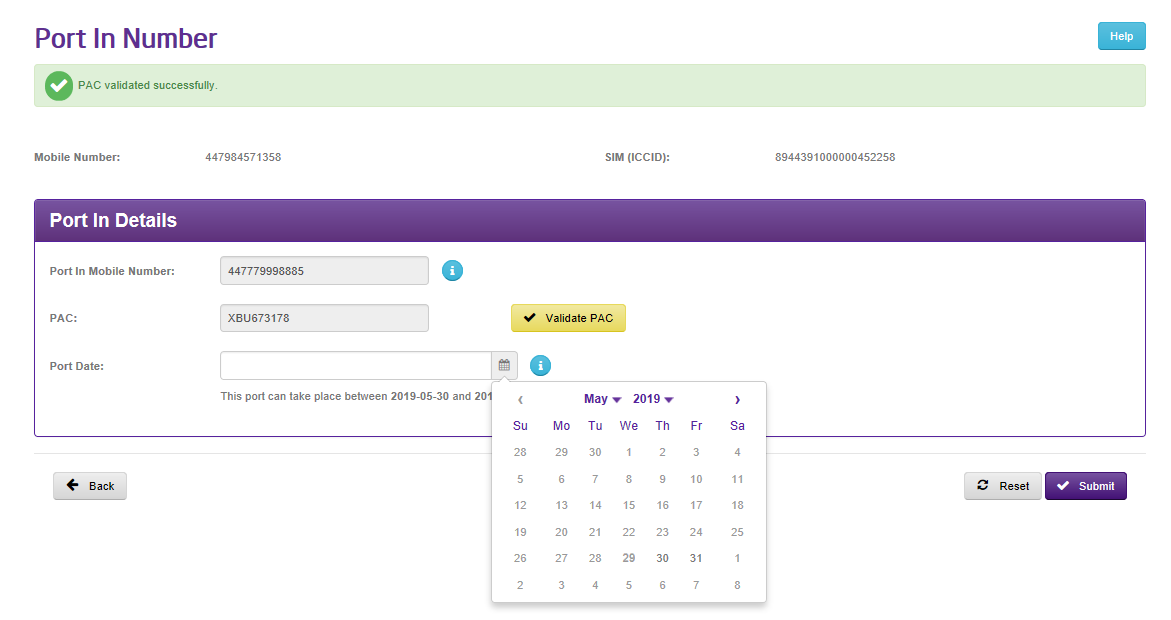
Once you have selected Port in Mobile Number(s) on the screen enter the Mobile Number and its associated PAC. Then select “Validate PAC” and then choose a Port Date. Note if you leave the date blank it will default to next working day. Then select submit to complete the process.
What Happens Next? #

Once the request has been received, the mobile number will have a status of “Active, Pending Port In” and the associated Porting number will be displayed along with the Port date.
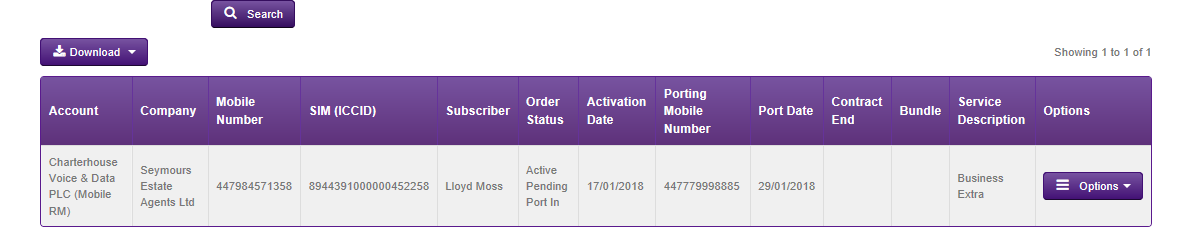
The port will complete on the Port date by 4pm , after this time all incoming calls to that number will be received on the Gamma SIM and all outgoing calls will from the Gamma SIM will have the Ported number as the originator.

Updated on 16/01/2024
Mobile – Manage Phone ServiceSIM Swap to the Enhanced Gamma Mobile Service
Contents
  • What Happens Next?

Copyright © 2026 -  Gamma Telecom Ltd

Gamma API
We use cookies to measure performance and make improvements to this service. This includes page views, device/browser, location, and page interactions. We do not collect any information you upload to this site. By agreeing, you consent for your data to be used for this purpose.