
- Send SIM card to customer and await their confirmation
- Log onto Gamma Portal go to Provisioning & Service Management >> Mobile >> Service Management
- Select the Account and search for the Mobile Number
- Select “Change SIM” from the drop down “Options” menu next to the Mobile Number
-
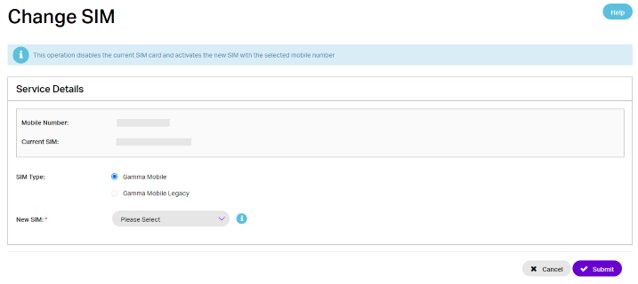
- On the Change SIM (ICCID) screen select Gamma Mobile and enter the new SIM number and click “Submit”
-
- Allow 2 hours for the SIM swap to complete, then advise your customer to put the SIM into the device
- Your customer will receive a text message or notification containing new data settings. These will need to be accepted when they arrive. If your customer doesn’t receive the network settings, they can be sent to their device by visiting https://setupyourbusinessmobile.co.uk/data-settings/ or by texting ‘settings’ to 773000. For some devices the settings cannot be sent by text so they may need to manually enter ‘Gamma’ in the data settings of your device.

Please note:
- MultiNet
- If MultiNet is provisioned this will need to be removed from the service before performing the SIM swap.
- Mobile usage controls – alerting and capping
- Any queued additions or changes to usage controls will be lost after the SIM swap. Please re-request after the SIM swap has been completed.
- Voice usage controls are not currently supported on the new platform.
- Voice barring
- Any voice barring on your connections may not be re-applied after the SIM swap. Please remove and re-apply voice barring.
- Voicemail
- Your customers will need to check their voicemail and note any important messages before the SIM swap takes place, all new and saved messages will be lost and cannot be retrieved.
- Voicemail will need to be set-up again after the swap is complete.
- Call forwarding
- Any call forwarding, other than to voicemail, will be lost when the SIM is swapped and will need to be set up again.
- Your customers can set up call forwarding from their device settings menu or using the short-codes
- To forward all calls: **21*[phone number]#
- To forward calls if busy: **67*[phone number]#
- To forward calls if not answered: **61*[phone number]#
- For all call forwarding the first 0 in the phone number need to be replaced with +44