Distribution Description #
Use the Distribution control to distribute calls across a number of agents or sites either randomly or sequentially.
This is one of the more functionally rich areas of Inbound 2 and there is a significant amount of reference information. Please use one of the hyperlinks below to move quickly to the relevant section of the document:
Distribution Tip #
If you have multiple sites with different call handling capacity use the Distribution control to allocate calls in proportion to their capability to handle calls.
Random distribution #
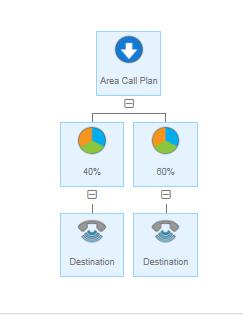
Use a Distribution control with the Node type set to Random to match call volumes to groups of agents with different resource levels. For example, you might have 5 staff answering calls with 3 at one site and 2 at another. The Distribution control could be used to split the calls 60/40 to ensure the call volume is matched to the resources available.
Serial Distribution #
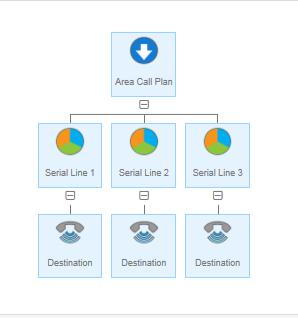
Use Serial distribution where you need to spread incoming calls around a group of people so they each take a turn at answering calls. In this case each call goes to the next line in the series defined in the call plan. For example, in the call plan below the first call will route to the line with sequence number 1, the next call to sequence number 2 and so on. Once the highest sequence number is reached the routing
will start at 1 again. Note, if the designated line is busy then the caller will simply receive an engaged tone, even though the other lines are free.
Divert #
Divert Description #
The Divert control is a sibling to the Destination control.
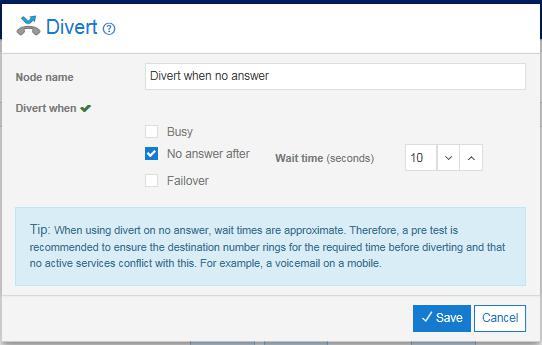
You can use the Divert control to define alternatives when calls are not answered by the destination number.
There are three types of Divert control available:
- Busy
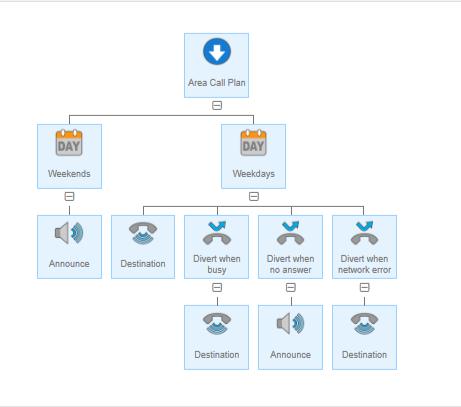
The routing action in this branch will be invoked if the sibling Destination control is busy.
- No answer
The routing action in this branch will be invoked if the sibling Destination control does not answer the incoming call within a specified time.
- Failover
The routing action in this branch will be invoked if the sibling Destination cannot be reached due to a fault, e.g. a line fault at the destination site.
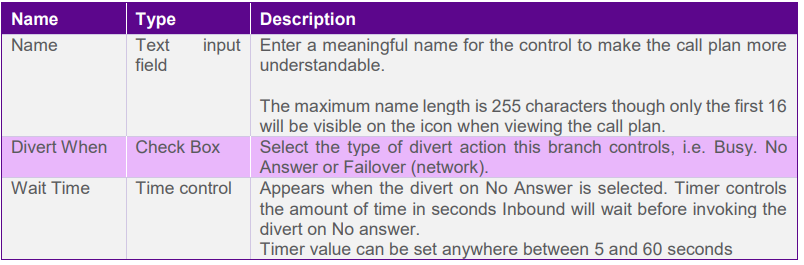
You can choose the appropriate option(s) by using the check boxes within the control properties.
In the example below, calls will be routed to the primary destination first. If the primary destination cannot be reached due to a line fault at the destination site then an announcement will be played. If the primary destination is not answered then after 10 seconds (the time limit defined in the control properties) the call will be routed to the secondary destination (e.g. a mobile number). Similarly, if the primary number is busy then the call will be routed to a secondary number.
Divert tip #
You can select 1,2 or all 3 of the divert options within the same control node if the destination number, announcement or voicemail is the same for divert on busy, no reply or failover.
Divert Rules #
A Divert must be attached as a sibling of a Destination control.
The sibling Destination control must be present before the Divert is added.
You must not have 2 Diverts of the same type within the same sibling group.
You can add up to 3 of different Divert types within the same sibling group.
The diverted-to Destination has its own property definition and does not inherit properties, e.g. call recording settings, from the sibling Destination control.
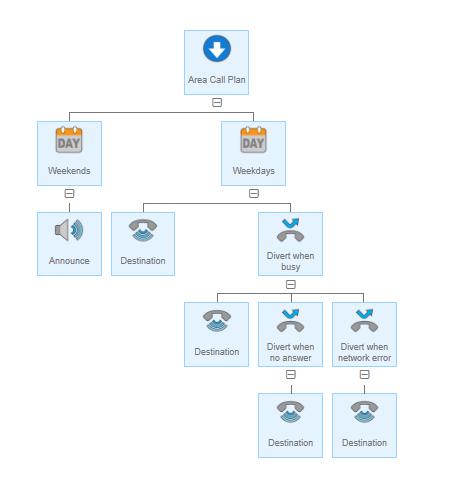
Nested diverts are permitted. For example, the call plan below allows alternative routing to a tertiary number if both the primary and secondary numbers are busy. This is limited to 3 levels of nesting as in the example below.
Divert Input Fields and Buttons #