
Skip to content
  • Academy KB Home Redesign
  • Broadband Home
  • CCaaS
  • Channel Partner Support
  • Circle Loop Home
  • Collaborate
  • Connectivity
  • Courses
  • Documentation
  • Ethernet
  • FibreXchange
  • FUSION IoT
  • Gamma AI Concierge
  • Gamma Plus
  • Gamma SIP for Cloud Connect
  • Gamma SIP for Cloud Connect
  • Gamma SIP for Genesys Cloud
  • Gamma SIP Global Communications Enablement
  • Gamma SIP Trunks for Genesys Cloud
  • Hannah – Homepage WIP
  • Home
  • Horizon
  • Horizon Contact
  • Horizon Forms
  • Horizon Service Description Home
  • Horizon with Webex
  • Inbound
  • iPECS
  • Knowledge Base Intro
  • Knowledgebase Directory
  • LoginPress
  • Microsoft
  • Microsoft Teams Direct Routing Home
  • Microsoft Teams Operator Connect
  • Mobile
  • Multiple KB
  • My Courses
  • No Access
  • No active page
  • Numbering and Porting
  • Phoneline+
  • Product Homepage
  • Quick Download Button
  • Release Notes
  • Release Notes
  • SIP Home
  • Test
  • UCaaS
  • User Account
  • Voice
  • Voice Enablement
  • Webex for Gamma
  • Webex for Gamma Release Notes
  • Gamma Academy Knowledge Base
Gamma Academy Knowledge Base
  • Cloud Calling and Collaboration
    • Webex for Gamma
    • Horizon with Webex
    • Horizon
    • Phoneline+
    • Operator Connect
    • Direct Routing
    • Inbound
    • Akixi CX Analytics
    • Red Cactus
  • Connectivity and Networking
    • Numbering and Porting
    • Broadband
    • FibreXchange
    • Ethernet
    • SIP Trunking
    • Gamma FUSION IoT
  • CX
    • Horizon Contact
    • AI Concierge
  • Mobile Services
    • Gamma Mobile
  • CyberSecurity
    • SafeWeb
  • Partner & Portal Support
Gamma Academy Knowledge Base

Provisioning and In-Life Changes

  • Before Ordering Inbound
    • Inbound Architecture
    • Inbound Features Matrix
    • Inbound and Horizon Working together
    • Inbound for Horizon Business Process Guide
  • Ordering Inbound
    • Ordering Inbound
    • Inbound International Number Porting Process
  • Configuring Inbound
    • Inbound User Login & MFA
    • Inbound – Administrating Users
    • Inbound – Managing MFA
    • Inbound Call Plans Creation and Changes
    • Inbound Account Management
    • Inbound Business continuity

Features

  • Call Plans
    • Inbound Manage My BC
    • Inbound Point My Number
    • Inbound IVR and Menu Option
    • Inbound Call Queues
    • Inbound Aliasing
    • Inbound Hunt Groups
    • Inbound Area Control
    • Inbound Limit Caller Admission
  • Routing
    • Inbound Root Control
    • Inbound CLI Based Routing
    • Inbound Date, Time and Destination Controls
    • Inbound Goto Features 1,2 and 3
    • Inbound Distribution and Diversion Controls
  • Company Admin
    • Inbound Manage Custom Fields
    • Inbound Notifications
    • Inbound Announce 
    • Inbound Suspend and Resume Call Recording Feature
    • Inbound Voicemail
  • Reviewing Calls and Statistics
    • Inbound View History
    • Inbound Performance and Statistics
    • Inbound Custom Fields
    • Inbound Listen to my Calls

Technical Support

  • Inbound – Technical Support
  • Inbound – Destination Risk
  • International Inbound Numbers – New Portal
  • Inbound – Unwanted and Nuisance Calls
  • Inbound – Glossary
  • Withdrawal of Gamma mobile applications for Inbound, Business Continuity and SIP Trunk Call Manager

Service Description

  • Inbound Service Description

Inbound SLAs

  • Inbound 2025 SLAs
  • Inbound 2024 SLAs
  • Inbound 2023 SLAs
  • Inbound 2022 SLAs
  • Inbound 2021 SLAs
  • Inbound 2020 SLAs
  • Inbound 2019 SLAs
  • Inbound 2018 SLAs
  • Inbound 2017 SLAs

Inbound Forms

  • Inbound Forms

Inbound Release Notes

  • Inbound Release Notes
  • Home
  • Home
  • Inbound
  • Features
  • Call Plans
  • Inbound Manage My BC
View Categories

Inbound Manage My BC

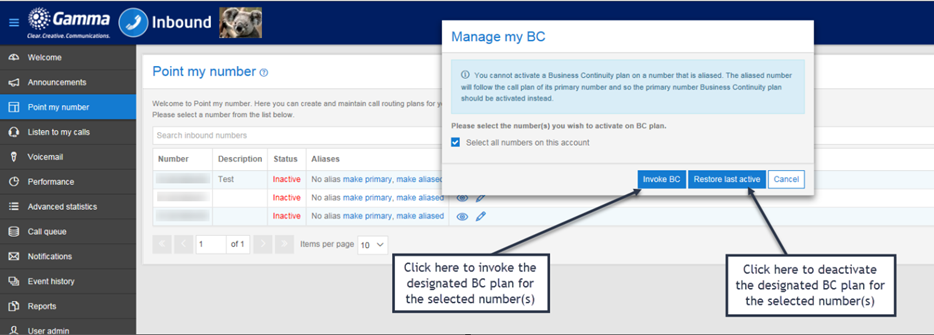
The Manage my BC button enables you to invoke a pre designated Business Continuity plan for your Inbound number(s). There is also the option to restore the last active call plan when the BC routing is no longer required (see How to use ‘One Touch’ for more detailed instruction on how to use the Business Continuity functionality).

After clicking on the Manage my BC plan you will see the popup window shown below.
image_pdf
Updated on 28/03/2024
Inbound Limit Caller AdmissionInbound Point My Number

Copyright © 2026 -  Gamma Telecom Ltd

Gamma API
We use cookies to measure performance and make improvements to this service. This includes page views, device/browser, location, and page interactions. We do not collect any information you upload to this site. By agreeing, you consent for your data to be used for this purpose.
