
Announcements #
Uploaded Announcements Not Visible
This could occur when, the File is not a supported format
Upload the same file in either .MP3 or .Wav, or upload an alternative in one of these formats.
The file may show on the table but will be unavailable for use within the plan
The length of the recording is less than 0.5 seconds
The minimum length of recording is 0.5 seconds, upload a new file which is longer than this.
The announcement has not finished converting
When announcements are uploaded they are converted to a local format. This can take up to 5 minutes depending on the size of the file.
Unable to play announcements from the table
This may be because you have Pop-up blocker enabled
The file will play in a new window, ensure your pop-up blocker is disabled or you add ‘myinbound.com’ to the allow list.
The duration shows as N/A.
The file is either the wrong format, an invalid file type, less than 0.5 seconds long or has yet to be converted. Conversion should take no more than 5 minutes.
Poor Quality Playback of Announcements
This can happen if there is a hardware problem
Test from another phone or play the file from another source, such as headphones.
The original file is of poor quality
Upload a better quality file.
For a better quality file try re-recording the file and saving as a higher bit-rate file or alternatively re-record the file using higher quality equipment.
Call Quality #
Poor Quality Voice Calls
This could mean there is a problem with the receiving party hardware
Ask the customer to test another phone to confirm the problem does not lie with their hardware.
This could also mean there is a problem with the calling party hardware
Make a test call from another phone to confirm problem does not lie with the caller’s hardware.
One Way Media #
There could be a problem with the termination number
pen the active call plan and dial the termination number, if the call fails the problem lies with this number and should be raised with the service provider.
Long Post Dial Delay
The potential cause of this is a Network Issue
Please raise a fault with details of sample call(s)
Poor Quality Played Media
The original announcement file was of poor quality
Log into the customer Inbound account and play the announcement. If it is poor quality please upload a new, better quality file. If the file plays OK please see below.
Call Queue #
Callers dropped from queues
A potential cause could have been the caller hanging up
To eliminate this, Make a test call and try to replicate the issue. If unable to replicate but occurring intermittently please complete the form below providing details of calls that have dropped.
Callers stuck in queues
A potential cause could be an Interoperability issue with call queue and destination setup (e.g. PBX)
The call queue must receive a ringing tone from the termination number to release a caller from the queue. Please ensure the end users system is set up to function in this way.
Call Routing #
Calls Not Routing to Inbound Number
This could be as there isn’t a valid and active service plan
Log into MyInbound as the user and confirm there is an active and valid service plan. If not, create, validate and activate a service plan and retest.
This may also happen as the call fails on the Gamma Network
Create a simple call plan to an announcement and make a test call, if you hear the announcement the call has reached the Inbound number. You may wish to refer to the Calls not Routing to Destination.
There may also be a Network Routing Issue
Make a test call from various sources (at least Gamma and BT).
Calls Not Routing to Destination
This could be as there isn’t a valid and active service plan
Log into MyInbound as the user and confirm there is an active and valid service plan. If not, create, validate and activate a service plan and retest.
This could be due to an Incorrect Termination number
Open the active call plan and ensure the destination number is correct. If not, update and retest.
This could be due to a problem with the termination number
Open the active call plan and dial the termination number, if the call fails the problem lies with this number and should be raised with the service provider.
This could also occur when the call routes to the voicemail of the termination number
The termination number cannot have additional services on the line such as voicemail or call waiting, these will take priority over the MyInbound service.
This can occur if the call fails before it reaches the MyInbound number
Create a simple test call plan that terminates on an announcement and make a test call. If the announcement plays, please contact the service desk for further assistance. If the announcement doesn’t play, the call has not routed to the MyInbound number.
Call Hangs
This may happen when there is a problem with the termination number
Dial the termination number direct. If the problem still exists the problem does not lie within Inbound, if there is no issue please complete the form below.
Calls get disconnected
This may happen if there is a problem with the termination number
Dial the termination number direct. If the problem still exists the problem does not lie within Inbound, if there is no issue please complete the form below.
Gamma Portal #
Problems Adding Additional Features
This could be down to a Gamma portal error.
Please contact Gamma’s service desk on 0161 667 72273
Unknown Error Displayed
This could be down to a Gamma portal error.
Please contact Gamma’s service desk on 0161 667 72273
Platform Issues #
MyInbound Not Available
This may occur when there is a scheduled or unscheduled outage for maintenance/updates
These are normally communicated so you should be aware of planned outages
This may also happen when there is an issue with the End User browser
You can rectify this by clearing temporary internet files/cookies/cache or by using another browser.
Features Not Available #
This may occur when the company is set up on a product which does not have these features
Check which product the customer is on via the Inbound Management screen and refer to the Product Handbook for the available features.
This can also happen when the company does not have the expected add-on features enabled.
Go to Inbound Management and select Edit Company Details from the drop down actions menu – this will display the current add-ons that are enabled. If you need to change these, select/de-select the relevant features and click edit.
This can happen if the user logged in does not have access to this page/feature
The admin user has access to all functionality, if the admin user is experiencing the issue please contact the service desk. If the problem is with a secondary user account go to Inbound Management and select End User Management from the actions drop down menu. This will show you and allow you to edit the restrictions applied to this user.
Pages take a long time to load
This can happen when the end user has a slow internet connection
Attempt to replicate the issue on a working PC with a good internet connection. If you still have the same issue then contact the service desk.
Error Message Displayed
This indicates there may be a potential fault, if you see this message please contact the service desk, please be sure to note the page where the error occurred.
Listen to My calls #
Calls not being recorded
This can happen when the destination node has not been set to record calls
Access the call plan and ensure the destination has been set to record.
This may also happen if the call recorded was less than 5 minutes ago
Call recordings can take between 5 to 10 minutes to be processed and show online
Poor Quality playback
This may be as the call itself was poor quality
To test this, make a test call from a working phone and listen to the recording.
Recordings take a long time to become available
This may also happen if the call recorded was less than 5 minutes ago
Call recordings can take between 5 to 10 minutes to be processed and show online
Voicemail Management #
Voicemails not being recorded
This could be because the call did not terminate on the Voicemail to E-mail node.
Make a test call and ensure the call terminates on a Voicemail to E-mail node.
This may happen if the voicemail was recorded less than 10 minutes ago
Recordings take about 5 – 10 minutes to appear on the voicemail management page. Wait for 15 minutes and check again.
Recordings take a long time to show
This may happen if the voicemail was recorded less than 10 minutes ago
Recordings take about 5 – 10 minutes to appear on the voicemail management page. Wait for 15 minutes and check again.
Poor Quality Voicemail Recording
This may happen when there is a problem with the customer’s audio output hardware Listen to the same recording on another PC or with headphones.
This could also occur if there was a problem on the side of the calling party Make a test call and record a voicemail from a working phone.
Voicemail to E-mail #
Email with voicemail not generated
This could be due to an incorrect e-mail address entered on the Voicemail to E-mail node properties screen
Log into MyInbound.com and open the active call plan. Click on the VM to EM node and ensure the e-mail address is correct. If it is incorrect de-activate the call plan, update the e-mail address, validate and activate the plan.
It could also be that nobody has left a voicemail
Make a test call that terminates on a Voicemail to E-mail node and leave a recording. This should be delivered within about 15 minutes.
The Emails may have been sent to junk/spam folders
If the e-mails have been marked as junk or spam they may have been deleted or placed into a separate folder. Add the domain @myinbound.com to your ‘safe’ list.
There could also be a delay in e-mail system/network
E-mail is not instantaneous. If the Gamma or Customers network is busy there may be a delay. E-mail should be delivered within 10 – 15 minutes.
Email to voicemail taking a long time to be delivered
Was the voicemail received less than 5 minutes ago?
Voicemails take about 5 to 10 minutes to be processed. The e-mail will be sent after this amount of time.
There could be a delay in e-mail system/network
E-mail is not instantaneous. If the Gamma or Customers network is busy there may be a delay. E-mail should be delivered within 10 – 15 minutes.
Poor Quality voicemail
This may be because there is a problem with the customer’s audio output hardware.
Listen to the same recording on another PC or with headphones
This may also be due to a problem on the side of the calling party
Make a test call and record a voicemail from a working phone
No recorded media in voicemail
This could be down to a system issue
Please contact the service desk.
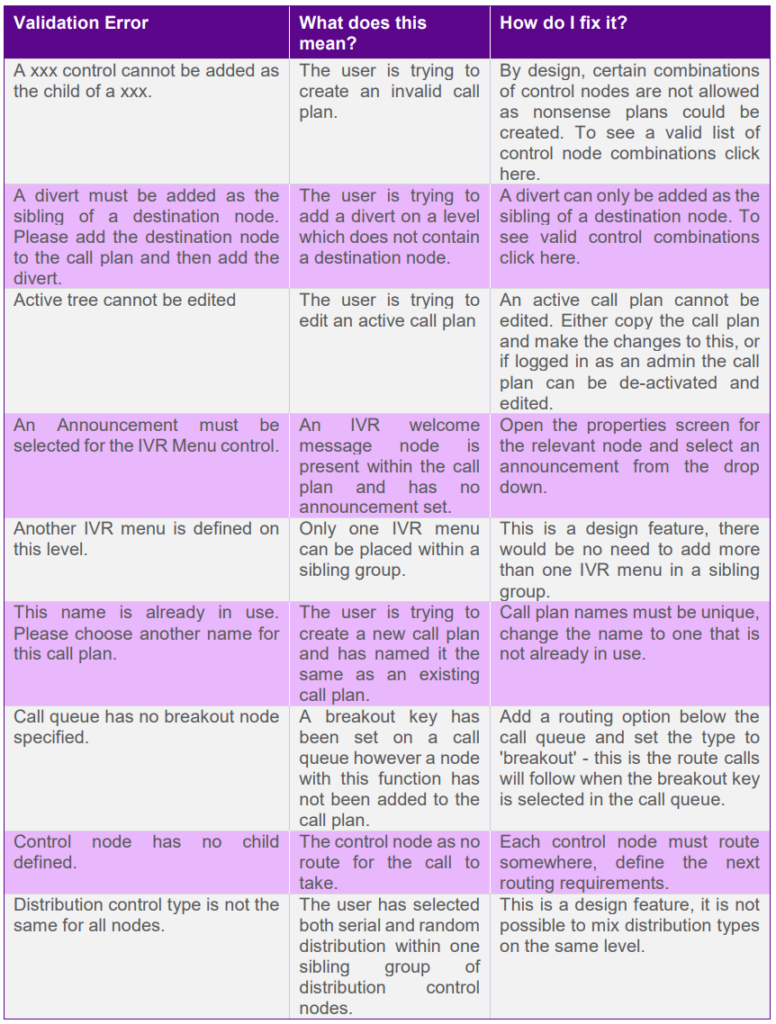
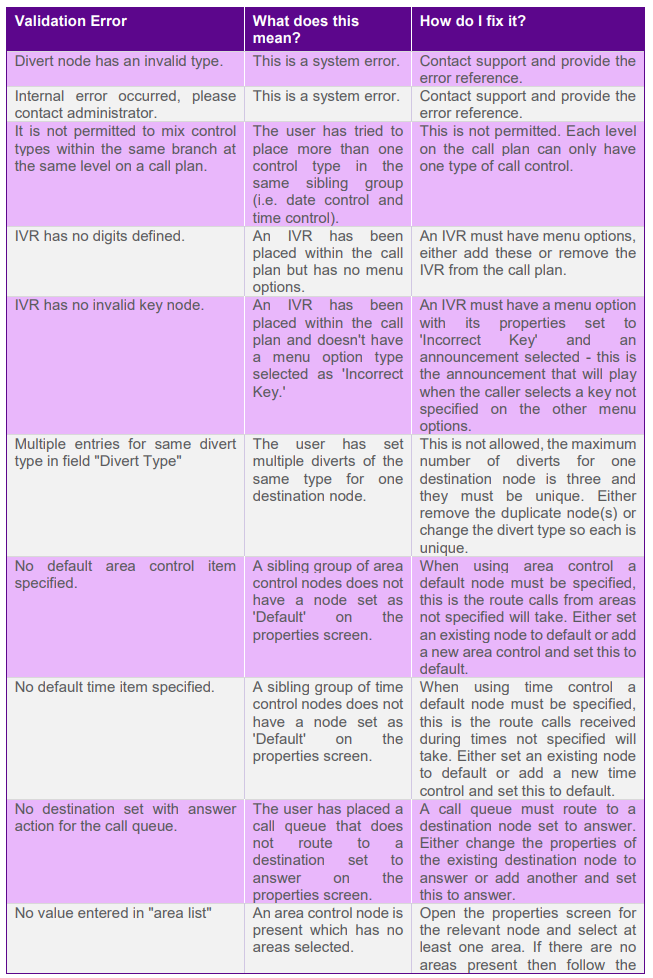
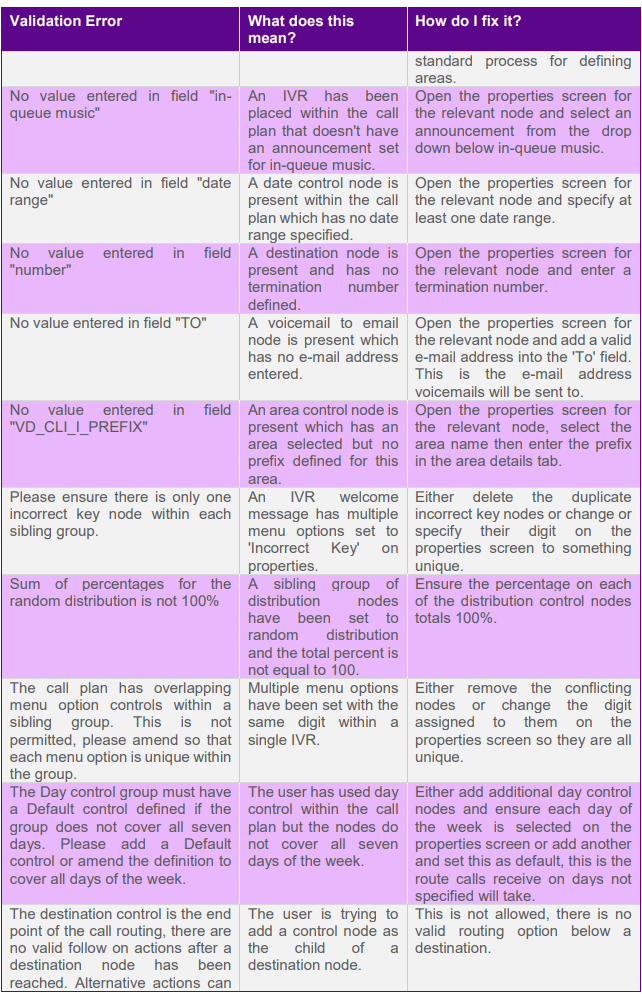
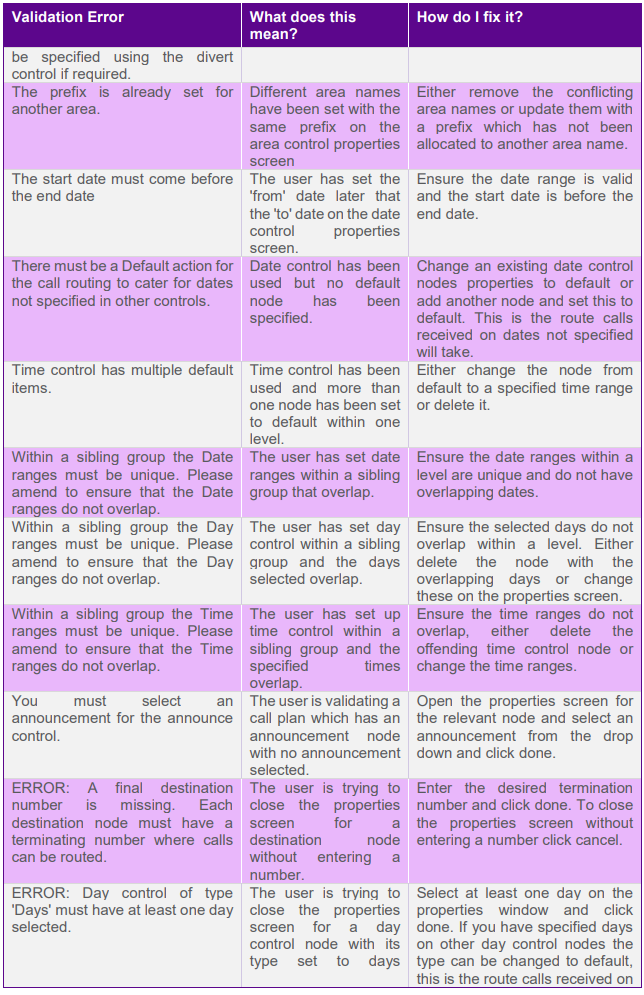
Call Plan Validation Errors #
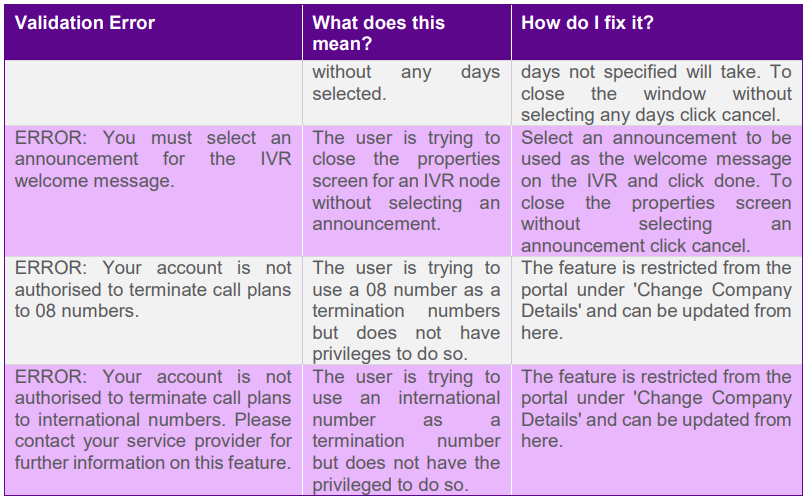
When validating call plans you may experience validation errors, these will stop you from activating your call plan and can have a number of causes. Here you will find a list of these responses, what they mean and how to fix them.
APIs #
For any specific API issues please contact Gamma Service Desk.
Service Announcements
Please sign up for Inbound Alerts on the Gamma Portal. It is important you do so as important service announcements and updates are communicated through these means