
Skip to content
  • Academy KB Home Redesign
  • Broadband Home
  • CCaaS
  • Channel Partner Support
  • Circle Loop Home
  • Collaborate
  • Connectivity
  • Courses
  • Documentation
  • Ethernet
  • FibreXchange
  • FUSION IoT
  • Gamma AI Concierge
  • Gamma Plus
  • Gamma SIP for Cloud Connect
  • Gamma SIP Global Communications Enablement
  • Gamma SIP Trunks for Genesys Cloud
  • Hannah – Homepage WIP
  • Home
  • Horizon
  • Horizon Contact
  • Horizon Forms
  • Horizon Service Description Home
  • Horizon with Webex
  • Inbound
  • iPECS
  • Knowledge Base Intro
  • Knowledgebase Directory
  • LoginPress
  • Microsoft
  • Microsoft Teams Direct Routing Home
  • Microsoft Teams Operator Connect
  • Mobile
  • Multiple KB
  • My Courses
  • No Access
  • No active page
  • Numbering and Porting
  • Phoneline+
  • Product Homepage
  • Quick Download Button
  • Release Notes
  • Release Notes
  • SIP Home
  • Test
  • UCaaS
  • User Account
  • Voice
  • Voice Enablement
  • Webex for Gamma
  • Webex for Gamma Release Notes
  • Gamma Academy Knowledge Base
Gamma Academy Knowledge Base
  • Cloud Calling and Collaboration
    • Webex for Gamma
    • Horizon with Webex
    • Horizon
    • Phoneline+
    • Operator Connect
    • Direct Routing
    • Inbound
    • Akixi CX Analytics
    • Red Cactus
  • Connectivity and Networking
    • Numbering and Porting
    • Broadband
    • FibreXchange
    • Ethernet
    • SIP Trunking
    • Gamma FUSION IoT
  • CX
    • Horizon Contact
    • AI Concierge
  • Mobile Services
    • Gamma Mobile
  • CyberSecurity
    • SafeWeb
  • Partner & Portal Support
Gamma Academy Knowledge Base

Provisioning and In-Life Changes

  • Before Ordering Broadband
    • Broadband Address Checking/Validation
    • Broadband Fibre Products
    • Broadband SLAs for Order Placement
    • Broadband Care Levels
    • Running broadband on a long PSTN line
    • Broadband IP Addressing and Justification
    • Broadband – Acceptable Use Policy
    • Broadband Traffic Priority Policy
    • One Touch Switch – Broadband Switching Process Update
  • Ordering Broadband
    • Broadband Using the Suitability Checker
    • Placing a New Broadband Order
    • Broadband SIM Provides
    • Broadband Routed IPs
    • Broadband Router delivery
    • Broadband Expedites
    • Broadband DSL Credentials
    • Track an Existing Order
    • Modifying or Cancelling an Order Broadband
  • In-Life Broadband Configuration
    • Broadband Service Management
    • Gamma Search Tool
    • Broadband WBC Migrations
    • Broadband Home Mover process
    • Change Care Level on an existing Broadband Service
    • FTTP Optical Network Termination box
    • Router Settings
    • Broadband Line Renumbering/Porting
    • Suspend and Resume Broadband

Technical Support

  • Broadband – Glossary
  • Diagnosing and Raising a Fault
    • First line Checks
    • No Authentication Fault
    • No Web Pages
    • No Sync Fault
    • Slow Speed Faults
    • Intermittent Connection
    • REIN and SHINE
    • Broadband Health Check And Diagnostics
    • Raising a Fault
  • Zyxel Router Support
    • Zyxel DX3301 – User Guide
    • Zyxel DX3301 – Creating User Accounts & Remote Access
    • Zyxel DX3301 – ADSL NAT-ed Setup
    • Zyxel DX3301 – SoGEA NAT-ed Setup
    • Zyxel DX3301 – FttP NAT-ed Setup
    • Zyxel DX3301 – Changing Router to Bridge Mode
    • Zyxel DX3301 – Enabling/Disabling NAT
    • Zyxel DX3301 – Routed Setup
    • Zyxel DX3301 – SIP ALG
    • Zyxel DX3301 – Changing Authentication Credentials
    • Zyxel DX3301 – WiFi and Guest Wifi
    • Zyxel DX3301 – Factory Reset
  • Technicolor Router Support
    • Technicolor Router Configuration Guides
    • Enabling port mirroring on Technicolor TG588/DGA122
    • Switch off SIP ALG on a Technicolor Router using Telnet
    • Router return process
  • Network and IP support
    • IP Addresses and DSL Credentials
    • IP rates and Configuration
    • Connecting to the SMTP Relay
  • Service Management
    • Broadband Reports and Checks

Service Description

  • Standard and Converged Broadband Service Description

Broadband Forms

  • Broadband Forms

Product Information

  • Product and Industry Information
  • Home
  • Home
  • Broadband
  • Provisioning and In-Life Changes
  • In-Life Broadband Configuration
  • Change Care Level on an existing Broadband Service
View Categories

Change Care Level on an existing Broadband Service

How to Place a regrade/modify order request. #

During the life of your customer’s broadband service their business requirements may change. Their exchange may have become fibre enabled, their business may have expanded, or they may wish to take advantage of a different product in our broadband range. You can upgrade or downgrade the broadband product as required via the Gamma portal. Please see the process below for guidance on completing a regrade.

Before placing a regrade, please use the availability checker to see what products are available to regrade to. To regrade an existing Broadband service or change a care level please follow the below

Considerations #

Does your customer require a new router? If regrading from an ADSL service to FTTC you will need to ensure that you supply a VDSL enabled router or request a pre-configured one from Gamma. If you are switching to an Assured or Converged service, Gamma will send out a pre-configured router to the site address listed on the broadband service. If you require this to be sent to a different address, please advise via an email to broadbandorders@gamma.co.uk once you have placed the regrade.

If you are regrading from a Converged 2+ product to a Converged FTTC product, Gamma will remotely apply a patch to enable FTTC on the Cisco router (as of August 2016)

There will be downtime for your customer when regrading from ADSL based services to FTTC. This downtime occurs when the Openreach FTTC installation engineer attends your customer’s local cabinet to enable FTTC, the new service will come online when the engineer attends your customer’s site around 15 minutes later to complete the installation. The engineer will call ahead 30 minutes before starting work to advise your customer, he will use the site contact details on the current broadband service. If these are no longer correct, please advise new site contact details via email to broadbandorders@gamma.co.uk

For FTTP circuits, regrades will only be available to other FTTP products.

If you are unable to regrade on the portal #

Gamma have recently released a new product set which uses a new pricing model, you can view this on the broadband price list by going to the billing home page on the Gamma Portal. When attempting to regrade a broadband service on the portal, you may receive an error message:

Regrade availability will be determined by whether your customer has fulfilled their contract length and whether the requested product is available on your customer’s PSTN line. If you are unsure around your customer’s contract length, please contact your Account Manager or iam@gamma.co.uk. To initiate a regrade in this circumstance please see the process guide below.

Attempt to place the regrade as normal on the portal, on receiving the error message above you will need to:

Send an email to your internal account manager or iam@gamma.co.uk including the CLI of the service you wish to regrade, the current broadband product and the exact product name of the product you wish to regrade to

Your account manager will then disclose whether this regrade is permissible from Gamma’s perspective and inform broadbandorders@Gamma.co.uk if accepted.

Step 1

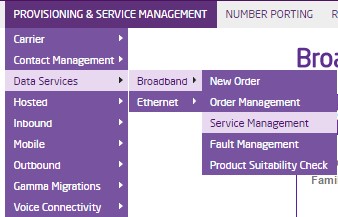
Log into the Gamma Portal and go to Provisioning and Service Management, Data Services, Broadband and select Broadband Service Management.
Step 2

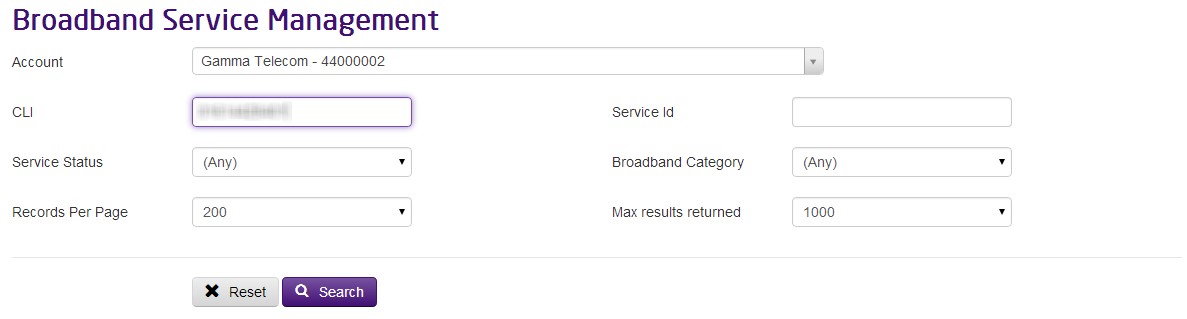
Search for the existing service using either CLI or Service ID.
Step 3

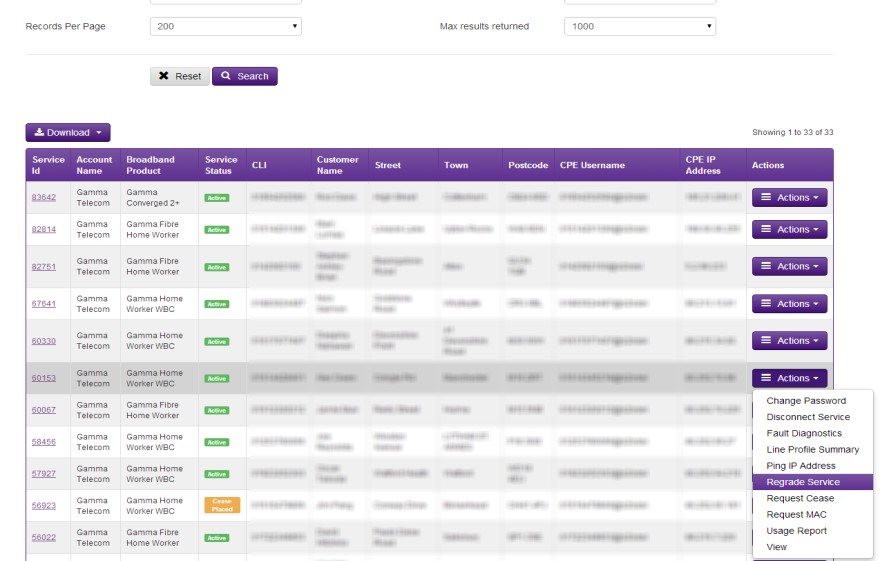
Click the link ‘Regrade Service’ from the Actions menu.
Step 4

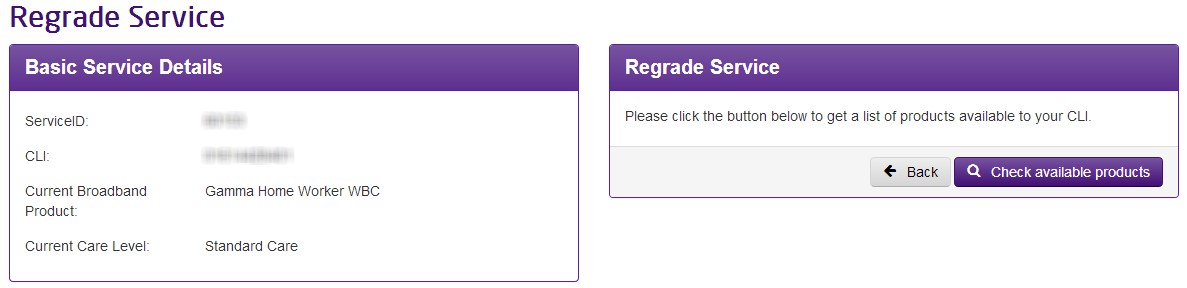
Click the check the available products (results are based on a Broadband availability checker)
Step 5

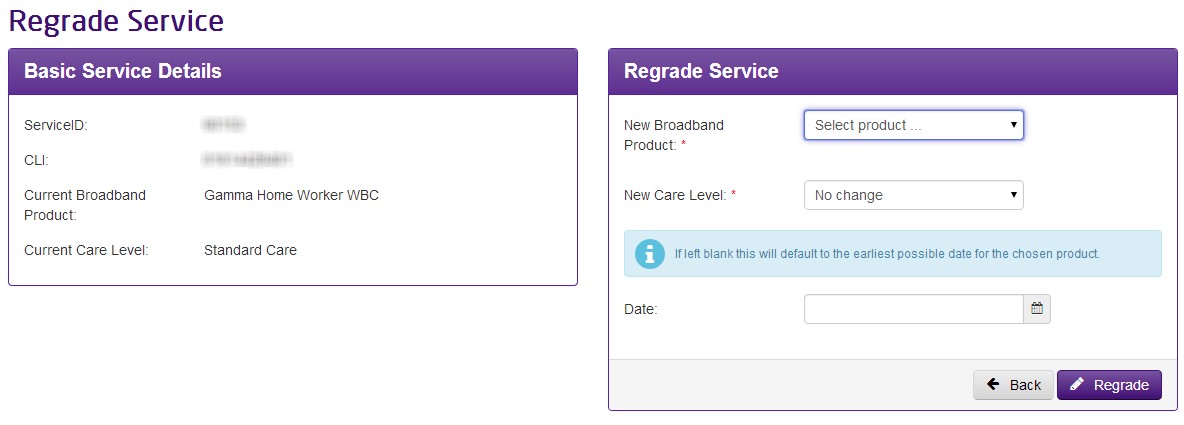
Chose the new product and any change in Care level and whether a router is required. Select the required date for the regrade to complete.

Note: Lead times are minimum of 5 working days. FTTC regrades require a minimum of 10 working days
Updated on 18/12/2023
Broadband Home Mover processFTTP Optical Network Termination box
Contents
  • How to Place a regrade/modify order request.
    • Considerations
    • If you are unable to regrade on the portal

Copyright © 2026 -  Gamma Telecom Ltd

Gamma API
We use cookies to measure performance and make improvements to this service. This includes page views, device/browser, location, and page interactions. We do not collect any information you upload to this site. By agreeing, you consent for your data to be used for this purpose.