
Skip to content
  • Academy KB Home Redesign
  • Broadband Home
  • CCaaS
  • Channel Partner Support
  • Circle Loop Home
  • Collaborate
  • Connectivity
  • Courses
  • Documentation
  • Ethernet
  • FibreXchange
  • FUSION IoT
  • Gamma AI Concierge
  • Gamma Plus
  • Gamma SIP for Cloud Connect
  • Gamma SIP for Cloud Connect
  • Gamma SIP for Genesys Cloud
  • Gamma SIP Global Communications Enablement
  • Gamma SIP Trunks for Genesys Cloud
  • Hannah – Homepage WIP
  • Home
  • Horizon
  • Horizon Contact
  • Horizon Forms
  • Horizon Service Description Home
  • Horizon with Webex
  • Inbound
  • iPECS
  • Knowledge Base Intro
  • Knowledgebase Directory
  • LoginPress
  • Microsoft
  • Microsoft Teams Direct Routing Home
  • Microsoft Teams Operator Connect
  • Mobile
  • Multiple KB
  • My Courses
  • No Access
  • No active page
  • Numbering and Porting
  • Phoneline+
  • Product Homepage
  • Quick Download Button
  • Release Notes
  • Release Notes
  • SIP Home
  • Test
  • UCaaS
  • User Account
  • Voice
  • Voice Enablement
  • Webex for Gamma
  • Webex for Gamma Release Notes
  • Gamma Academy Knowledge Base
Gamma Academy Knowledge Base
  • Cloud Calling and Collaboration
    • Webex for Gamma
    • Horizon with Webex
    • Horizon
    • Phoneline+
    • Operator Connect
    • Direct Routing
    • Inbound
    • Akixi CX Analytics
    • Red Cactus
  • Connectivity and Networking
    • Numbering and Porting
    • Broadband
    • FibreXchange
    • Ethernet
    • SIP Trunking
    • Gamma FUSION IoT
  • CX
    • Horizon Contact
    • AI Concierge
  • Mobile Services
    • Gamma Mobile
  • CyberSecurity
    • SafeWeb
  • Partner & Portal Support
Gamma Academy Knowledge Base

Provisioning and In-Life Changes

  • Before Ordering Broadband
    • Broadband Address Checking/Validation
    • Broadband Fibre Products
    • Broadband SLAs for Order Placement
    • Broadband Care Levels
    • Running broadband on a long PSTN line
    • Broadband IP Addressing and Justification
    • Broadband – Acceptable Use Policy
    • Broadband Traffic Priority Policy
    • One Touch Switch – Broadband Switching Process Update
  • Ordering Broadband
    • Broadband Using the Suitability Checker
    • Placing a New Broadband Order
    • Broadband SIM Provides
    • Broadband Routed IPs
    • Broadband Router delivery
    • Broadband Expedites
    • Broadband DSL Credentials
    • Track an Existing Order
    • Modifying or Cancelling an Order Broadband
  • In-Life Broadband Configuration
    • Broadband Service Management
    • Gamma Search Tool
    • Broadband WBC Migrations
    • Broadband Home Mover process
    • Change Care Level on an existing Broadband Service
    • FTTP Optical Network Termination box
    • Router Settings
    • Broadband Line Renumbering/Porting
    • Suspend and Resume Broadband

Technical Support

  • Broadband – Glossary
  • Diagnosing and Raising a Fault
    • First line Checks
    • No Authentication Fault
    • No Web Pages
    • No Sync Fault
    • Slow Speed Faults
    • Intermittent Connection
    • REIN and SHINE
    • Broadband Health Check And Diagnostics
    • Raising a Fault
  • Zyxel Router Support
    • Zyxel DX3301 – User Guide
    • Zyxel DX3301 – Creating User Accounts & Remote Access
    • Zyxel DX3301 – ADSL NAT-ed Setup
    • Zyxel DX3301 – SoGEA NAT-ed Setup
    • Zyxel DX3301 – FttP NAT-ed Setup
    • Zyxel DX3301 – Changing Router to Bridge Mode
    • Zyxel DX3301 – Enabling/Disabling NAT
    • Zyxel DX3301 – Routed Setup
    • Zyxel DX3301 – SIP ALG
    • Zyxel DX3301 – Changing Authentication Credentials
    • Zyxel DX3301 – WiFi and Guest Wifi
    • Zyxel DX3301 – Factory Reset
  • Technicolor Router Support
    • Technicolor Router Configuration Guides
    • Enabling port mirroring on Technicolor TG588/DGA122
    • Switch off SIP ALG on a Technicolor Router using Telnet
    • Router return process
  • Network and IP support
    • IP Addresses and DSL Credentials
    • IP rates and Configuration
    • Connecting to the SMTP Relay
  • Service Management
    • Broadband Reports and Checks

Service Description

  • Standard and Converged Broadband Service Description

Broadband Forms

  • Broadband Forms

Product Information

  • Product and Industry Information
  • Home
  • Home
  • Broadband
  • Technical Support
  • Diagnosing and Raising a Fault
  • REIN and SHINE
View Categories

REIN and SHINE

What is REIN & SHINE? #

Repetitive Electrical Impulse Noise (REIN) and Single Isolated Impulse Noise (SHINE) is interference found on an ADSL connection and is caused by electrical impulses from such electrical items as a faulty power supply which can result in line errors, slow speed and even disconnections. Usually, power sources and an ADSL connection can co-inside happily. SHINE happens in a burst (i.e. when a device is switched off), whereas REIN is constant throughout a devices usage.

Whilst all electrical equipment will generate some “noise”, it should comply with the Electromagnetic Compatibility (EMC) directives, thus avoiding disturbance by radio and telecommunications equipment, though some equipment may be old, foreign or faulty.

How do I look for a REIN or SHINE fault? #

Diagnosing REIN or SHINE faults can be complicated. It is the End User who would diagnose these faults and it is simply a process of elimination. You should get an AM/MW radio and set it to 612KHz. If you place the radio next to your modem/router, you’ll hear the ADSL signal. If you then place the radio next to another power source, such as an LCD monitor, you’ll hear a distinct sound and such fade out as you move it away. By using the radio, you may be able to see where the noise is coming from, and switch off that power source and then retest your ADSL connection.

Not all noise you may hear will affect your ADSL connection, this is just to help you find the potential cause.

If you are unable to find the cause within the site of the ADSL connection, it could be further afield, such as a neighbours equipment, or something along the route of the ADSL connection from the exchange, such as roadworks or a faulty streetlight. If the source is external, then you should call into the service desk who will then be able to assist you further.

Please note:
REIN and SHINE faults can be complicated and can take months to resolve. In extreme cases, the cause cannot be eliminated.

Typical REIN and SHINE Causes #

  • Faulty Power Adapters
  • Christmas tree lights
  • Thermostats (central heating etc)
  • Railway cables
  • Electric fences / motors
  • Street lighting
  • Laptops / TVs / Set top boxes for Sky, Virgin, Freeview etc.
  • Roadworks
  • Florescent lights

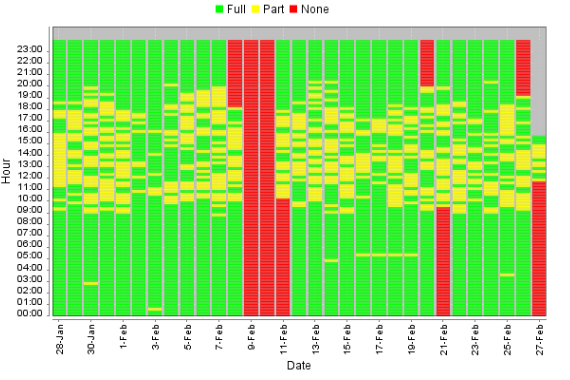
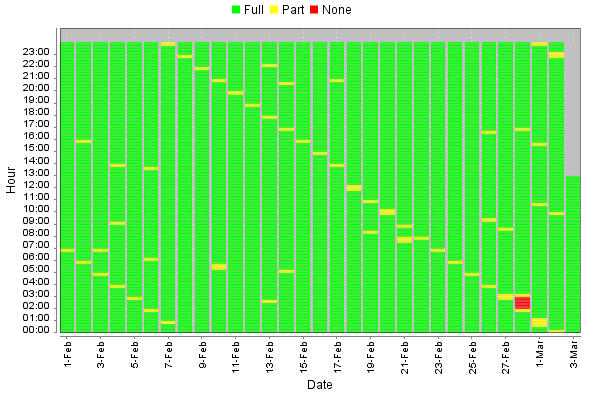
Please see below for some example pictures for RIEN & SHINE

RIEN –
SHINE–
How can I help fix a REIN problem? #

If you suspect that you have a REIN fault, you still need to do standard fault diagnostics. BT Openreach will only escalate a suspect REIN fault to their specialist REIN engineers once standard fault finding (including their normal engineers) have run tests and tried to avoid REIN.

It’s also important to note that once the initial engineer is satisfied that everything has been done to avoid REIN and whatever is causing the fault is not on BTs network is when the REIN engineer will be assigned. Therefore this is not subject to a normal BT service level agreement and the BT REIN engineer maybe take a couple of weeks to attend the site. You may also be charged for this visit as the REIN is likely caused by an appliance or configuration at your site.

You can see if the problem is attributed to REIN yourself, and sometimes even track it down. You should make a log of the dates and times the internet goes down (you’ll be able to see this using our Fault Diagnostics tool). If there is a pattern, such as the internet goes down between 9am and 5pm the interference must be by an electrical appliance that is active within that time frame. Try unplugging different electric items near the telephone line or the router from the mains supply and see if this resolves the issue. Remember when doing this it could take up to 2 minutes before you see if it works.

If the cause of REIN is offsite then REIN engineers can ask the owner of the kit to turn it off but the owner is not obliged to do so.

image_pdf
Updated on 14/12/2023
Intermittent ConnectionBroadband Health Check And Diagnostics
Contents
  • What is REIN & SHINE?
  • How do I look for a REIN or SHINE fault?
  • Typical REIN and SHINE Causes
  • How can I help fix a REIN problem?

Copyright © 2026 -  Gamma Telecom Ltd

Gamma API
We use cookies to measure performance and make improvements to this service. This includes page views, device/browser, location, and page interactions. We do not collect any information you upload to this site. By agreeing, you consent for your data to be used for this purpose.