
Skip to content
  • Academy KB Home Redesign
  • Broadband Home
  • CCaaS
  • Channel Partner Support
  • Circle Loop Home
  • Collaborate
  • Connectivity
  • Courses
  • Documentation
  • Ethernet
  • FibreXchange
  • FUSION IoT
  • Gamma AI Concierge
  • Gamma Plus
  • Gamma SIP for Cloud Connect
  • Gamma SIP for Cloud Connect
  • Gamma SIP for Genesys Cloud
  • Gamma SIP Global Communications Enablement
  • Gamma SIP Trunks for Genesys Cloud
  • Hannah – Homepage WIP
  • Home
  • Horizon
  • Horizon Contact
  • Horizon Forms
  • Horizon Service Description Home
  • Horizon with Webex
  • Inbound
  • iPECS
  • Knowledge Base Intro
  • Knowledgebase Directory
  • LoginPress
  • Microsoft
  • Microsoft Teams Direct Routing Home
  • Microsoft Teams Operator Connect
  • Mobile
  • Multiple KB
  • My Courses
  • No Access
  • No active page
  • Numbering and Porting
  • Phoneline+
  • Product Homepage
  • Quick Download Button
  • Release Notes
  • Release Notes
  • SIP Home
  • Test
  • UCaaS
  • User Account
  • Voice
  • Voice Enablement
  • Webex for Gamma
  • Webex for Gamma Release Notes
  • Gamma Academy Knowledge Base
Gamma Academy Knowledge Base
  • Cloud Calling and Collaboration
    • Webex for Gamma
    • Horizon with Webex
    • Horizon
    • Phoneline+
    • Operator Connect
    • Direct Routing
    • Inbound
    • Akixi CX Analytics
    • Red Cactus
  • Connectivity and Networking
    • Numbering and Porting
    • Broadband
    • FibreXchange
    • Ethernet
    • SIP Trunking
    • Gamma FUSION IoT
  • CX
    • Horizon Contact
    • AI Concierge
  • Mobile Services
    • Gamma Mobile
  • CyberSecurity
    • SafeWeb
  • Partner & Portal Support
Gamma Academy Knowledge Base

Provisioning and In-Life Changes

  • Before Ordering Horizon
    • Example Checklist of a Horizon Installation
    • Horizon Site Survey
    • Customer Site and Horizon Service
    • Horizon Number Requirements
    • Horizon Network Configuration Guidelines
    • Horizon After Care
    • Horizon Glossary
  • Ordering Horizon on the Gamma Portal
    • Ordering a Horizon Company
  • Configuring Your Horizon Company
    • Horizon Sites
    • Add Horizon Users
  • In-Life Ordering
    • Horizon Change Branding
    • Horizon Bolt-Ons
    • Horizon: Managing Subscriptions
    • Horizon Numbers & Porting
  • In-Life Configuration
    • Multi factor Authentication (MFA)
    • Horizon: Configuring the New Solution
    • Horizon Fraud Management
    • Cease a Horizon Company

Features

  • Device Management
    • Device Customisation
    • Yealink DECT – Multiple Users Assigned to a Single Base Station
  • Outgoing Call Settings
    • Click to Dial
    • Call Barge
  • Call Groups
    • Nuisance Call Management for Horizon Call Groups
    • Instant Conference Group
    • Hunt Groups
    • Call Queue Groups
    • Call Pickup
    • Call Park
    • Call Paging
    • Auto Attendant
  • Voicemail
    • Voice Portal
    • Voicemail
    • Horizon Voicemail Map
  • Scheduling
    • Schedules
    • Create a Call Group Schedule
    • Configuring Additional Routing for Christmas Schedules
    • Configuring Schedules for Auto Attendants using a Hunt Group
  • User Call Setup
    • Availability Profiles
    • Busy Lamp Field (BLF)
    • Comfort Messages
    • CLI Presentation
    • Distinctive Ringing for External Calls
    • Do Not Disturb
    • Hot Desking
    • Remote Office
    • Sequential Ringing
    • Twinning
    • 1 or 2 Digit Dialling (Speed Dials)
  • Company Admin
    • Site-to-Site Presentation Policy
    • Music on Hold
    • Horizon Shortcodes
    • Directory
    • Departments
    • Account and Authorisation Codes
  • Incoming Call Settings
    • Call Waiting
    • Call Transfer
    • Call Recording
    • Call Forwarding
    • Call Barring
    • Automatic Call Back
    • Anonymous Call Rejection

Advanced Feature Guides

  • Call Recording
    • Call Recording Service
    • Call Recording – Portal User Guide
    • Call Recording – MFA How to Guide
    • Call Recording – MFA Technical Support
    • Call Recording – Known Behaviours
    • Call Recording – FAQs
  • Integrator
    • Horizon Integrator TAPI User Guide
    • Horizon Integrator Controlled Integrations
    • Horizon Integrator Standard Select Integrations
    • Horizon Integrator Client SDK Engagement Process
    • Horizon Salesforce (Lightning) Adaptor Add-in Guide
  • Call Center Guides
    • Horizon Call Centre Administrators Guide
    • Horizon Internet Explorer Settings for Full Screen Mode
  • Multi-Factor Authentication (MFA)
    • How-To Guide: Horizon Multi-Factor Authentication
    • Multi-Factor Authentication (MFA) FAQs
    • Technical Support Guide: Multi-Factor Authentication
  • Soft Phone Guides
    • Horizon Soft Phone Guide – iOS
    • Horizon Android Soft Phone Guide
    • Horizon Soft Phone Client PC Guide
    • Horizon Setup Soft Phone Client for a user Guide
  • Akixi
    • Akixi Documentation

Technical Support

  • Diagnosing and Raising a Fault
    • Horizon Health Check
    • I Have a Problem With Call Connection/Calls are Dropping
    • I Have a Problem With Call Quality
    • I Have a Problem With a Feature
    • I Have a Problem With the Horizon Portal
    • New Call Recording Technical Support
    • Raise a Fault
  • Handset Support
    • Poly Profile Rules and Recovery
    • Cisco Profile Rules and Recovery Process
    • Yealink Profile Rules and Recovery Process
    • Handset Returns
    • Horizon RMA Check List
  • Handset User Guides
    • Poly Handset User Guides
    • Cisco Handset User Guides
    • Yealink Handset User Guides
    • Sennheiser Handset User Guides
  • Known Behaviours
    • Horizon Known Behaviours
    • Horizon SIP ALG

Service Description

Horizon Release Notes

T&Cs and SLAs

Horizon Forms

Provisioning and In-Life Changes

  • Ordering Horizon with Webex on the Gamma Portal

Features

Technical Support

User Knowledge Base

Service Description

Horizon with Webex Release Notes

Horizon with Webex Forms

T&Cs and SLAs

  • Home
  • Home
  • Advanced Feature Guides
  • Integrator
  • Horizon Integrator Client SDK Engagement Process
View Categories

Horizon Integrator Client SDK Engagement Process

Introduction #

Client SDK Horizon Integrator 3.1 offers a client-side API that can be used by developers of contact-orientated desktop business applications (e.g. CRM systems) to add their own telephony integration features into their application.

An application program interface (API) is a set of routines, protocols, and tools for building software applications.

This technique might be used where the customer wants a telephony integration not available through the standard add-in method of Horizon Integrator.

This method requires the Developer of the application to modify their product to make the integration available. No changes to Horizon Integrator are required.

The API is made available through Horizon Integrator running on the desktop with a DB-level licence.

The API allows the Developer to exploit the following features to enable telephony integration within their application

– Call actions: make call, answer, hold, hang up

– Call events: ringing, connected, completed, hold, un-hold

– Call information: caller’s number, dialled number

How do I get access to the Client SDK #

If you are interested in using our Client SDK to allow Horizon Integrator to integrate with your CRM, please ask your CRM Developer to access our programme here on our Horizon Integrator Microsite
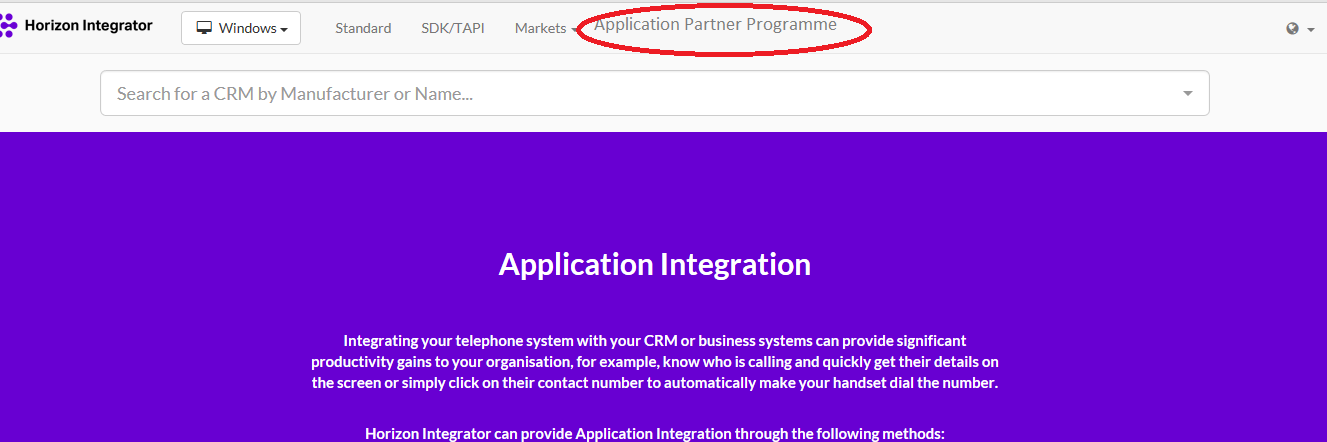
Once you have read over the information, please register your interest by emailing servicedesk@helpcti.com

Depending on your requirements, our Developers will have a 30-minute technical discussion with your CRM Developer on what they want to get out of the integration.

This conversation will most likely have one of two outcomes

-We will write an add-in and this will become one of our Standard integrations

– We will provide you with access to our Client SDK

Developer Programmes #

Developers will have the option to join Partner Programmes for both of these types of services.

Add-in Partner Programme #

Included within this programme are:

– Mondago writes add-in for your application at no charge

– Add-in is included as Standard Integration in Mondago’s branded solutions

– Add-in is listed on product websites

– Partner is listed as a Partner on Mondago’s home website

– Access to Mondago logos for marketing purposes

– Not-for-resale licenses for applicable Mondago products available for internal use where possible

SDK Partner Programme #

Included within this programme are:

– Privileged access to technical forum and developer resources during the development cycle

– Integration is listed on product websites

– Partner is listed as a Partner on Mondago’s home website

– Access to Mondago logos for marketing purposes

– Not-for-resale licenses for applicable Mondago products available for internal use where possible

For Developers who do not wish to join the Partner Programme, we can still offer the service pack to you. This will give access to the required documentation and the Open Forum to ask any questions

Do I still need to purchase Horizon Integrator Licences? #

Yes, you will need to order the required number of Horizon CRM Integrator licences on the Gamma Portal and ensure these are assigned to each User on the Horizon Portal

Professional Services #

For CRM Developers who require more assistance with the Client SDK outside of the 30-minute technical discussion, Professional Services are available.

This will be provided by way of a one-day consultancy (8 hours) that can be spread over a period of 3 months. After this period, support can be offered by the Open Forum

Charges will apply

What if I have a problem with Integration? #

CRM Developers will be given access to an Open Forum provided in the NPM link.

Here you can ask open questions to in-house Developers which they will respond to.

Please note there are no SLAs on response times and responses will be provided via the Open Forum

Depending on the type of type of integration, the following Support will be offered

Custom end customer system, no professional services taken – Support can be accessed via the Open Forum only

Custom end customer system, professional services taken – Support will be provided directly to the Developer during the 3-month window, then support via the Open Forum after this

Off-shelf professional application, Developers have joined the partner program – Support will be provided directly via in-house Developers

Off-shelf professional application, Developers have not joined the partner program –Support is provided via the Open forum only

Feedback #

Name

Service Development

portalfeedback@gamma.co.uk

0333 240 7771

image_pdf
Updated on 21/12/2023
Horizon Integrator Standard Select IntegrationsHorizon Salesforce (Lightning) Adaptor Add-in Guide
Contents
  • Introduction
  • How do I get access to the Client SDK
  • Developer Programmes
    • Add-in Partner Programme
    • SDK Partner Programme
  • Do I still need to purchase Horizon Integrator Licences?
  • Professional Services
  • What if I have a problem with Integration?
  • Feedback

Copyright © 2026 -  Gamma Telecom Ltd

Gamma API
We use cookies to measure performance and make improvements to this service. This includes page views, device/browser, location, and page interactions. We do not collect any information you upload to this site. By agreeing, you consent for your data to be used for this purpose.
