
Introduction #
The purpose of this document is to offer guidelines to Channel Partners and End Users on how the LAN & WAN environment should be configured to be able to run the Horizon and associated services successfully at a customer site.
Horizon is designed to work using public IP addressing for access and as such this provides more than just the provision of speech and signalling protocols; it also provides access to other publicly available services which Horizon requires to function correctly.
If a channel partner and/or end user wishes to utilise another, non-Gamma access solution, they need to ensure that the solution can meet the requirements and functionality set out in this document. Failure to meet these requirements will result in quality and setup/support issues.
Please note below the defined demarcation points when using third-party access and on the customer’s LAN.
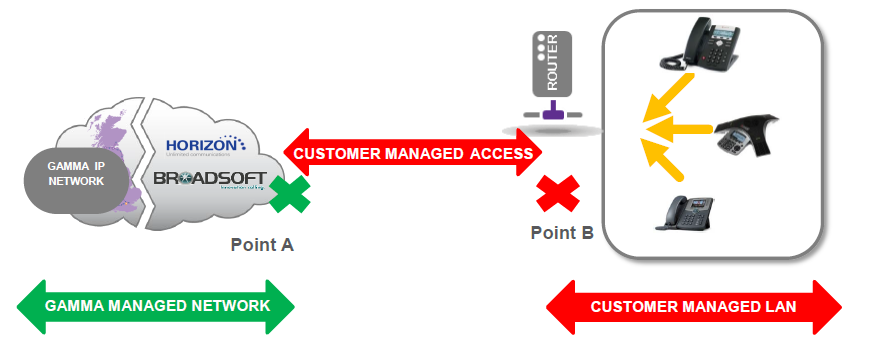
Configuration of Non-Gamma Access routers #
Access Control #
Network administrators must ensure that the following IP addresses and outbound ports are available and not blocked by firewalls. If these ports are not opened (i.e., a customer or network-based firewall is blocking them), or IP addresses allowed, Horizon will not function correctly.
There is no need to unblock the inbound ports because once the devices have registered and they’ve allowed outbound access, then we can route traffic based on the active registration so that we can see the IP address and ports etc .
DNS records utilised by Horizon are provided. These are informational only for most deployments as DNS will be learned from records populated on Gamma’s authoritative public DNS servers. Customers who maintain private DNS servers may need to populate the DNS records in their servers.
Gamma recommends that only trusted IPs are allowed to send and receive traffic via ports 5060 and 5080.
The requirements need to be checked by the Channel Partner with the customer/access provider as part of the Sales process to ensure that the solution will be fit for purpose for Horizon. This applies to all ISPs.
If the Channel Partner has not checked the details with their ISP, or there is any doubt, they should opt for the Gamma Assured & Gamma Ethernet access products.
From the 1st of September 2021, Gamma expanded and modernised its network infrastructure as our service continues to grow. As such, updates are required for customers’ firewalls for Horizon to be able to communicate with customers’ hardware and software at site.
These changes are: 151.2.128.0/19 (subnet mask 255.255.224.0)
As a cloud service Horizon server may be present at any IP address in this range so it is recommended that firewall ACLs allow outbound access to the whole range, on all TCP and UDP ports, that is port range 0-65535
New IPv4 Public Address | Subnet Mask | Ports | Function |
|---|---|---|---|
151.2.128.0 /19 | 255.255.224.0 | All TCP and UDP ports, that is port range: 0-65535 *Further detail below | Device provisioning, including soft clients and software downloads |
The most commonly used ports are listed below and as a minimum, we would recommend that these ports are opened. However please note that Gamma will, over time, introduce new devices on the 151.2.128.0/19 range and on ports not previously listed or used. We would endeavour to provide as much notice as we can on these changes, but there may be occasions where no notice can be given and therefore recommend that all TCP and UDP ports in the 0-65535 range are opened.
• No permanent inbound ports are required for Horizon.
| Portocol and Ports | Function |
|---|---|
| TCP 5060 UDP 5060 TCP 5080 UDP 5080 | SIP signalling |
| TCP 80 | Provisioning, soft-clients, downloads |
| TCP 443 TCP 8443 | Soft-clients, TAPI etc. |
| TCP 389 TCP 636 | LDAP Directories |
| TCP 3478 UDP 3478 TCP 5349 UDP 5349 | STUN |
| TCP 5222 TCP 5269 | Instant Messaging |
| RTP 6000 – 60000 | Media |
| TCP 5222 TCP 5269 TCP 443 | Collaborate Instant messaging and Presence server. |
TCP 5280-5281 | |
TCP 1081-1082 | |
TCP 8060 | Collaborate WebRTC server signalling, media and STUN port |
TCP 8070 | |
UDP 1024-3024 | |
UDP 3478 | |
TCP 443 |
Horizon phones and clients will open and keep alive any outbound firewall pinholes, so specific incoming ACL should not be required.
Gamma will not provide individual IP addresses for these services. The entire IP range can be trusted to only host Gamma UCaaS and voice services and therefore it is safe to open the specified ports for this IP range.
Voice and Video Traffic #
Voice and video traffic from all Horizon IP phones and soft-clients route via Horizon Access SBCs as defined below. Occasionally new Horizon Access SBCs will be added to the list and the change will be communicated via regular channels.
| IP Address | Protocol and Ports | Function |
|---|---|---|
88.215.63.171 | UDP 5060 TCP 5080 | SBC SIP signalling |
88.215.63.21 | UDP 5060 TCP 5080 | SBC SIP signalling |
88.215.58.1 | UDP 5060 TCP 5080 | SBC SIP signalling |
88.215.55.33 | UDP 5060 TCP 5080 | SBC SIP signalling |
88.215.54.1 | UDP 5060 TCP 5080 | SBC SIP signalling |
88.215.58.129 | UDP 5060 TCP 5080 | SBC SIP signalling |
88.215.58.161 | UDP 5060 TCP 5080 | SBC SIP signalling |
88.215.58.2 | UDP 10000- 60000 | SBC RTP Traffic |
88.215.63.172 | UDP 10000- 60000 | SBC RTP Traffic |
88.215.54.2 | UDP 10000 – 60000 | SBC RTP Traffic |
88.215.55.34 | UDP 10000 – 60000 | SBC RTP Traffic |
88.215.63.22 | UDP 10000- 60000 | SBC RTP Traffic |
88.215.58.130 | UDP 10000- 60000 | SBC RTP Traffic |
88.215.58.162 | UDP 10000- 60000 | SBC RTP Traffic |
88.215.48.0 /25 | UDP 5060 TCP 5080 UDP 10000- 60000 | SBC SIP signalling SBC RTP Traffic |
138.248.17.0/24 | UDP 5060 TCP 5080 UDP 10000- 60000 | SBC SIP signalling SBC RTP Traffic |
138.248.19.128/25 | UDP 5060 TCP 5080 UDP 10000- 60000 | SBC SIP signalling SBC RTP Traffic |
Note: From August 2019 Gamma will not provide SBC IP addresses for individual SBCs. Instead, the entire 88.215.48.0/25 range (88.215.48.1 to 88.215.48.126), 138.248.17.0/24 & 138.248.19.128/25 can be trusted to only host Gamma Horizon SBCs. It is therefore safe to open the specified ports for this IP address range.
SBC Discovery #
DNS SRV records are used to provide high-availability service for Horizon IP phones and soft clients. DNS SRV records resolve to two or more DNS A-records, which in turn resolve to IP addresses of Horizon Access SBCs. This mechanism provides each Horizon device with multiple SBCs to send or receive calls.
| Domain Name | Record Type | Service Name | Protocol | Port | Function |
|---|---|---|---|---|---|
| sipX.unlimitedhorizon.co.uk Example: _sip._udp.sip1.unlimitedhorizon.co.uk _sip._udp.sip9.unlimitedhorizon.co.uk | SRV | SIP | UDP | 5060 | SRV Records for Horizon Voice Signalling Traffic X being the variable for any number (previous version showed 1-8) |
| siptX.unlimitedhorizon.co.uk Example: _sip._tcp.sipt3.unlimitedhorizon.co.uk | SRV | SIP | TCP | 5080 | SRV record for SIP ALG bypass for Horizon Desktop Clients |
| sipmX.unlimitedhorizon.co.uk Example: _sip._tcp.sipm3.unlimitedhorizon.co.uk | SRV | SIP | TCP | 5080 | SRV record for SIP ALG bypass for Horizon Mobile Clients |
| mobile-sipX.unlimitedhorizon.co.uk Example: _sip._tcp.mobile-sip1.unlimitedhorizon.co.uk | SRV | SIP | TCP | 5080 | SRV Records for Horizon Mobile Client Voice Signalling Traffic |
| nodex.sip.unlimitedhorizon.co.uk Example: node4.sip.unlimitedhorizon.co.uk | A | NA | NA | NA | A Records for Horizon Voice Signalling Traffic |
Horizon Contact #
Channel Partners who are deploying Unified Communications features with Horizon Contact can use the IP address and port information below to configure firewalls.
| Domain Names Where Applicable | IP Address | Ports | Function |
|---|---|---|---|
| horizon.contact.gammagroup.co contact.unlimitedhorizon.co.uk | 18.98.165.64/26 151.2.128.0/19 88.215.52.205 88.215.52.89 | TCP 443 | Contact web services (for Agents) Contact web interface App integrations |
| autologin-horizon.contact.gammagroup.co autologincontact.unlimitedhorizon.co.uk autologincontact2.unlimitedhorizon.co.uk | 18.98.165.64/26 151.2.128.0/19 88.215.52.205 88.215.52.89 | TCP 443 | Contact integration services (for Partners) Portal SSO logins |
Sub-domains of the above addresses are also used:
- If using name-based filtering then wildcards *.horizon.contact.gammagroup.co, *.contact.unlimitedhorizon.co.uk and *.autologin-horizon.contact.gammagroup.co must also be added where necessary.
- If wildcards are not supported then add all addresses h0-h5 for all domains, eg. h0.horizon.contact.gammagroup.co
| Domain Names Where Applicable | IP Address | Ports | Function |
|---|---|---|---|
| xmpp-horizon.contact.gammagroup.co xmpp-contact.unlimitedhorizon.co.uk tcc.xmpp-contact.unlimitedhorizon.co.uk xmpp-contact2.unlimitedhorizon.co.uk tcc.xmpp-contact2.unlimitedhorizon.co.uk | 18.98.165.64/26 151.2.128.0/19 88.215.52.205 88.215.52.89 | TCP 443 | Webchat integration (for Agents) |
| 18.98.165.64/26 151.2.128.0/19 88.215.58.192/28 13.41.209.141 18.171.121.114 35.178.47.230 | UDP 30000 – 65535 | Voice traffic (RTP/RTCP) for WebRTC Agents | |
| 18.98.165.64/26 151.2.128.0/19 88.215.58.192/28 13.42.98.68 18.134.173.134 18.168.231.15 | TCP 3478 TCP 5349 UDP 3478 UDP 5349 | Voice traffic (STUN/TURN) for Agents | |
| 18.98.165.64/26 151.2.128.0/19 88.215.55.65 3.9.214.229 13.41.93.163 35.177.158.10 | Various ports | Contact integration services (to customer systems) Call recording file transfer Email server integration Call flow web services integration Offline reporting |
UDP Fragmentation during Horizon communications. #
In some instances, the size of the UDP packets transmitted between the Horizon platform and customer handsets will exceed the default 1500-byte payload, when this happens packet fragmentation will occur. It is the responsibility of the Channel Partner and/or End User to ensure that any in-path CPE is able to support UDP fragmentation. It is also advised that a check is made to confirm that any further applications/functions running on the CPE do not interfere with the reassembly of fragmented UDP packets.
If UDP fragmentation is not allowed on CPE network devices the following features may not function correctly.
- BLF (Busy Lamp Field)
- Feature Synchronisation (DND, Call Forward Busy, Call Forward Always & Call Forward Unreachable/No Answer)
- Incoming calls to Horizon devices after a series of call forwards within the same Horizon Company
SIP ALG #
SIP Application Layer Gateway (ALG) is common in many of today’s routers and in most cases enabled by default on enterprise, business and home broadband routers. Its primary use is to prevent problems associated with the router’s firewalls by inspecting VOIP traffic packets, and if necessary, modifying them to allow connection to the required protocols or ports.
On many business and home class routers Active SIP ALG will cause a mixture of problems by adjusting or terminating Horizon traffic packets in such a manner that they are corrupted and cause issues with the service, manifesting in a range of intermittent issues such as; one-way audio, dropped calls, problems transferring calls, handset dropping registration and making or receiving internal calls.
SIP ALGs should be disabled on all CPE routers, we will not accept any faults or issues raised against Horizon if a SIP ALG is enabled.
For instructions on disabling this feature please refer to the specific router user guide. We have a limited selection of instructions for completing this via telnet which are available here.
Desktop client SIP ALG bypass #
Summary
For deployments featuring Horizon Desktop Client, on Windows and Mac OS, please ensure that firewalls allow access to Gamma SBCs on TCP port 5080. TCP 5080 is a non-standard port for SIP traffic so SIP ALGs will not inspect and alter the traffic.
Detail
Prior to January 2019 all Horizon Desktop clients used standard SIP protocol and port UDP 5060 to communicate with Horizon SBCs.
Due to its portability Horizon Desktop Client is often used in remote access situations, at home or on public internet connections where SIP ALG may be present, and it is outside the user’s control to disable it.
From January 2019 Horizon Desktop client used new DNS SRV records as defined in the SBC Discovery section of this document. These records route SIP traffic to the Horizon Access SBCs via TCP 5080 first choice. TCP 5080 is a non-standard port for SIP traffic so SIP ALGs will not inspect and alter the traffic.
Between January 2019 and August 2019 Horizon Desktop client used DNS records to provide a fallback to UDP 5060 if TCP 5080 was blocked on the customer firewall. This is being phased out due to compatibility issues with the Desktop client.
From August 2019 the Horizon Desktop client will only send SIP signalling to the Horizon SBCs on TCP 5080.
Keep-Alives #
Handsets are pre-configured to send UDP keep-alive messages towards the Horizon platform every 45 seconds using the SIP port. These messages keep the firewall pin-holes open which ensures the success of incoming calls.
UDP NAT Timeout #
Set UDP NAT Timeout > 572 seconds.
Some routers have been reported to close NAT pinholes despite Horizon phones sending keep-alives every 45 seconds. To protect against this occurring, it is recommended that UDP NAT Timeout on the router is set higher than the SIP registration refresh interval for Horizon phones. That is higher than 572 seconds.
NAT Port Translation #
For Horizon handsets to register correctly, if using a router that requires setting up Dynamic Port Address Translation – Port Multiplexing option must be selected.
DNS #
A public DNS service must be available to the Horizon handsets so that the domain names can be resolved to the associated IP addresses. SRV and A record types are used by the Horizon service. As best practice resilience of DNS needs to be considered hence both a primary and secondary DNS service should be configured as part of any deployment.
Gamma’s DNS servers are detailed below, please note these can only be used with Gamma access.
| Primary DNS Server | Secondary DNS Server |
|---|---|
| 88.215.61.255 | 88.215.63.255 |
The LAN #
Support for VLANS #
Both Cisco and Polycom phones provided as part of the Horizon service have CDP (Cisco Discovery Protocol) and LLDP (Link Layer Discover Protocol) enabled as default on delivery. Yealink Dect supports LLDP only. These protocols, CDP (Cisco proprietary), and LLDP including LLDP-MED (vendor neutral), are link layer protocols used by network devices for advertising their identities and capabilities in order to assist with management of the local area network environment, specifically VLAN segregation.
If you wish to support either of these functions for VLAN configuration/selection on the customer LAN, then you should enable the desired function on the customer’s network equipment and disable the alternative option. For example, if you wish to support CDP for a particular end user you should make sure LLDP is not configured as a live option on their network equipment and that CDP is enabled as a live option.
When using LLDP or CDP the Horizon phones will support and use any VLAN ID configured on the customer switching infrastructure (as part of the LLDP and CDP configuration) for both Voice and Data. If the customer wishes to daisy chain laptops or PCs using the switch port on the Horizon phones, any traffic from this port will be entered into the data VLAN.
An example VLAN set-up (using CDP/LLP)
Example Data VLAN: 20
Example Voice VLAN: 30
What we don’t support:
- Fixed VLAN ID’s
- Static VLAN assignment either directly from the phone or from the core network.
- We cannot enable only one of the VLAN options (either CDP or LLDP). Both will always be enabled on Horizon phones, and it is the customer’s responsibility to enable/disable the required function on their network.
Please be aware the Softphone Clients & ATAs do not support VLAN.
Yealink devices support VLAN Tagging on LLDP Not CDP (W52p/W73 & T46U)
Firmware Upgrades #
Horizon handsets are pre-configured to check for configuration and firmware updates every evening between 00:00 and 05:00.
Horizon handsets will only download new configuration or firmware files when they detect that a change has been made. Configuration files are typically ~70Kb or less, but firmware files are larger ranging between 3.5 to 57.5MB. Network administrators should consider these file downloads with regard to the bandwidth available on the access circuits the Horizon service runs over.
| Device Type | Firmware File Size |
|---|---|
| Cisco 122 | 10.0 MB |
| Cisco 192 | 31.0 MB |
| Cisco 232 | 11.3 MB |
| Cisco 501 | 4.2 MB |
| Cisco 502 | 4.2 MB |
| Cisco 504 | 4.2 MB |
| Cisco 509 | 4.2 MB |
| Cisco 525 | 11.6 MB |
| Cisco CP-7832 | 41.4 MB |
| Cisco MPP 8841 | 105MB |
| Cisco MPP 8851 | 105MB |
| Cisco MPP 886 | 105MB |
| Polycom 331 | 3.5 MB |
| Polycom 335 | 3.5 MB |
| Polycom 450 | 4.1 MB |
| Polycom 650 | 3.5 MB |
| Polycom 5000 | 3.7 MB |
| Polycom 7000 | 11.3 MB |
| Polycom VVX 150 | 34.8 MB |
| Polycom VVX 201 | 33.4 MB |
| Polycom VVX 250 | 46.2MB |
| Polycom VVX 310 | 51.1 MB |
| Polycom VVX 411 | 51.1 MB |
| Polycom VVX 450 | 46.2 MB |
| Polycom VVX 500 | 58.9 MB |
| Polycom VVX 600 | 57.5 MB |
| Polycom Trio 8500 | 294.3 MB |
| Polycom Trio 8800 | 294.3 MB |
| Yealink W52P | 9.2 MB |
| Yealink W73P | 9.2 MB |
Mobile Clients Customer Firewall Requirements (R22+) #
Since August 2017 Horizon Mobile Clients have used cloud messaging systems from Apple and Google to receive incoming call notifications. In 2019 instant messages will be sent to Mobile Clients in the same way.
When an incoming call is received by a user who is logged into the Horizon Mobile Client on Android or iOS (R22+) Horizon servers will send a notification to Apple or Google’s servers. Apple or Google will forward the notification to the device and the app will wake up, alert for an incoming call and will set up the voice call with the Horizon servers if the call is answered.
Any Horizon Mobile Clients (R22+) operating behind firewalls must therefore allow access to Apple and Google push notification servers at the IP addresses and via the ports below.
These rules are derived from advice from Google and Apple. They specify wide ranges of IP addresses as their push notification servers scale to millions of requests so new servers may be commissioned at new IP addresses in their ranges with no way to provide prior notice.
For the Mobile client to receive push notifications from Apple or Google servers, when running on a phone behind a firewall access must be allowed to Apple and Google servers on the following ports:
Apple
TCP: 443, 5223
Google
TCP: 443, 5228, 5229, and 5230
The connections are outbound originated only, from the phone to the cloud messaging server. The phone will keep the connection alive and set up a new connection when required.
Apple and Google may commission new servers, at new IP addresses at any time to manage the load across the systems. As a result, it is not possible to provide customers with a list of IP addresses to configure the firewall. Push Notification servers are discovered using DNS requests, but these are managed by Operating System processes so, again, it is not possible to state a list of hostnames that could be entered into a firewall that can allow traffic based on configured FQDNs.
Apple provide a straight-forward solution, their servers will appear somewhere in their class A subnet: 17.0.0.0/8
Google, however, only states that the IPs will appear in their ASN 15169. This contains hundreds of IP subnets which would be impractical to input into a firewall. Gamma have summarised the subnets to a more manageable list. This list is subject to change by Google and Gamma will not be notified so use of it is at the maintainer’s own risk.
| IP Subnet | Ports | Function |
|---|---|---|
| 8.0.0.0/10 23.224.0.0/11 35.128.0.0/9 64.0.0.0/4 104.0.0.0/5 128.0.0.0/3 162.216.0.0/13 185.0.0.0/8 172.96.0.0/12 172.192.0.0/10 173.192.0.0/10 192.104.160.0/23 192.158.28.0/22 192.178.0.0/15 199.192.0.0/11 207.223.160.0/20 208.0.0.0/4 | TCP: 443, 5228, 5229, 5230 | Push Notifications for Horizon Mobile Client – Android These ranges, and the servers behind them are operated by Google. Horizon Mobile clients R22 and up use Google’s Firebase Cloud Messaging service to deliver notifications: https://firebase.google.com/docs/cloud-messaging/ |
| 17.0.0.0/8 | TCP 443 TCP 5223 | Push Notifications for Horizon Mobile Client – iOS. These ranges and the servers behind them are operated by Apple. Horizon Mobile clients R22 and up use Apple’s Push Notification service to deliver notifications: https://developer.apple.com/library/content/documentation/NetworkingInternet/Conceptual/RemoteNotificationsPG/APNSOverview.html |
3rd Party Access – Handsets #
- The phones require a DHCP address, hence must have access to a DHCP server.
- (Fixed static IPs are not supported).
- NAT must be used and enabled for the DHCP pool supplied to phones.
Phone RTP port ranges #
Horizon phones will send/receive RTP from the following port ranges:
| Device | RTP Port Minimum | PTP Port max |
|---|---|---|
| Mobile client (Android/iOS) Audio | 8500 | 8599 |
| Mobile client (Android/iOS) Video | 8600 | 8699 |
| Desktop client (Windows/Mac) Audio | 8500 | 8599 |
| Desktop client (Windows/Mac) Video | 8600 | 8699 |
| Polycom_xxx | 2222 | 2268 |
| Yealink_xx | 16384 | 16538 |
| Cisco_122 | 16384 | 16482 |
| Cisco_232 | 16384 | 16482 |
| Cisco_501 | 16384 | 16538 |
| isco_502 | 16384 | 16538 |
| Cisco_504 | 16384 | 16538 |
| Cisco_509 | 16384 | 16538 |
| Cisco_525 | 16384 | 16482 |
Horizon with Webex #
Horizon with Webex utilises separate SBCs and API gateways. The Webex client apps also require access to Cisco Webex services as detailed below.
Gamma Services: #
| IP Address Range | Protocols and Ports | Function |
|---|---|---|
| 151.2.128.0/19 | TCP 443 | HTTPS APIs |
| 151.2.128.0/19 138.248.17.0/24 138.248.19.128/25 | TCP 5082 UDP 10000 – 60000 | SIPS signalling, SRTP media |
If DNS based filtering is used, then access to the below domains should be allowed:
| Domain | Function |
|---|---|
| *. pub.uhorizon.cloud | Gamma cloud services |
SBC Discovery: #
DNS SRV records are used to provide high-availability service for Webex client applications. DNS SRV records resolve to two or more DNS A-records, which in turn resolve to IP addresses of Horizon Access SBCs.
In the domain names below each X refers to any digit.
| Domain Name | Record Type | Service Name | Protocol | Port |
|---|---|---|---|---|
| wasXXhjXX.pub.uhorizon.cloud Example: _sips._tcp.was03hj01.pub.uhorizon.cloud | SRV | sips | UDP | 5082 |
| wasXXjhXX.pub.uhorizon.cloud Example: _sips._tcp.was03jh01.pub.uhorizon.cloud | SRV | sips | UDP | 5082 |
| wasXXptXX.pub.uhorizon.cloud Example: _sips._tcp.was04pt01.pub.uhorizon.cloud | SRV | sips | UDP | 5082 |
| wasXXtpXX.pub.uhorizon.cloud Example: _sips._tcp.was04tp01.pub.uhorizon.cloud | SRV | sips | UDP | 5082 |
Webex Services: #
| Destination | Protocols and Ports | Function |
|---|---|---|
| See “Webex Service Domains” below | TCP 443 | HTTPS signalling and APIs |
| See “Webex Media Services” below | UDP 5004 & 9000 | SRTP media |
| Any | UDP 123 | NTP, not required if NTP available within customer network |
| Any | UDP 53 TCP 53 | DNS, not required if DNS available within customer network |
Webex Service Domains: #
| Domain/URL | Function |
|---|---|
| *.webex.com *.cisco.com *.wbx2.com *.ciscospark.com *.webexapis.com | Webex micro-services |
| *.webexcontent.com | Webex user content storage |
| *.accompany.com | People Insights Integration |
| *.sparkpostmail1.com *.sparkpostmail.com | E-mail service |
| *.giphy.com | GIF image sharing |
| safebrowsing.googleapis.com | URL safety checking |
| msftncsi.com/ncsi.txt captive.apple.com/hotspot-detect.html | Internet connectivity checking |
| *.appdynamics.com *.eum-appdynamics.com | Performance tracking |
| *.amplitude.com | Testing metrics |
| *.slido.com *.sli.do *.data.logentries.com slido-assets-production.s3.eu-west-1.amazonaws.com | Slido add-in |
| *.quovadisglobal.com *.digicert.com *.godaddy.com *.identrust.com *.lencr.org *.intel.com | Certificate revocation lists |
| *.google.com *.googleapis.com | Notifications to mobile apps |
| cdnjs.cloudflare.com cdn.jsdelivr.net static2.sharepointonline.com appsforoffice.microsoft.com | Webex Scheduler for Microsoft Outlook |
Webex Media Services: #
| IP Address Range | Function |
|---|---|
| 66.114.160.0/20 66.163.32.0/19 69.26.160.0/19 114.29.192.0/19 144.196.0.0/16 150.253.128.0/17 163.129.0.0/16 170.72.0.0/16 170.133.128.0/18 173.39.224.0/19 23.89.0.0/16 173.243.0.0/20 207.182.160.0/19 44.234.52.192/26 209.197.192.0/19 210.4.192.0/20 62.109.192.0/18 216.151.128.0/19 64.68.96.0/19 | Webex meetings media |
