
Introduction #
The following instructions provide set-up guidance on how to use the Call Centre and Receptionist client on Full Screen mode via Internet Explorer.
Internet Explorer Settings for Full Screen Mode #
Internet Explorer must be configured as follows to enable the Full Screen link in Receptionist. Otherwise, the link has no effect; Receptionist is not displayed in full-screen mode when the Full Screen link is clicked and no error message is displayed to the user.
- On the Internet Explorer Menu bar, select the Tools menu and then click Internet Options.
- In the Internet Options dialog box, click the Security tab and then click the Custom level… button.
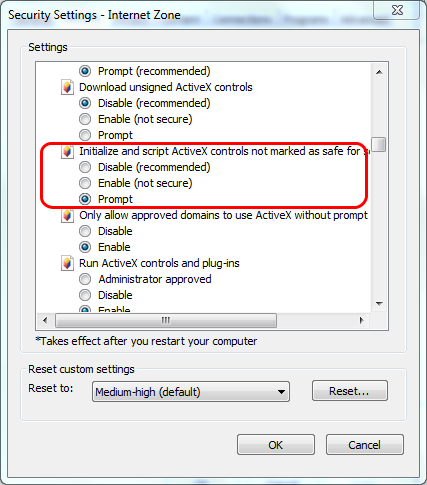
- In the Security Settings – Internet Zone dialog box, scroll down to the ‘Initialize and script ActiveX controls not marked as safe for scripting’ setting in the ActiveX controls and plug-ins section.
- Select Enable or Prompt.
- Restart Internet Explorer.